How to Factory Reset an AirTag So Someone Else Can Use It - MacRumorsOpen MenuShow RoundupsShow Forums menuVisit ForumsOpen Sidebar
Skip to Content

How to Factory Reset an AirTag So Someone Else Can Use It

by

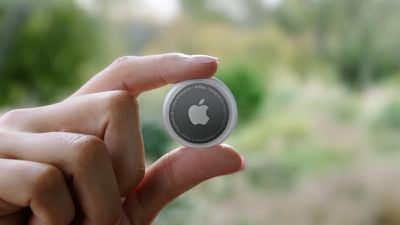
When you set up an AirTag, it's automatically associated with your Apple ID, which means it's linked to your ‌Apple ID‌ and can't be used by someone else unless you reset it.
f1618938547
Resetting can be as simple as removing an ‌AirTag‌ from your ‌Apple ID‌, by following these steps:

  1. Open the Find My app.
  2. Tap on the ‌AirTag‌ that you want to remove by choosing its name from the list.
  3. Swipe upwards to bring up the full ‌AirTag‌ settings.
  4. Tap on "Remove Item." remove airtag
  5. Tap on "Remove" and then tap again on the "Remove" popup.
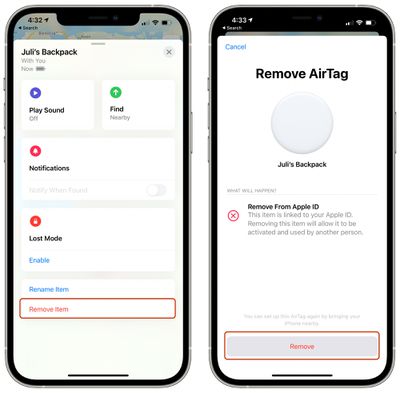
Once you've gone through this process, the ‌AirTag‌'s ownership is cleared and you can give it to someone else to set up and use with their own account.

Unfortunately, if you're not in Bluetooth range of your ‌AirTag‌ when you remove it from your account, it won't register and a manual reset will be required. If you wind up with an ‌AirTag‌ from someone else that says it's linked to their ID but they've already removed it from their account, follow these steps to physically reset the ‌AirTag‌:

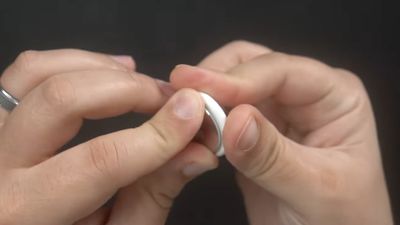
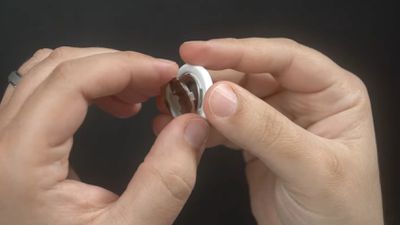
  1. Press down on the stainless steel backing of the ‌AirTag‌.
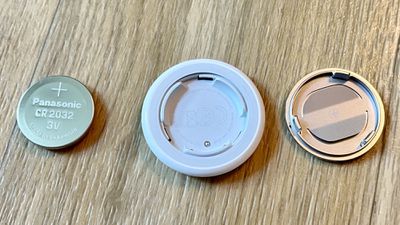
  2. As you press down, rotate counterclockwise until the cover stops rotating. airtag battery twist open
  3. Pull apart the two halves of the ‌AirTag‌. airtag battery pry apart
  4. Take out the battery.
  5. Put the battery back in.
  6. Press down on the battery until it makes a sound.
  7. Once the sound finishes, repeat this process four more times, removing and replacing the battery and then pressing on the battery until you hear a sound. airtag battery removed
  8. You need to hear a total of five sounds to ensure that the ‌AirTag‌ is reset.
  9. After you've finished this process, put the cover on the ‌AirTag‌ back on and then align the three tabs on the cover with the three slots on the ‌AirTag‌.
  10. Press down on the cover until there's a sound, and rotate the cover clockwise until it locks in place.
To avoid having to do this tedious physical resetting process, it's best to make sure that the person giving you an ‌AirTag‌ has removed it from their account in the proper way while it's in range of Bluetooth, because that's a far easier process for clearing ‌AirTag‌ ownership to pass it along to someone else.
Related Roundup: AirTag
Buyer's Guide: AirTag (Buy Now)

Top Rated Comments

70 months ago
Second step is required only if you removed the Airtag from your account and it's not in Bluetooth range. Thieves cannot use it if you didn't remove it from your account in the beginning.


Score: 23 Votes (Like | Disagree)
dwaltwhit Avatar
70 months ago
AirTags are made to track LOST items, not stolen ones. It is not an anti-theft device. It is not made so you can hunt down a thief and retrieve your items. It is not made to be thief-proof. I feel like people are making the AirTag into something it’s not.
Score: 22 Votes (Like | Disagree)
countryside Avatar
70 months ago
WARNING: Please do this away from children as they MAY swallow the battery... or the entire AirTag for that matter. Thanks, Officeworks ('https://forums.macrumors.com/threads/airtag-removable-battery-sparks-child-safety-concerns.2294746/') for alerting me to this incredible oversight.
Score: 17 Votes (Like | Disagree)
randomthoughts Avatar
70 months ago
So this is what happens, you can’t pair it to the other Apple ID, but the Find My app on the original Apple ID can’t update the location. If I bring it to a device with the original Apple ID, it wants to try to pair again.

So while someone won’t be able to disassociate the AirTag from your account for their own use, if you don’t have the item in your possession, someone could reset it and prevent you from tracking it.

That’s an issue.
Score: 12 Votes (Like | Disagree)
Icaras Avatar
70 months ago

So someone can find my AirTag and reset it to take ownership before I even realize it’s lost? I would think that these would have the same ownership lock that iPhones do… (forgive me but I forget what they call it… maybe Authentication Lock or something?)
No.

"If you wind up with an AirTag from someone else that says it's linked to their ID but they've already removed it from their account, follow these steps to physically reset the AirTag:"
Score: 10 Votes (Like | Disagree)
70 months ago
Why do they even have the second option to remove from Apple ID? Makes this less and less secure, meaning people will still try to steal it and use it for themselves
Score: 9 Votes (Like | Disagree)

Popular Stories

iOS 27 Next to iPhone

Here's When iOS 27 Rolls Out Today in Every Time Zone

Sunday September 13, 2026 3:00 am PDT by
Apple is about to release iOS 27, which will finally deliver more advanced Siri AI capabilities as well as a variety of other refinements, improvements, and new features to iPhones. It's Apple's biggest software update of the year, and Apple announced at Wednesday's iPhone event that it will be releasing iOS 27 sometime today – Monday, September 14. iOS 27 won't be the only release today,...
deep black iphone 18 pro

Apple Says iPhone 18 Pro Max Sold in U.S. Differs in One Way

Saturday September 12, 2026 3:27 pm PDT by
As noted by Nicolas Lellouche, who writes for the French tech website Numerama, Apple has updated its tech specs pages for the iPhone 18 Pro and iPhone 18 Pro Max to clarify which models are equipped with its new C2 cellular modem and where. Apple now says the iPhone 18 Pro has a C2 modem worldwide, while the iPhone 18 Pro Max uses the chip in every country except for the U.S. According...
iphone duo

IMAX Reacts to iPhone Duo's 1:1.4 Aspect Ratio Displays

Friday September 11, 2026 4:42 am PDT by
Production theater company IMAX has responded in a mixed way to Apple's embrace of a 1:1.4 aspect ratio on the iPhone Duo's inner and outer displays. The boxier ratio happens to be very close to the classic "full-frame" IMAX 1.43:1 aspect ratio, which comes from the geometry of the company's original 15-perforation/70mm film system. In response to an X post from someone wondering if we'll see...

🔗 Related Apple News & Rumors

Stay updated with the latest Apple ecosystem news and verified rumors