

watchOS 5 introduces a new Podcasts app for Apple Watch, which is designed to let you listen to your favorite podcasts on the watch without the need for the iPhone.
Streaming podcasts works over Wi-Fi or a cellular connection, and you can also use the Podcasts app to play podcasts from a connected iPhone if desired.
Using the Podcasts App on Apple Watch
As with Apple Music, when using Podcasts on the Apple Watch, you will need to have a pair of AirPods or other Bluetooth headphones paired to your Apple Watch.
Once Bluetooth headphones are paired, you will need to tap on the Podcasts icon, which looks like a radio antenna on a field of purple, much like the Podcasts app icon on the iPhone. You can also ask Siri to open it.
The Podcasts app will open up to the most recent podcast among the podcasts you're subscribed to, and you can play it by tapping on it.
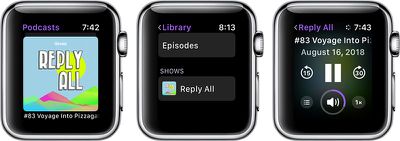
Music controls are available by scrolling with the Digital Crown or swiping and tapping on "Now Playing."
Viewing Your Library
To view your library of subscribed podcasts, follow these steps:

- Open the Podcasts app.
- Scroll down with the Digital Crown or Swipe to get to the list of app options.
- Choose "Library."
The Library section of the Podcasts app will let you see all of the different podcasts that you subscribe to in the "Shows" section, and individual episodes in the "Episodes" section.
Scroll through each section using a swipe on the Apple Watch's face or the Digital Crown.
Adding New Podcast Subscriptions
To add new podcast subscriptions on the Apple Watch, you'll need to know the name of the podcast you want to add. You can subscribe using Siri, with a command like "Hey Siri, subscribe to Reply All" or Hey Siri, subscribe to The Daily podcast."
If you would rather listen to a podcast or a specific podcast without subscribing to it, you can ask Siri to play it with commands like "Hey Siri, Play Reply All," or "Hey Siri, Play episode 21 of The Daily."
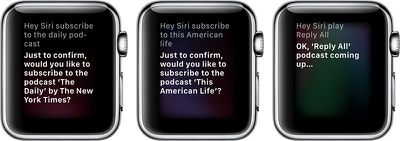
Outside of subscribing to new podcasts using Siri, there is no way to browse through podcast content on the Apple Watch. If you want to find new podcasts to listen to, you'll need to use the Podcasts app on iPhone.
Offline Usage
Podcasts that are listed in the episodes section of the Podcasts app are downloaded to the Apple Watch and can be listened to even without a cellular or WiFi connection. According to Apple, podcasts are downloaded when the Apple Watch is connected to power and placed near the iPhone.
After an episode has been played, it will be removed from the Apple Watch to make room for new episodes.
Controlling Podcasts on iPhone From Apple Watch
If your phone is connected to your Apple Watch and there's a podcast playing, you'll see an "On Phone" section in the Apple Watch Podcasts app and there will be a little red icon on the Apple Watch's face.
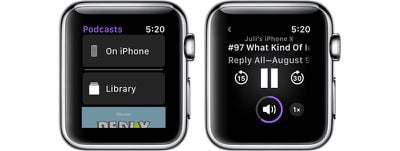
If you tap on the "On iPhone" section in the Podcasts app, you'll see options for "Now Playing" with controls for the current content, a "Listen Now" section that shows recent podcasts, a "Shows" section that displays all of the shows you subscribe to, an "Episodes" section that displays all of the available episodes, and a "Stations" section that displays Podcasts stations created on iPhone.














































Top Rated Comments
(There is already something similar with Music where you can, in principle, sync a playlist from your Phone to be cached on your Watch; but everything about this feature is so moronically designed that it's practically unusable.)
The thinking behind it seems astonishingly stupid, like they simply cannot imagine that users might be pissed off if they cannot be SURE that their content is on the watch, and then run out of content while away from their phone.
To me it looks like one of these crazy Apple ideas where some idiot designer loses all contact with reality. Usually they fix them (eventually) but we may have a year or two of this idiocy before sanity prevails.