

How to Use the Preview Loupe Tool in macOS - MacRumorsOpen MenuShow RoundupsShow Forums menuVisit ForumsOpen Sidebar
Skip to Content

How to Use the Preview Loupe Tool in macOS

by

All of Apple's Macs come with Preview, the powerful file viewer that's built into macOS. Preview is the default app that opens up whenever you double-click an image or a PDF, and features several annotation tools for you to use when working with these file types.

The most obvious and oft-used markup tools include things like arrows, lines, ovals, rectangles, and text, but in this article we're highlighting what is arguably one of the more under-appreciated of Preview's annotation options: the Loupe tool.
how to use the preview loupe tool
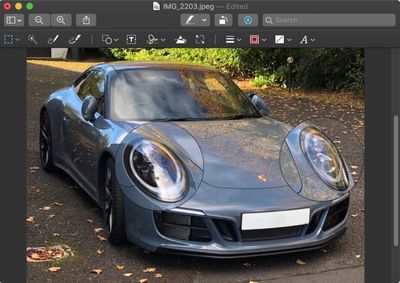
The Loupe tool is useful if you want to zoom in on certain areas in an image or document for the purposes of clarity or to bring attention to something in particular.
2 loupe markup icon
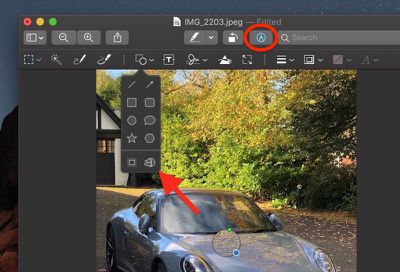
You can access the Loupe tool by selecting Tools -> Annotate -> Loupe from the Preview menu bar, or by enabling the Markup toolbar and then clicking the bottom right icon in the Shape menu.

3 magnify loupe
Once you've added a loupe to your image, you can easily increase or decrease its magnification level by dragging the green circle along the loupe's circumference.

4 make loupe larger
Similarly using your mouse, drag the blue circle outwards or towards the center of the loupe to expand or contract the area of magnification.

You can add multiple loupes to the same image or document, and even have them overlap to zoom in on an area that's already magnified.

5 loupe last
Additionally, if you arrange two loupes so that one is stacked on top of or behind the other, you can right-click (or Ctrl-click) them to rearrange their order using the contextual menu options Bring Forward, Bring to Front, Send Backward and Send to Back.

You can easily delete a selected loupe with the Delete key, just remember that the Loupe is an annotation tool rather than a simple zoom function, so if you save or export the file with a loupe still in use then it becomes a permanent feature of that image or document.


Top Rated Comments

jonnysods Avatar
104 months ago
Funny enough I just noticed this tool yesterday and I use Preview constantly!


Yeah, it's incredibly powerful, and so nicely integrated into the OS, you don't have to think about "What app do I need to use?" for so many tasks. Daily I do a screen shot, review, email, annotate type workflow for UI work.
One thing I've used it for extensively the past year is resizing and reducing file sizes in bulk for web design.

I'm also screen shorting hundreds of things a day it seems. And with the video capture feature that I just discovered in Mojave I've ditched other apps and just started to use the OS.

MacOS is just so flipping awesome.
Score: 2 Votes (Like | Disagree)
104 months ago
Now we just need the feature built into Apple Photos like it used to be in Aperture!
Score: 2 Votes (Like | Disagree)
104 months ago
The visual highlighting of that loupe tool result needs an overhaul with some love (and mabye some shadow and distortion if you want that). It‘s not always immediately understandable for the viewer that you used a loupe to highlight something.

The car example works somehow, but there are other cases with less perspective where it just looks weird. Like a black hole in a static image of space and stars, where you can‘t immediately say what‘s going on. Gets better when adding arrows, but still, some UI designer should give it some more thought.

More frame and shifting options might also help.

Score: 2 Votes (Like | Disagree)
KazKam Avatar
104 months ago
Preview truly is the under-appreciated, yet indispensable, step-child of Mac OS. I take it for granted until I have to use a computer (Windows o_O) that doesn't have anything close to it.

I think my favorite thing about it is that it (along with QT) open damn near anything which means I don't have to open Photoshop, Excel, or other dedicated apps, with all their overhead, just to read or look at something. Love it.
Score: 1 Votes (Like | Disagree)
jonnysods Avatar
104 months ago
Wow this is cool I didn't know preview had that zoom tool! Preview is a highly underrated feature of MacOS.
Score: 1 Votes (Like | Disagree)

Popular Stories

Home Hub Command Center with Dome Base Feature

Apple Smart Home Hub to Feature iMac G4-Style Design

Wednesday September 30, 2026 4:36 am PDT by
Apple's long-rumored smart home hub will have an iMac G4-style design and a host of unique features, Bloomberg's Mark Gurman reports. The smart home hub is said to feature a square 6-inch display, with variants that can be placed on a countertop or mounted on a wall. It features a single FaceTime camera on the front, with microphones and speakers in its connected base. Gurman described the...
HomePod minis on gradient feature 1 1

Three New Apple Smart Home Products Coming on October 13

Wednesday September 30, 2026 4:04 am PDT by
Apple plans to introduce a series of new smart home products on Tuesday, October 13, according to Bloomberg's Mark Gurman. Apple reportedly plans to debut its long-awaited smart home hub device, a new HomePod mini, and a new Apple TV on the date. The new HomePod mini and Apple TV are set to retain their existing designs, but tout faster chips to support Siri AI. The new HomePod mini will...
iPhone Duo Open

iPhone Duo Reportedly Facing Production Problems Ahead of Launch

Tuesday September 29, 2026 6:16 am PDT by
The iPhone Duo is reportedly facing production difficulties ahead of its October launch, with early output expected to be limited. A person said to be close to Foxconn's supply chain told China's Jiemian News that final assembly yields for Apple's first foldable iPhone were only slightly above 60% as of September 17. The source said that, under Apple's current quality standards, it could...
Latest Stories
New 'AirFly Drive' Accessory Turns Wired CarPlay Into Wireless CarPlay
4 hours ago
Apple Shares Photos Shot on iPhone Duo
6 hours ago
Apple Says iPhone Duo Has Replaceable 'Cover Layer'
7 hours ago
Apple's Smart Home Camera Will Apparently Have 'No Video Recording'
9 hours ago
Apple TV Just Updated Its Selection of 'Bonus' Movies
10 hours ago
iPhone 18 Pro Colors Buyer's Guide: Which Should You Choose?
10 hours ago
Early Prime Big Deal Days: Best Discounts on Accessories, TVs, and More at Amazon
11 hours ago
MacBook Pro With OLED Touch Screen Rumored to Launch in October or November
12 hours ago
Apple's All-New Home Hub Rumored to Launch in These Four Colors
12 hours ago
iPhone 18 Pro Aperture Control Goes Fully Manual in Halide 3.2
14 hours ago
Apple Stores Receive 'Do Not Open' Boxes Ahead of Smart Home Products Launch
14 hours ago
iPhone 18 Pro Sales Jump in China Ahead of iPhone Duo Launch
15 hours ago
Apple TV Still Down for Some Users Following Apple Services Outage
15 hours ago
PSA: Apple Mail on Mac May Stop Syncing Microsoft 365 Accounts Today
16 hours ago
Apple's Smart Home Hub: Everything We Know So Far
1 day ago
Apple's Home Hub Borrows From the iPhone Duo's StandBy Mode
1 day ago
Apple Invites App Updated With Three New Features
1 day ago
Apple Event on October 13?
1 day ago
Apple Watch SE 3 vs. Series 12 Buyer's Guide: Which Should You Buy?
1 day ago
iPad Mini 8 to Offer These 10 New Features
1 day ago
DoorDash Unveils AI Food Ordering Through Apple's Messages App
2 days ago
Amazon Takes Up to $150 Off Select M5 MacBook Air Models
2 days ago
Apple Still Plans to Release a New Full-Sized HomePod
2 days ago
Apple Working to Expand HomeKit
2 days ago
Apple Smart Home Hub to Feature iMac G4-Style Design
2 days ago
Three New Apple Smart Home Products Coming on October 13
2 days ago
Apple Pay Now Available in India With Axis Bank Cards
2 days ago
OpenAI Launches Always-On 'Dots' Agents to Rival Meta's Muse
2 days ago
AirPods 5 Teardown: Batteries Removable, Case Still Tough
2 days ago
iPhone 18 Pro Owners Complain of Speaker Crackling or Popping
2 days ago

🔗 Related Apple News & Rumors

Stay updated with the latest Apple ecosystem news and verified rumors






































