

How to Use the macOS Help Menu - MacRumorsOpen MenuShow RoundupsShow Forums menuVisit ForumsOpen Sidebar
Skip to Content

How to Use the macOS Help Menu

by

The ever-present Help menu in your Mac's menu bar is an easily overlooked aspect of macOS, but it's home to some surprising and extremely handy features that every user can benefit from.

how to use macos help menu
Apart from being a useful first port of call for any queries you may have about the application in use or your Mac in general, it also serves as a menu navigator. Let's take a closer look.

How to Use the Mac Help Menu

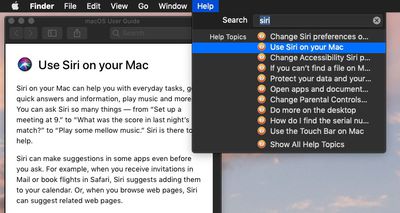
You can use the keyboard shortcut Command-Shift-/ to quickly access the macOS Help Menu. At the top of the Help menu is a Search field for typing in the subject you need help with. Below this, you'll also see a direct link to the help documentation for the currently active application, which is useful for looking up topics manually.
how to use macos help menu 2
If it's an Apple app you're using, search results come from the official macOS User Guide, while the direct help link below the search field takes you straight to the relevant section of the guide, or in the case of Finder, the main contents page.

how to use macos help 3
It's important to remember that if the active app is a third-party one, the contents of the Help menu can differ depending on how much effort the developer has put into it. For example, some apps may include FAQs, manuals, or links to online help, while others may offer very little.

How to Use Help's Action Search Feature

Another neat built-in feature of the Help menu is its ability to point to available actions in other menus for the currently active app.

how to use macos help menu 4
Next time you type into the Help menu's Search field, check to see if the results include any Menu Items. Hover over one of these with your mouse, and macOS will locate the action for you by pointing an arrow at it in the corresponding menu. Hit Enter, and the action will be performed for you.

how to use macos help menu 5

Depending on the app, this feature can even extend to contextual menu functions. For instance, you can use Safari's Help field to search your bookmarks and recent browsing history for keywords to quickly navigate back to web pages. Next time you're in your favorite app, try out its Help menu functions to see how deeply they've been implemented.


Top Rated Comments

101 months ago
How to call Apple Support.
How to read MacRumors help articles.
How to read English.
Don't bash. When I first got a Mac In 07, after graduating hs, I had no one to show me how to do the simplest of tasks. And I know my way around a computer.

Tips like these are valuable to almost anyone. If they're not to you, there's no reason to be rude.
Score: 6 Votes (Like | Disagree)
MacHiavelli Avatar
101 months ago

You can use the keyboard shortcut Command-Shift-/ to quickly access the macOS Help Menu. At the top of the Help menu is a Search field for typing in the subject you need help with. Below this, you'll also see a direct link to the help documentation for the currently active application, which is useful for looking up topics manually.
According to Apple, you're inadvertently giving key commands incorrectly. For Help, it should be COMMAD QUESTION MARK, not COMMAND SHIFT SLASH. This (1) makes sense as the user wants to ask a question in looking for help, and (2) the slash and the question mark aren't always positioned together on all keyboards, so telling people to type COMMAND SHIFT SLASH might well lead them up a blind alley.

https://developer.apple.com/design/human-interface-guidelines/macos/user-interaction/keyboard/


Attachment Image
Score: 3 Votes (Like | Disagree)
sailmac Avatar
101 months ago
These articles may seem trivial to users who already know the commands, tips, and tricks being explained. In my case, I've been using Macs regularly since 1990 and appreciate learning things I didn't know, along with reminders about things I've forgotten. Thanks, MR.


Score: 3 Votes (Like | Disagree)
ArtOfWarfare Avatar
101 months ago
How to call Apple Support.
How to read MacRumors help articles.
How to read English.
Score: 3 Votes (Like | Disagree)
szw-mapple fan Avatar
101 months ago
The help menu search is one of my favorite things about macOS. You can just hit the keyboard shortcut and start typing what you want. Really handy when you want something quickly without knowing which menu it’s under.
Score: 2 Votes (Like | Disagree)
101 months ago
I know how to use a search box.
I didn't know the keyboard shortcut.
I didn't know about showing menu items.

It sounded like a lame article, but it was worth the read for me.
Score: 1 Votes (Like | Disagree)

Popular Stories

Home Hub Command Center with Dome Base Feature

Apple Smart Home Hub to Feature iMac G4-Style Design

Wednesday September 30, 2026 4:36 am PDT by
Apple's long-rumored smart home hub will have an iMac G4-style design and a host of unique features, Bloomberg's Mark Gurman reports. The smart home hub is said to feature a square 6-inch display, with variants that can be placed on a countertop or mounted on a wall. It features a single FaceTime camera on the front, with microphones and speakers in its connected base. Gurman described the...
HomePod minis on gradient feature 1 1

Three New Apple Smart Home Products Coming on October 13

Wednesday September 30, 2026 4:04 am PDT by
Apple plans to introduce a series of new smart home products on Tuesday, October 13, according to Bloomberg's Mark Gurman. Apple reportedly plans to debut its long-awaited smart home hub device, a new HomePod mini, and a new Apple TV on the date. The new HomePod mini and Apple TV are set to retain their existing designs, but tout faster chips to support Siri AI. The new HomePod mini will...
Apple TV Sans Remote Feature

New Apple TV 4K Leaked

Friday September 25, 2026 8:16 am PDT by
MacRumors contributor Aaron Perris has uncovered an image file from Apple for an unreleased Apple TV 4K, suggesting that a new model will finally be released soon. The image is specifically for an "Apple TV 4K (4th generation)" model. Apple TV 4K (4th generation) image (on a gradient) The image reveals that the Apple TV will have the same external design as the current model, with all of its...
Latest Stories
New 'AirFly Drive' Accessory Turns Wired CarPlay Into Wireless CarPlay
24 minutes ago
Apple Shares Photos Shot on iPhone Duo
2 hours ago
Apple Says iPhone Duo Has Replaceable 'Cover Layer' Above the Display
3 hours ago
Apple's Smart Home Camera Will Apparently Have 'No Video Recording'
5 hours ago
Apple TV Just Updated Its Selection of 'Bonus' Movies
6 hours ago
iPhone 18 Pro Colors Buyer's Guide: Which Should You Choose?
7 hours ago
Early Prime Big Deal Days: Best Discounts on Accessories, TVs, and More at Amazon
7 hours ago
MacBook Pro With OLED Touch Screen Rumored to Launch in October or November
8 hours ago
Apple's All-New Home Hub Rumored to Launch in These Four Colors
9 hours ago
iPhone 18 Pro Aperture Control Goes Fully Manual in Halide 3.2
10 hours ago
Apple Stores Receive 'Do Not Open' Boxes Ahead of Smart Home Products Launch
11 hours ago
iPhone 18 Pro Sales Jump in China Ahead of iPhone Duo Launch
11 hours ago
Apple TV Still Down for Some Users Following Apple Services Outage
12 hours ago
PSA: Apple Mail on Mac May Stop Syncing Microsoft 365 Accounts Today
12 hours ago
Apple's Smart Home Hub: Everything We Know So Far
23 hours ago
Apple's Home Hub Borrows From the iPhone Duo's StandBy Mode
1 day ago
Apple Invites App Updated With Three New Features
1 day ago
Apple Event on October 13?
1 day ago
Apple Watch SE 3 vs. Series 12 Buyer's Guide: Which Should You Buy?
1 day ago
iPad Mini 8 to Offer These 10 New Features
1 day ago
DoorDash Unveils AI Food Ordering Through Apple's Messages App
1 day ago
Amazon Takes Up to $150 Off Select M5 MacBook Air Models
1 day ago
Apple Still Plans to Release a New Full-Sized HomePod
1 day ago
Apple Working to Expand HomeKit
1 day ago
Apple Smart Home Hub to Feature iMac G4-Style Design
1 day ago
Three New Apple Smart Home Products Coming on October 13
1 day ago
Apple Pay Now Available in India With Axis Bank Cards
2 days ago
OpenAI Launches Always-On 'Dots' Agents to Rival Meta's Muse
2 days ago
AirPods 5 Teardown: Batteries Removable, Case Still Tough
2 days ago
iPhone 18 Pro Owners Complain of Speaker Crackling or Popping
2 days ago

🔗 Related Apple News & Rumors

Stay updated with the latest Apple ecosystem news and verified rumors






































