How to Use Quick Look in macOS Mojave - MacRumorsOpen MenuShow RoundupsShow Forums menuVisit ForumsOpen Sidebar
Skip to Content

How to Use Quick Look in macOS Mojave

by

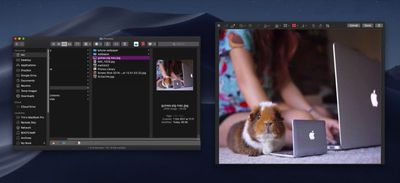
In previous versions of macOS, the Quick Look feature lets you view photos and files without having to open them in an app. In macOS Mojave, Apple has also introduced some convenient new editing tools to Quick Look, allowing you to perform actions specific to the kind of file you're viewing. Let's take a look at how it all fits together.
mojave quick look file edits

How Quick Look Works

For those unfamiliar with Quick Look, the feature can be used for items on the Desktop, in Finder windows, in emails, in messages, and other places. It supports numerous file types, including HTML, PDF, Plain text, RTF, iWork, MS Office, RAW, JPEGs, and QuickTime formats. To activate it, simply select one or more items, then press the Spacebar or force-click using your Mac's trackpad.

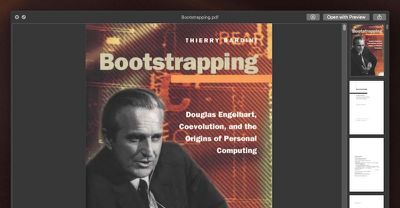
In the top left of the Quick Look window you'll find the Maximize button next to the Close button. (You can also manually enlarge the window by dragging the corners.) Open with [App] and Share buttons are located in the top-right corner of the Quick Look window, along with a Rotate Left button if you're working with images or video.
mojave quick look 1
As before, if you select multiple items, you'll see arrow buttons to navigate through them, as well as a Sheet View button to see the items in an index sheet view. If you opened a document such as a PDF, you'll see a column of thumbnails along the side of the window for quickly navigating through the pages.

What's New in Quick Look

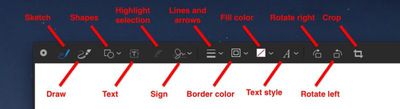
New to Quick Look in Mojave is the ability to access Markup tools. Simply click the Markup button to reveal the toolset.

mojave quick look markup button e1531128163973
Quick Look lets you draw on and annotate images or PDF documents using arrows, shapes, and text. You can also use Markup to quickly sign a document with your digital signature. Click Done, and your changes are automatically saved.
mojave quick look file edits1
If you're viewing a video file in Quick Look, you'll see a new Trim button that allows you to trim the clip without having to open QuickTime.

mojave quick look trim clip button e1531128093109
Clicking the Trim button reveals the scrubbing and edit ribbon along the bottom of the clip. You can click anywhere in the ribbon to jump to another point in the video, and drag the edges of the yellow frame to trim the clip to the desired length.

mojave quick look file edits6
Again, simply click Done when you're finished and your changes are automatically saved.

Related Forum: macOS Mojave

Top Rated Comments

Detektiv-Pinky Avatar
103 months ago
What about directly copying text from a document via Quicklook?
This was one of my favourite hidden feature in previous versions, until Apple took it away.
Score: 6 Votes (Like | Disagree)
jonnysods Avatar
103 months ago
Mojave is looking tight!
Score: 2 Votes (Like | Disagree)
ppdix Avatar
103 months ago
I use quicklook all the time. It's great but still can't look at contents of a folder. Back in 2009 there was quick look x-ray that showed some of the documents in a folder. U had to manually enable it in terminal but it was useful.
The new stacks are cool and u can scrub thru documents but not folders. I wish the scrubbing function would work for folders or at least show you an icon view of the folder's contents.
Score: 2 Votes (Like | Disagree)
JosephAW Avatar
103 months ago
Does quick look in Mojave now clear it's thumbnail cache on a schedule? Especially from an encrypted volume?

https://www.macrumors.com/2018/06/18/macos-quick-look-encrypted-data-bug/
Score: 2 Votes (Like | Disagree)
jimthing Avatar
100 months ago
This is exactly the case. And it sucks.
Wonder if there's any other solution here?

I guess what we need is a third-party QL replacement that can playback any file type desired without Apple's needless gimping of filetype support.

However as a non-dev, I'd be surprised if it was even possible to do, given the lack of those APIs spoken about above.

Although if apps like Dropbox et al. can use special permissions to operate in Finder, maybe it's possible via a different route or something? Who knows. :-/

It's just such a shame that yet again Apple highly limit such a potentially powerful tool to semi-useless by their own actions. We see things like this all the time with Apple OS's.

The recent one I've been dealing with (yet again!), is how Finder doesn't always correctly give the total for folder sizes with "cmd-i" keystroke (or when selecting multiple files, and using "cmd-ctl-i" keystroke), making comparisons a complete pain.
Then you check through each file individually with "cmd-i", only to find that they actually ARE identical to the ones you were trying to compare after all. So when grouped together, Finder must have been giving a wrong figure! (doing "cmd-shift-." to see hidden files like .ds crap or similar, showed none there, so that wasn't what caused it, either.)
Score: 1 Votes (Like | Disagree)
kriebe Avatar
100 months ago
Quicklook does works seamlessly for most filetypes as Apple delivers QL plugins for the most common filetypes. However, that doesn't mean that if Apple didn't deliver a QL plugin for a filetype that you're stuck -- because Apple also made it easy to add your own QL plugins.

The following web site gives pointers to QL plugins for a number of filetypes that Apple doesn't deliver -- In particular Quicklook Video which adds support for .asf, .avi, .flv, .mkv, .rm, .webm & .wmf
http://www.quicklookplugins.com/
[doublepost=1537910576][/doublepost]
What gives? Instead of complaining that Apple hasn't covered your corner case, why not spend a few seconds looking for "quick look plugins"? Naaaah, too much effort...
So yeah, I did find this site, like 3 years ago, and nothing exists that would help with the issues I've mentioned. It would be nice if you would actually read the site before accusing people here of not knowing what we're talking about. Jimthing already pointed out what exactly is wrong with the one single QL plugin for video files that does work. And that's just that it only shows the preview screenshot and icon of the video. Nothing more. It will not play any of those video files the same way it will a standard .mov or mp4. I actually have this plugin installed and have for years. It does exactly what it says it does, but still does not do what I and many other would like it to do.

[doublepost=1538375156][/doublepost]
Looks like a complete fail. Hence why I originally moaned about the lack of format support, as I likely checked it out previously, and gave up.

The video one, titled "Quicklook Video", is actually useless, and is from ages ago, "Oct 2014":
https://www.quicklookplugins.com/2014/10/27/quicklook-video / https://github.com/Marginal/QLVideo

Says "allows macOS Finder to display thumbnails, static QuickLook previews, cover art and metadata for most types of video files."
So basically it doesn't PLAY any video, but instead shows still image shot(s) of a video. Thus making it pretty useless as a so-called video playback QT plugin! Read the comments underneath, with people thinking it would, only to find out it doesn't.

My limited understanding here, is that in the latest few versions of macOS, make it not possible to get most things to function in QT, as there are not the API hooks available anymore in order to do so, &/or things like Perian are not able to work either. Making the idea of most of these apparent QT plugins largely legacy only.

Please correct me if I'm wrong.
This is exactly the case. And it sucks.
Score: 1 Votes (Like | Disagree)

Popular Stories

HomePod mini and Apple TV Sage

New Apple TV and HomePod Mini Are 'Nearly Ready' to Launch, New Siri Remote Also Rumored

Sunday May 31, 2026 8:47 am PDT by
New models of the Apple TV 4K and HomePod mini are "nearly ready to go," according to the latest word from Bloomberg's Mark Gurman. Subscribe to the MacRumors YouTube channel for more videos. Both devices have been ready "for months," but Apple is holding off on launching them until the more personalized version of Siri is available, he said. "I am told the hardware for the next Apple TV...


Apple Foldable Thumb

First 'Confirmed' iPhone Ultra Color Allegedly Revealed in Leaked Image

Monday June 1, 2026 4:39 am PDT by
Apple is expected to launch its first foldable iPhone later this year. Rumors suggest the "iPhone Ultra" will come in two color options, and a leaker shared an image today that allegedly shows one of them. Posted on Weibo by the Chinese leaker known as Ice Universe, the image purportedly offers a first glimpse of Apple's foldable in white. The device is believed to have entered early mass...
Meta Ray Ban Glasses

Apple Glasses Reportedly Launching in 'Late 2027' With These Features

Sunday May 31, 2026 9:21 am PDT by
Apple is now aiming to release its first smart glasses in "late 2027," according to the latest word from Bloomberg's Mark Gurman. Meta Ray-Bans He previously said that Apple planned to begin shipping the glasses by early 2027, but he said the product has faced development delays. The glasses will feature "oval-shaped cameras, unique colors, and multiple frame styles," according to Gurman....

🔗 Related Apple News & Rumors

Stay updated with the latest Apple ecosystem news and verified rumors