iOS 18: How to Use New Text Effects in Messages - MacRumorsOpen MenuShow RoundupsShow Forums menuVisit ForumsOpen Sidebar
Skip to Content

iOS 18: How to Use New Text Effects in Messages

by

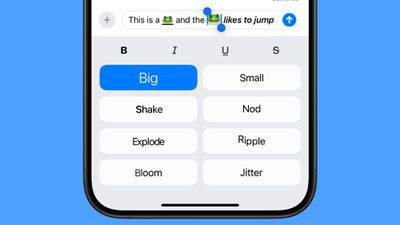
In iOS 18, Apple has added several new features to its Messages app, one being the ability to add neat text effects to your messages to make them more expressive.
ios 18 text effects messages
The new animated text effects can be applied to your entire message, a single word, a phrase, or even an emoji or sticker. The options include Big, Small, Shake, Nod, Explode, Ripple, Bloom, and Jitter.

Here's how to add a text effect in the Messages app in iOS 18:

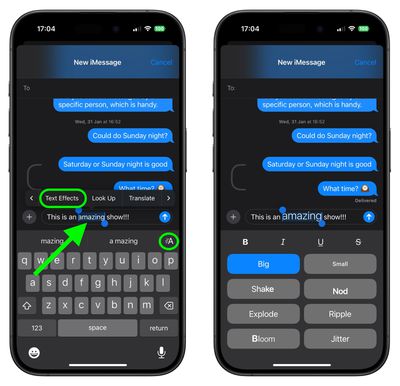
  1. Select the text, emoji, or sticker that you want to add an effect to with a double tap. (You can use the anchors to shorten and widen your selection.)
  2. Tap the "A" icon in the suggestions bar above the keyboard, or select the Text Effects option in the popup menu (tap the right chevron button to reveal it).
  3. Choose the text effect that you'd like to use.
messages

In a conversation with someone running ‌iOS 18‌ or a later update, the text or emoji that has an effect applied to it will continually animate when viewed. Note that these effects do not work on earlier versions of Apple's operating systems and won't show up at all.

Top Rated Comments

alexandr Avatar
26 months ago

Would be great if iMessage could somehow let us know if the recipient is using an older OS and won't be able to see what we send them. I hardly ever use these new effects or emojis because chances are they haven't upgraded yet. Whenever I have sent a new emoji in the past, I often got asked "What's that square?"


So you tell them — that square is you.
Score: 3 Votes (Like | Disagree)
robgreene Avatar
26 months ago
Bold/Italic/Underline should not be buried under text effects. As structured, they’ll rarely be used.
Score: 3 Votes (Like | Disagree)
26 months ago
Would be great if iMessage could somehow let us know if the recipient is using an older OS and won't be able to see what we send them. I hardly ever use these new effects or emojis because chances are they haven't upgraded yet. Whenever I have sent a new emoji in the past, I often got asked "What's that square?"
Score: 2 Votes (Like | Disagree)
26 months ago
The basic formatting might occasionally be useful. The dynamic text feels like a 2005 Internet forum feature.

The UI for this Apple went with looks horrible. It’s giant, boring buttons, with minimal spacing. It feels heavy. And the animations just keep going. It’s too busy and crazy.
Score: 2 Votes (Like | Disagree)
26 months ago
The keyboard/typing issues I’ve encountered in iOS 18 is out of this world. I thought it was just me getting old. Nope, tons of issues. Even while I’m typing this. Lag, odd key presses, weird auto correct anomalies, what appears to be stuck letters at times. UGH
Score: 2 Votes (Like | Disagree)
26 months ago
I was considering going to a 16PM from my 14PM - but I believe 17 will be a drastic change - plus, Apple Intelligence might actually work by then.
Score: 2 Votes (Like | Disagree)

Popular Stories

iOS 27 Next to iPhone

Here's When iOS 27 Rolls Out Today in Every Time Zone [Update: It's Out]

Sunday September 13, 2026 3:00 am PDT by
Update 10:04 a.m.: iOS 27 is rolling out now, though it may take a bit for all users to see it, so keep checking! Apple is about to release iOS 27, which will finally deliver more advanced Siri AI capabilities as well as a variety of other refinements, improvements, and new features to iPhones. It's Apple's biggest software update of the year, and Apple announced at Wednesday's iPhone event...
iOS 27 Icon iPhone

iOS 27 Available Now With These 8 New Features

Monday September 14, 2026 9:00 am PDT by
Update — 10 a.m. Pacific Time: Apple has released iOS 27. During its iPhone 18 Pro and iPhone Duo event last week, Apple announced that iOS 27 will be released widely on Monday, September 14. iOS 27 should be available around 10 a.m. Pacific Time / 1 p.m. Eastern Time today via the Settings app, under General → Software Update. Below, we have highlighted eight new features and...
Apple iCloud Plus expansion hero

iCloud+ Now Includes Apple TV, Apple Arcade, and Curated Apple Music Stations in Over 100 Countries

Tuesday September 15, 2026 1:43 am PDT by
Apple today announced a new subscription initiative that turns paid iCloud+ subscriptions into a broader services bundle in more than 100 countries. In select countries, Apple says every paid iCloud+ plan, including the cheapest 50GB tier, now includes Apple TV and Apple Arcade "at no additional cost," while family sharing extends the storage, TV and Arcade access to up to five people....

🔗 Related Apple News & Rumors

Stay updated with the latest Apple ecosystem news and verified rumors