 Apple has been steadily improving its stock Photos app in recent years to make viewing pictures on the iPhone and iPad easier and more fulfilling. iOS 13 continues that trend with several welcome enhancements, one of which is a redesigned Photos tab.
In previous versions of iOS, you could view all your photos by day, month, and year, but the bigger the time window you selected, the smaller your pictures appeared. Thankfully, iOS 13 changes all that by adopting preview panes in the Photos tab that give you an overview of pictures taken together during the same day, month, and year.
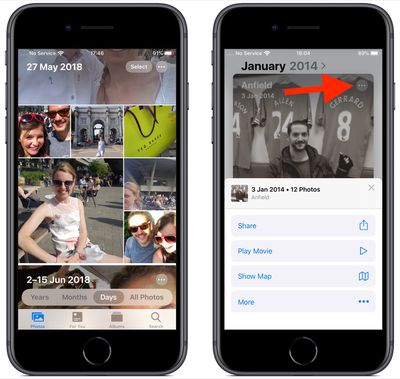
You can choose between the Years, Months, Days, and All Photos views using the button overlay that appears just above the main tabs at the bottom of the screen. In the Years view, each year is displayed as a pane that will automatically flip through an overview of each month. Alternatively, you can swipe across panes to quickly flip through the months manually.
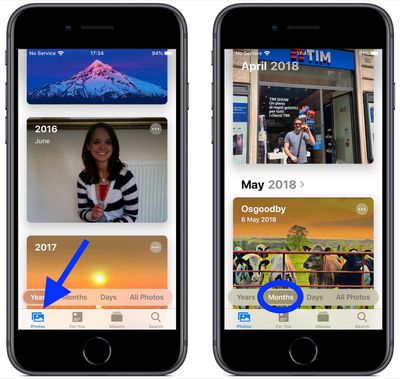
Try swiping up to previous years and then tapping one of them, and you should see photos taken at around the same time of year. For instance, if it's June and you tap the 2017 tab, you'll see photos that were taken in June of 2017.
Notice that when you tap on a year, the view will switch to the Months view. Likewise, tap on a month, and the the panes will change to the Days view.
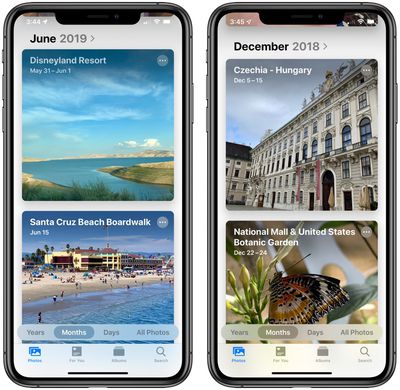
Whichever pane view you select, the Photos app combines metadata information and intelligent algorithms to highlight picture titles and photos taken in the same location. It can even match things like concert performances, holidays, and more, so you know where your photos were taken.
In all of these views, you'll see a circle containing an ellipsis in the top-right corner of each pane. Tap this circle to reveal additional options like Play Movie, Share, and Show Map. If you swipe up on these options you may also see any People you know that appear in the pictures.
It's worth noting that the new Photos tab is still separate from the For You section that Apple introduced in iOS 12. For You still focuses on aggregating content from multiple dates like beach days, trips, specific people, pets, and more, but the Photos tab organizes them chronologically around specific dates.
This makes the redesigned Photos tab a great accompaniment to the For You tab, as both help you discover your best memories and make browsing your photo library a more enjoyable experience.