

With the introduction of iOS 15, Apple rebadged its paid iCloud plans to "iCloud+" to reflect the fact that subscribers now get access to additional privacy features like Private Relay and Hide My Email. This article explains what Hide My Email is and how to use it.
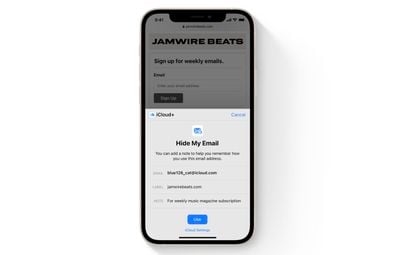
Hide My Email builds on the idea of Sign in With Apple by providing you with unique, random email addresses that forward to your personal inbox whenever you want to keep your personal email address private.
It's especially useful if you suspect that a business you're transacting with is likely to share your email address with ad agencies or other third-parties for marketing purposes. Using a random email address means you can delete the address at any time, ensuring unsolicited emails don't reach your inbox.
How to Create an Email Address Using Hide My Email
The following steps show you how to create a new dummy email address with Hide My Email, for use in Safari and Mail. Make sure your iOS device is running iOS 15 or later.
- Launch the Settings app on your iPhone or iPad
- Tap your Apple ID name at the top of the main settings menu.
- Tap iCloud.

- Tap Hide My Email.
- Tap Create new address.
- Tap Continue, then give your address an identifying label. You can also optionally make a note about it.
- Tap Next, then tap Done.
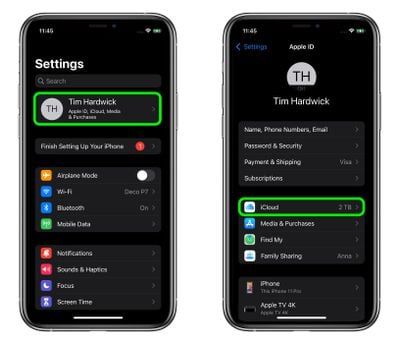
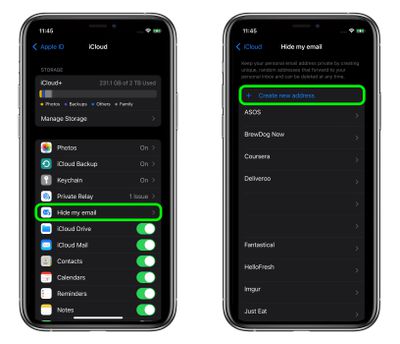
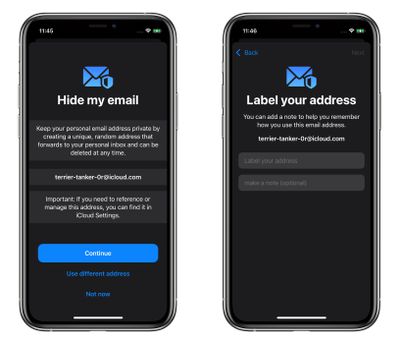
You can now use the random email address when you send emails in Mail, or when you're asked to enter your email address on a website in Safari.
How to Deactivate an Address Using Hide My Email
If you aren't currently using a random address generated by Hide My Email, you can temporarily deactivate it so that you don't receive any forwarded email from it.
- Launch the Settings app on your iPhone or iPad
- Tap your Apple ID name at the top of the main settings menu.
- Tap iCloud.
- Tap Hide My Email.
- Tap the email address in the list that you want to deactivate.
- Tap Deactivate email address.
- Tap Deactivate to confirm.
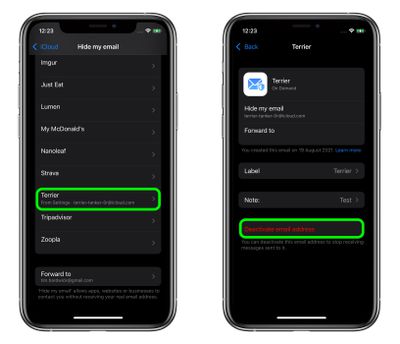
From now on, you won't receive emails sent to that address anymore. If you want to re-activate the address at any time, you'll find it in an "Inactive addresses" section at the bottom of your active addresses list. Tap the address in question, then tap Reactivate Address. Alternately, you can delete it by selecting Delete Address.
How to Change Your Hide My Email Forwarding Address
You can change the forwarding address for the dummy accounts that Hide My Email randomly generates. Here's how.
- Launch the Settings app on your iPhone or iPad.
- Tap your Apple ID name at the top of the main settings menu.
- Tap iCloud.
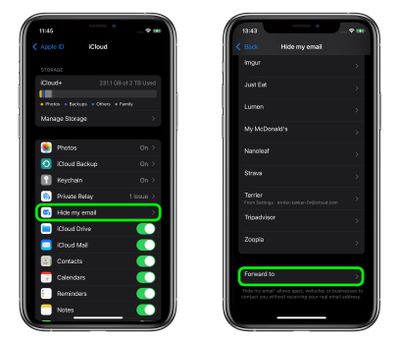
- Tap Hide My Email.
- Scroll to the bottom of the address list and tap Forward to.
- Select one of your email addresses, then tap Done.
Paid iCloud+ plans also include another premium feature called Private Relay, which ensures that all traffic leaving your device is fully encrypted, so that no third party between the website and your device can see the website being viewed. Check out our dedicated how-to for all the details.














































Top Rated Comments
1) See who sold my email / has slack security, allowing my address out into the wild (Yes I mean you, ProtectYourBubble, GolfOnline, LinkedIn, Tumblr etc..)
2) Blackhole that address.
Alternatively, with Gmail, you can add a plus and then anything you like, and you will still get it.
E.g. mygmailaccountname+macrumors@gmail.com
Having a bespoke email address is good as well as if bad people get a hold of it, they can't automatically be sure they can login to your account elsewhere, should you make the mistake of reusing a password which lets face, we all have done at some point.
edit: corrected my gmail mistake.
I would use them mainly for websites I don’t really trust. And even then I could still cluster.