iOS 15: How to Turn iCloud Private Relay On and Off - MacRumorsOpen MenuShow RoundupsShow Forums menuVisit ForumsOpen Sidebar
Skip to Content

iOS 15: How to Turn iCloud Private Relay On and Off

by

Alongside iOS 15, Apple introduced an iCloud+ service that adds new features to its paid ‌‌iCloud‌‌ plans (upgraded ‌‌iCloud‌‌ storage tiers start at $0.99). One of these features is ‌‌iCloud‌‌ Private Relay, which is designed to encrypt all of the traffic leaving your device so no one can intercept it or read it.
iCloud General Feature
Private Relay sends web traffic to a server that is maintained by Apple to strip the IP address. Once IP info has been removed, Apple sends the traffic to a second server maintained by a third-party company that assigns a temporary IP address and then sends the traffic to its destination, a process that prevents your IP address, location, and browsing activity from being used to create a profile about you.

Involving an outside party in the relay system is an intentional move that Apple says was designed to prevent anyone, including Apple, from knowing both a user's identity and the website the user is visiting. ‌

The following steps show you how to enable and disable Private Relay on an iPhone or iPad running iOS 15.

  1. Launch the Settings app on your iOS device.
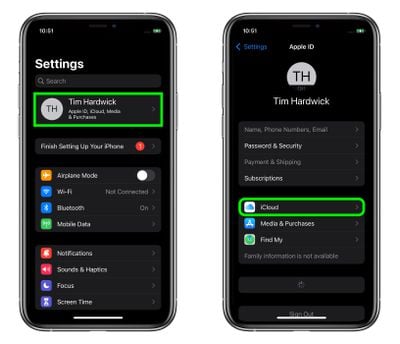
  2. Tap your name at the top of the main settings menu.
  3. Tap iCloud.
    settings

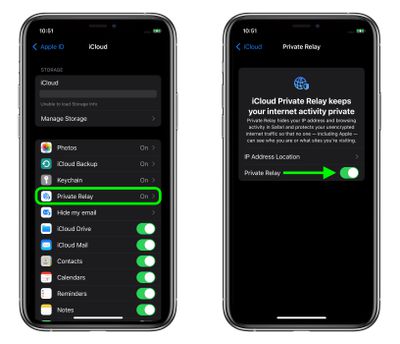
  4. Tap Private Relay.
  5. Toggle on/off the switch next to iCloud Private Relay. If you're turning it off, tap Turn Off Private Relay to confirm.
  6. With Private Relay enabled, by tapping IP Address Location you can use the default Maintain General Location option to retain local content in browsing, or change to the less geographically specific and more private Use Country and Time Zone option.
    settings

Paid ‌‌iCloud‌‌+ plans also include a new Hide My Email feature that lets you create unique, random email addresses that forward to your personal inbox, and it allows for ‌‌iCloud‌‌ Mail addresses to be personalized with a custom domain name. To learn more about Hide My Email and how to enable it, check out our dedicated how-to guide.


Popular Stories

iCloud General Feature Redux

iCloud+ Subscribers Get Higher Apple Intelligence Usage Limits in iOS 27

Tuesday June 9, 2026 6:05 am PDT by
Certain Apple Intelligence features in iOS 27 will carry daily usage limits, with iCloud+ subscribers receiving higher allowances than free users. The company reiterated the details in its press release accompanying yesterday's Apple Intelligence announcements. Apple said the limits apply to features that rely on "powerful server models," with image generation cited as the primary example....

iCloud General Feature Redux

Apple's New Hide My Email Domain Makes It Easier to Block iCloud Aliases

Wednesday June 17, 2026 7:41 am PDT by
Apple's decision to move Hide My Email to a dedicated "private.icloud.com" domain appears to have the consequence of making it easier for platforms that want to block iCloud aliases to do so. Apple is unifying the email domains used by Sign in with Apple and iCloud+ Hide My Email under a single private.icloud.com domain later this summer. Sign in with Apple currently uses...
iCloud General Feature Redux

UK iCloud Users Could Claim £77 Each as Apple Case Heads to Trial

Tuesday June 23, 2026 1:49 am PDT by
A class action lawsuit accusing Apple of overcharging U.K. iCloud users has been certified to go ahead, putting the £3 billion ($3.9 billion) claim on track for a trial in October 2028. According to BBC News, the Competition Appeal Tribunal cleared consumer group Which? to bring the case on behalf of an estimated 40 million U.K. iPhone and iPad owners, each of whom could receive up to £77...

🔗 Related Apple News & Rumors

Stay updated with the latest Apple ecosystem news and verified rumors