

WhatsApp in May 2023 introduced a new Chat Lock feature that allows you to secure select conversations in your inbox behind a passcode, fingerprint, or Face ID authentication. Keep reading to learn how it's done.

Millions of users rely on WhatsApp as a means of privately and securely communicating with others, which is why the company's developers are continually seeking new ways to improve the encrypted messaging service with these core principles in mind.
WhatsApp's latest privacy feature is Chat Lock, which lets you protect your most intimate conversations behind one more layer of security.
When you lock a conversation, it is automatically separated from the regular chat list and hidden in a locked folder that requires your passcode, fingerprint, or Face ID authentication to open.
What's more, notification previews for any locked chats don't show sender or message content, and any media shared in locked chats are not auto-saved to your phone's photo library, altogether keeping the conversations more private.
The feature should prove handy if you occasionally share your phone with a family member, or in cases when someone else is looking at your phone's screen at the exact moment an extra-sensitive chat arrives.
The following steps show you how to lock a WhatsApp conversation.
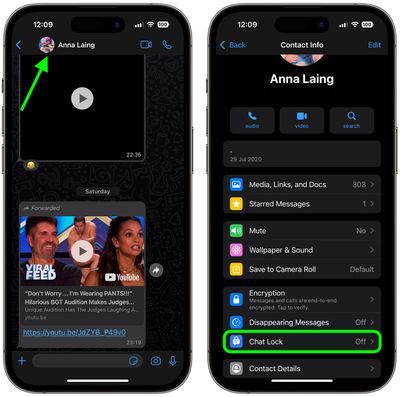
- In WhatsApp, tap a conversation in the Chats inbox that you want to lock.
- Next, tap the name of the contact or group name at the top of the screen.
- Tap Chat Lock in the Contact Info menu.

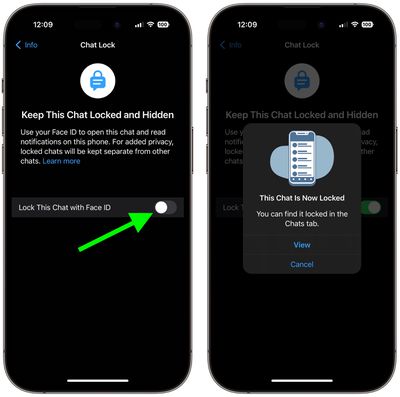
- Tap the switch next to the Lock This Chat option (it will say "With Face ID" or whatever authentication your device supports).
- Tap View to immediately return to the locked chat.
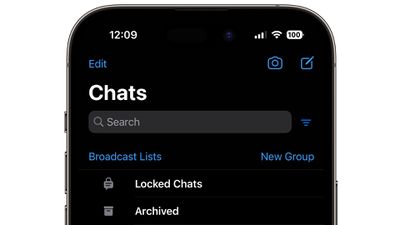
To return to a locked chat at a later time, slowly pull down on your Chats inbox to reveal the Locked Chats folder, then tap it. You'll be prompted for authentication, after which you'll be able to see and access all your locked chats in a separate list.
To unlock a locked conversation, simply follow the steps above again and toggle off the Lock This Chat switch.
WhatsApp says that in future it intends to add more options to Chat Lock, including locks for companion devices and creating a custom password for your chats so that you can use a unique password different from your phone's.












































