

Mac issues can occur for a variety of reasons, but in general most errors can be traced back to unstable software. The best way to prevent problems from cropping up is to make sure you are using the latest versions of Apple's programs and third-party applications.

However, if you've troubleshooted software and the problem persists, it's time to consider whether it's your Mac's hardware that's at fault.
Disk Utility is the first program you should fire up if you suspect disk errors or permission issues, but if that fails to identify the problem or you can't even get your Mac to boot up into the operating system, you can try using Apple's integrated Mac diagnostics tool.
Apple Diagnostics is built into every Mac released since June 2013. If you have an earlier Mac, the equivalent is called an Apple Hardware Test (AHT), but the basic principles are the same.

To start using Apple Diagnostics or AHT, first turn off any firmware password if you're using one. Next, shut down your Mac, disconnect all external devices except keyboard, mouse, display, and any Ethernet connection, and then follow the steps below.
- Press the power button on your Mac and then immediately press and hold down the D key on the keyboard. (To start Apple Diagnostics over the internet, hold down Option-D.)
- Release the D key when the prompt appears on the screen asking you to choose your language using the arrow keys.
- Join a local Wi-Fi network if prompted.
- If your Mac is a pre-2013 model, you'll be given the option to "Perform extended testing," which essentially checks every block of your Mac's memory. Select this option if desired and click the Test button. On post-2013 Macs, simply select the Test option.
- Wait for the progress bar to fill while a scan of your Mac's hardware is performed. On newer Macs this usually takes at least a couple of minutes, but AHT can take a lot longer, especially if you chose extended testing.

- Once the scan is complete, a list of any potential hardware issues will appear on the screen or a "No issues found" message will be displayed. Note any issue reference codes before continuing.
- To repeat the test, click Run test again. For more information about an issue, click Get Started. Otherwise you can click Restart or Shut Down to exit diagnostics.
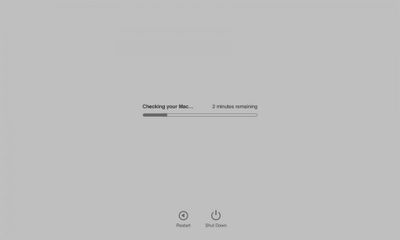
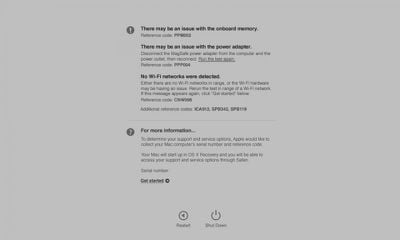
If you click Get Started for more information about an issue that Apple Diagnostics has identified, your Mac will boot into macOS Recovery Mode and display a web page asking you to choose your country or region.
Click Agree to send to send your serial number and reference codes to Apple, and follow the onscreen service and support instructions. You can also check any reference codes you noted down against Apple's official code table for more information.













































