How to Set a Firmware Password on Your Mac - MacRumorsOpen MenuShow RoundupsShow Forums menuVisit ForumsOpen Sidebar
Skip to Content

How to Set a Firmware Password on Your Mac

by

Using a login password on your Mac is a simple way of ensuring your macOS user account stays private, and using FileVault to encrypt your startup disk means only users who can log in to your Mac can read the disk's data. However, neither security method will prevent someone from booting your machine from an external hard drive.
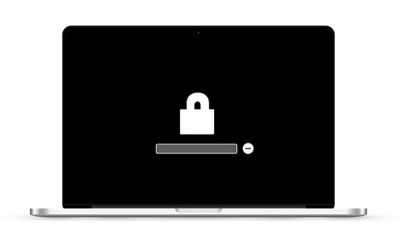
mac locked
One way to eliminate this vulnerability is by setting a firmware password on your Mac, which will prevent it from working with any other bootable volume than the one you've designated. However before you follow through with the procedure, there's a potential drawback you should definitely consider.

The password is held in a special area of persistent memory on your Mac's mainboard, so it's not something you can reset easily like other passwords. In fact, if you forget the firmware password, the only way to get it reset is to schedule an in-person service appointment with an Apple Store or an Apple Authorized Service Provider. With that caveat in mind, here are the steps you can take to set up a firmware password on your Mac.

How to Set a Firmware Password on Your Mac

  1. Power off your Mac if it's already running.
  2. Turn on your Mac and then immediately press and hold down the Command (⌘) and R keys to activate Recovery Mode.
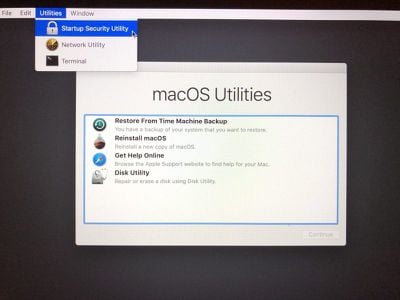
    set a firmware password on your mac

  3. Wait for the OS X Utilities screen to appear, then select Utilities -> Startup Security Utility from the menu bar.
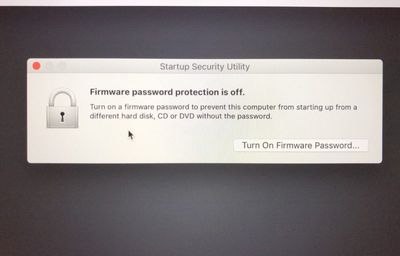
    set a firmware password on your mac 2

  4. Click Turn On Firmware Password....
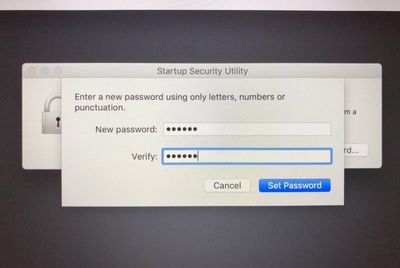
    set a firmware password on your mac 3

  5. Enter the same firmware password in both fields provided, then click Set Password.
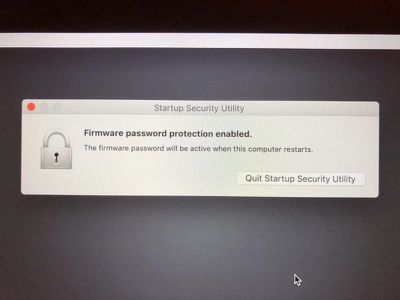
    set a firmware password on your mac 4

  6. Click Quit Firmware Password Utility.
    set a firmware password on your mac 5

  7. Click the Apple () menu and select Restart.

That's all there is to it. With the firmware password set, no one will be able to access your Mac's data by using an external hard drive. If you want to turn off a firmware password on your Mac that you've set up, the process is basically the same as above, except at step 4 you click Turn Off Firmware Password.


Popular Stories

Apple Event Logo

Apple Working on All-New Operating System

Wednesday July 29, 2026 11:39 am PDT by
Apple is developing an all-new operating system that is essentially a mix of tvOS, watchOS, and iOS, according to Bloomberg's Mark Gurman. In a report this week, he said the operating system will feature a grid of icons, widgets, and apps, along with customizable clock faces. The new software platform is intended for Apple's long-rumored smart home hub. With built-in facial recognition,...

imac video apple feature

Apple Made Its Second-Biggest Acquisition Ever This Year

Wednesday July 29, 2026 12:03 pm PDT by
Apple this year acquired Israeli startup Q.ai for close to $2 billion, according to the Financial Times. That would make this Apple's second-biggest acquisition ever, after it paid $3 billion for the popular headphone maker Beats in 2014. This is also the largest known Apple acquisition since the company purchased Intel's smartphone modem business and patents for $1 billion in 2019. Q.ai...
Dynamic Island iPhone 18 Pro Feature

iPhone 18 Pro: Twelve Changes Coming to Apple's Next Flagship

Thursday July 30, 2026 3:43 am PDT by
We're less than two months out from the launch of Apple's premium next-generation smartphone lineup, and while we're not expecting a dramatic change in terms of functionality, there are still several enhancements rumored to be coming to the iPhone 18 Pro and iPhone 18 Pro Max. One thing worth noting is that Apple is reportedly planning a major change to its iPhone release cycle this year,...

🔗 Related Apple News & Rumors

Stay updated with the latest Apple ecosystem news and verified rumors