How to Uninstall iPhone and iPad Apps on an M1 Mac - MacRumorsOpen MenuShow RoundupsShow Forums menuVisit ForumsOpen Sidebar
Skip to Content

How to Uninstall iPhone and iPad Apps on an M1 Mac

by

If you own a Mac powered by Apple silicon, you can download and install iOS and iPadOS apps from the Mac App Store in macOS Big Sur. But how do you uninstall them? Keep reading to learn how.
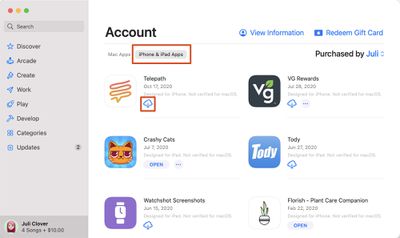
mac app store iphone ipad apps
Apple's M1 Macs, which are the first to be powered by an Apple-designed Arm-based chip, are able to run iOS and iPadOS apps because of the common architecture between the different operating systems.

That means ‌M1‌ Mac owners can download and install iOS apps from the ‌Mac App Store‌ just as if they were Mac apps, and Apple even includes preferences for Touch Alternatives that allow users to set keyboard commands for iPhone/iPad touch input alternatives.

However, many users have found themselves wondering how iOS apps are properly uninstalled on an Apple silicon-based Mac.

The question comes up because many users have tried dragging the app icon to the Trash in the usual way, only to find that the app binary gets deleted yet much of the app's related content remains on the disk, usually in the ~/Library/Containers folder, needlessly taking up storage.

Fortunately, there is a surefire way to ensure that all of the data associated with an iOS app is removed when you uninstall it, but it does require the use of a couple of Terminal commands, so make sure you're comfortable working in a command prompt window before you attempt the following.

How to Uninstall iOS Apps on an M1 Mac

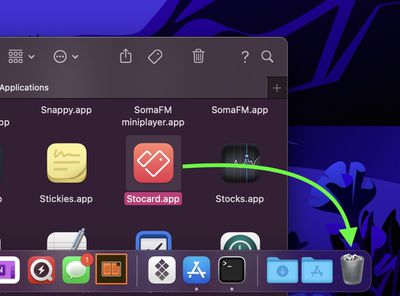
  1. Open the Applications folder and drag the app you want to uninstall into the Trash.
    trash

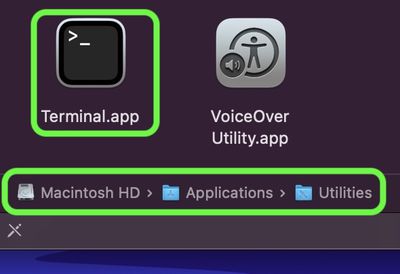
  2. Now, launch Terminal (Applications/Utilities/Terminal.app).
    terminal

  3. At the Terminal window prompt, input the command cd ~/Library/Containers and hit Enter.
  4. Next, input the command find . -iname "*appname*" , and replace "appname" (but keeping the asterisks) with the name of the app you just dragged to the Trash. This command should output any matches found, typically in the form of obscured directory names (eg. 0D3DA1EC-21FB-4836-B6A7-8C6053EF9567).
    terminal

  5. Next, input the command rm -Rf XXXXX-XXXX-XXXX-XXXXXXX but replace the XXXX with the obscured directory name shown in the previous output, then hit Enter.
  6. If several directories are shown in the output, repeat the previous step for each directory.
The iOS app and all data associated with it should now be removed from your Mac.
Related Forum: macOS Big Sur

Popular Stories

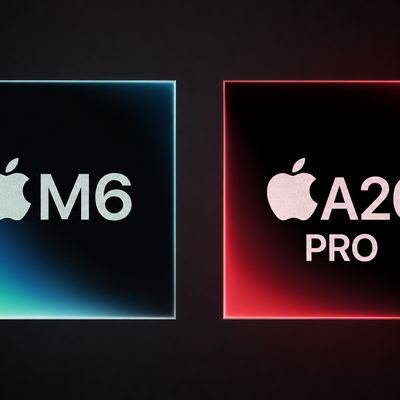
m6 a20 pro chips

iPhone 18 Pro: Everything M6 Tells Us About the A20 Chip

Saturday September 5, 2026 9:00 am PDT by
Apple announced the M6 chip last week, just ahead of its September iPhone event, providing the clearest indication yet of what the A20 will bring to the iPhone 18 lineup. Apple silicon generations share much of their architecture across the A-series and the M-series, so a new A-series chip normally functions as a partial preview of the M-series chip that follows it. This year the order...

a20 pro chip

Apple Unveils A20 Pro as First 2nm Smartphone Chip

Wednesday September 9, 2026 10:22 am PDT by
Apple today revealed the A20 Pro chip in the iPhone 18 Pro and iPhone 18 Pro Max, built on a brand new architecture using 2nm process technology. Apple described the A20 Pro as "an exceptional chip that sets a new bar for mobile computing." The chip has a 6-core CPU design with two new super cores that Apple says are up to 20% faster, calling them "desktop class" and "the fastest in any...
Home Hub Command Center with Dome Base Feature

Apple Smart Home Hub to Feature iMac G4-Style Design

Wednesday September 30, 2026 4:36 am PDT by
Apple's long-rumored smart home hub will have an iMac G4-style design and a host of unique features, Bloomberg's Mark Gurman reports. The smart home hub is said to feature a square 6-inch display, with variants that can be placed on a countertop or mounted on a wall. It features a single FaceTime camera on the front, with microphones and speakers in its connected base. Gurman described the...
Latest Stories
Apple Shares Photos Shot on iPhone Duo
11 minutes ago
Apple Says iPhone Duo Has Replaceable 'Cover Layer' Above the Display
1 hour ago
Apple's Smart Home Camera Will Apparently Have 'No Video Recording'
3 hours ago
Apple TV Just Updated Its Selection of 'Bonus' Movies
5 hours ago
iPhone 18 Pro Colors Buyer's Guide: Which Should You Choose?
5 hours ago
Early Prime Big Deal Days: Best Discounts on Accessories, TVs, and More at Amazon
5 hours ago
MacBook Pro With OLED Touch Screen Rumored to Launch in October or November
6 hours ago
Apple's All-New Home Hub Rumored to Launch in These Four Colors
7 hours ago
iPhone 18 Pro Aperture Control Goes Fully Manual in Halide 3.2
8 hours ago
Apple Stores Receive 'Do Not Open' Boxes Ahead of Smart Home Products Launch
9 hours ago
iPhone 18 Pro Sales Jump in China Ahead of iPhone Duo Launch
9 hours ago
Apple TV Still Down for Some Users Following Apple Services Outage
10 hours ago
PSA: Apple Mail on Mac May Stop Syncing Microsoft 365 Accounts Today
10 hours ago
Apple's Smart Home Hub: Everything We Know So Far
21 hours ago
Apple's Home Hub Borrows From the iPhone Duo's StandBy Mode
22 hours ago
Apple Invites App Updated With Three New Features
1 day ago
Apple Event on October 13?
1 day ago
Apple Watch SE 3 vs. Series 12 Buyer's Guide: Which Should You Buy?
1 day ago
iPad Mini 8 to Offer These 10 New Features
1 day ago
DoorDash Unveils AI Food Ordering Through Apple's Messages App
1 day ago
Amazon Takes Up to $150 Off Select M5 MacBook Air Models
1 day ago
Apple Still Plans to Release a New Full-Sized HomePod
1 day ago
Apple Working to Expand HomeKit
1 day ago
Apple Smart Home Hub to Feature iMac G4-Style Design
1 day ago
Three New Apple Smart Home Products Coming on October 13
1 day ago
Apple Pay Now Available in India With Axis Bank Cards
2 days ago
OpenAI Launches Always-On 'Dots' Agents to Rival Meta's Muse
2 days ago
AirPods 5 Teardown: Batteries Removable, Case Still Tough
2 days ago
iPhone 18 Pro Owners Complain of Speaker Crackling or Popping
2 days ago
You Can 'Get Ready' for iPhone Duo Pre-Orders on October 12
2 days ago

🔗 Related Apple News & Rumors

Stay updated with the latest Apple ecosystem news and verified rumors