iOS 17: How to Turn Your Photo Subjects into Message Stickers - MacRumorsOpen MenuShow RoundupsShow Forums menuVisit ForumsOpen Sidebar
Skip to Content

iOS 17: How to Turn Your Photo Subjects into Message Stickers

by

Apple in ‌iOS 16‌ introduced a Remove Subject From Background option for photos on your iPhone, and in ‌iOS 17‌, you can also use the feature to create and save your own stickers. Keep reading to learn how it works.
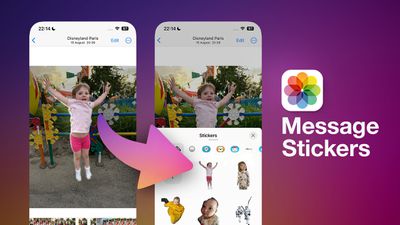
iOS 17 Message Stickers Feature
In iOS 16, Apple enhanced its Visual Look Up capability for photos by making it possible to isolate the subject of a picture from its background so that you can copy it to the clipboard for use elsewhere or share it in another app.

With iOS 17, Apple has taken the feature further by allowing you to export isolated photo subjects as stickers that you can use in Messages. And if the subject is in a Live Photo, the sticker will even animate.

There are a number of effects that can be added to make your digital stickers look more like real stickers, including a white outline, comic-like shading, a puffy 3D look, and a shiny, holographic finish. The sticker effects will animate and reflect the light appropriately, making your self-created stickers look professionally done.

The following steps show you how to create your first photo-sourced sticker in iOS 17.

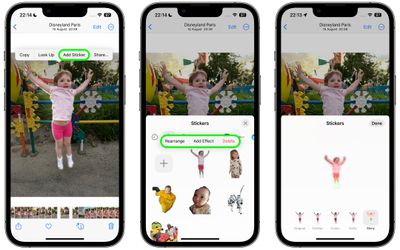
  1. Launch the Photos app and select an image from your library containing a well-defined subject.
  2. Press and hold on the subject until it ripples and a white glow flows around its outline.
  3. In the popup menu that appears, tap Add Sticker.
  4. To change the look of your sticker, tap Add Effect, and you'll be given several options including Original, Outline, Comic, Puffy, and Shiny.
  5. Tap Done to finish.

photos

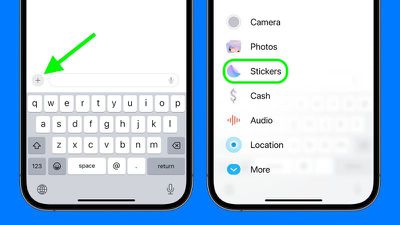
That's all you need to do. The next time you open Messages, you'll find it in your personal stickers collection, ready to send to friends and family. To use it in a Messages conversation thread, simply tap the + button next to the compose field, then tap Stickers.
stickers
Tap the sticker in question, then tap the Send button. Alternatively, you can long-press the sticker and drag it into the conversation, or even onto a specific message bubble, just like a tapback reaction.

In iOS 17, Apple has added several new features to its Messages app to make communicating with other Apple users more creative and fun. Check out our dedicated Messages roundup to learn else is in store when iOS 17 is publicly released next month.

Top Rated Comments

fatTribble Avatar
40 months ago
I’m going to make an animated sticker of Scotty beaming me up! 🤓
Score: 5 Votes (Like | Disagree)
40 months ago
Good article. Nice feature of iOS 17!

Score: 3 Votes (Like | Disagree)
40 months ago
Never really used stickers before but I really want to try this out.
Score: 2 Votes (Like | Disagree)
alexandr Avatar
40 months ago

I think it will be open as Memoji Stickers, just devs can’t add it yet as it’s not released yet
Would be great, if that's the case. Making similar stickers for Telegram is a chore!
Score: 2 Votes (Like | Disagree)
jdavid_rp Avatar
40 months ago

I wish you could use these stickers in different apps too.
I think it will be open as Memoji Stickers, just devs can’t add it yet as it’s not released yet
Score: 2 Votes (Like | Disagree)
klasma Avatar
40 months ago

Did you set up a go fund me for you poor child?
It’s a MacRumors editor’s child I think, so you’ll have to ask them.
Score: 2 Votes (Like | Disagree)

Popular Stories

iOS 27 Next to iPhone

Here's When iOS 27 Rolls Out Today in Every Time Zone [Update: It's Out]

Sunday September 13, 2026 3:00 am PDT by
Update 10:04 a.m.: iOS 27 is rolling out now, though it may take a bit for all users to see it, so keep checking! Apple is about to release iOS 27, which will finally deliver more advanced Siri AI capabilities as well as a variety of other refinements, improvements, and new features to iPhones. It's Apple's biggest software update of the year, and Apple announced at Wednesday's iPhone event...
iOS 27 Icon iPhone

iOS 27 Available Now With These 8 New Features

Monday September 14, 2026 9:00 am PDT by
Update — 10 a.m. Pacific Time: Apple has released iOS 27. During its iPhone 18 Pro and iPhone Duo event last week, Apple announced that iOS 27 will be released widely on Monday, September 14. iOS 27 should be available around 10 a.m. Pacific Time / 1 p.m. Eastern Time today via the Settings app, under General → Software Update. Below, we have highlighted eight new features and...
Apple iCloud Plus expansion hero

iCloud+ Now Includes Apple TV, Apple Arcade, and Curated Apple Music Stations in Over 100 Countries

Tuesday September 15, 2026 1:43 am PDT by
Apple today announced a new subscription initiative that turns paid iCloud+ subscriptions into a broader services bundle in more than 100 countries. In select countries, Apple says every paid iCloud+ plan, including the cheapest 50GB tier, now includes Apple TV and Apple Arcade "at no additional cost," while family sharing extends the storage, TV and Arcade access to up to five people....

🔗 Related Apple News & Rumors

Stay updated with the latest Apple ecosystem news and verified rumors