Turn a Long Webpage into a PDF with a Single iPhone Screenshot - MacRumorsOpen MenuShow RoundupsShow Forums menuVisit ForumsOpen Sidebar
Skip to Content

Turn a Long Webpage into a PDF with a Single iPhone Screenshot

by

In iOS and iPadOS, Apple includes a built-in screenshot feature that also provides you with the ability to capture an entire webpage on your iPhone or iPad that you can then save or share with someone as a PDF document.

safari macos icon banner
By converting full‑page screenshots into PDFs directly within Safari, you can preserve the exact layout and content of lengthy articles, receipts, or social media threads in a single, shareable file. Using the feature also eliminates the need to stitch together multiple images or rely on third‑party apps, plus the text remains searchable and any images stay crisp.

Here's how the feature works.

  1. Launch Safari and navigate to the webpage that you wish to capture.
  2. If your device lacks a Home button, press the power button located at the top of the device and the volume up button located on the right of the device at the same time to take a screenshot. Otherwise, press the Home button and the Sleep/Wake button simultaneously to capture a screenshot.
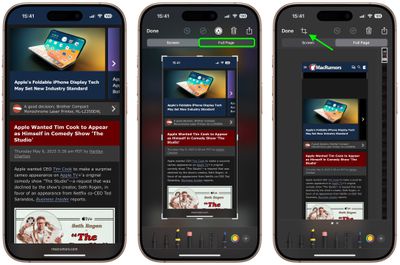
  3. A preview of the screenshot will pop up in the lower left of the display. Tap it to open up the Instant Markup interface. You'll have about five seconds before it disappears.
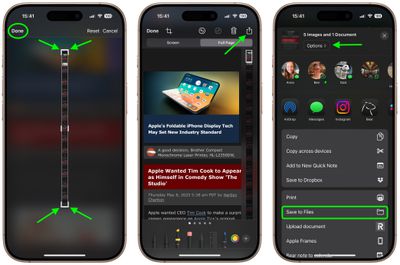
  4. Tap the Full Page tab in the upper right corner of the Markup interface, then tap the Crop icon at the top.
    safari

  5. Use the frame around the webpage to select what to capture by dragging the corners with your finger, then tap Done.
  6. Tap the Share sheet icon (the square with an arrow pointing out) to bring up a panel of share options and actions.
  7. From here, you can either share the captured webpage as a PDF document using the top two rows of icons, or save it somewhere (Save to Files, for example) using the Action menu options below. You can also use the Options button to name the file.
    safari

Note that you can always use the Markup tools to edit your PDF before saving or sharing it.

Tag: Safari

Top Rated Comments

16 months ago

... press the power button located at the top of the device and the volume up button located on the right...
Actually they moved the power button from the top to the right side...just the other day. And the volume buttons have always been on the left side.
Score: 11 Votes (Like | Disagree)
16 months ago
Love this feature. As insane as the thumbnail looks, the resulting document is very easy to read on mobile. I do wish News supported the same thing.
Score: 6 Votes (Like | Disagree)
It’s always something Avatar
16 months ago

Now, if we can only get a save as photo option. If you’re sending someone a screenshot in a text, you don’t want to send them a PDF. It’s not a job application.
You can do this two ways with the full page: the Done menu gives you the choice to save the full page screenshot to Photos (from where you can then share it). Or, in the Share menu, tap Options and choose Single Image before sending it in a text.
Score: 4 Votes (Like | Disagree)
cateye Avatar
16 months ago
This is one of those weird little features that I was like, "but why, tho?" when it debuted, and then I ended up using it all the time. It's super handy.
Score: 4 Votes (Like | Disagree)
russell_314 Avatar
16 months ago
Now, if we can only get a save as photo option. If you’re sending someone a screenshot in a text, you don’t want to send them a PDF. It’s not a job application.
Score: 4 Votes (Like | Disagree)
russell_314 Avatar
16 months ago

I'm just here to say that I love those small iOS and macOS tip posts!
Absolutely! I learned something from this thread
Score: 3 Votes (Like | Disagree)

Popular Stories

Apple Event Logo

Apple Working on All-New Operating System

Wednesday July 29, 2026 11:39 am PDT by
Apple is developing an all-new operating system that is essentially a mix of tvOS, watchOS, and iOS, according to Bloomberg's Mark Gurman. In a report this week, he said the operating system will feature a grid of icons, widgets, and apps, along with customizable clock faces. The new software platform is intended for Apple's long-rumored smart home hub. With built-in facial recognition,...
imac video apple feature

Apple Made Its Second-Biggest Acquisition Ever This Year

Wednesday July 29, 2026 12:03 pm PDT by
Apple this year acquired Israeli startup Q.ai for close to $2 billion, according to the Financial Times. That would make this Apple's second-biggest acquisition ever, after it paid $3 billion for the popular headphone maker Beats in 2014. This is also the largest known Apple acquisition since the company purchased Intel's smartphone modem business and patents for $1 billion in 2019. Q.ai...

Dynamic Island iPhone 18 Pro Feature

iPhone 18 Pro: Twelve Changes Coming to Apple's Next Flagship

Thursday July 30, 2026 3:43 am PDT by
We're less than two months out from the launch of Apple's premium next-generation smartphone lineup, and while we're not expecting a dramatic change in terms of functionality, there are still several enhancements rumored to be coming to the iPhone 18 Pro and iPhone 18 Pro Max. One thing worth noting is that Apple is reportedly planning a major change to its iPhone release cycle this year,...

🔗 Related Apple News & Rumors

Stay updated with the latest Apple ecosystem news and verified rumors