

How to Transfer Your WhatsApp Chat History From Android to iPhone - MacRumorsOpen MenuShow RoundupsShow Forums menuVisit ForumsOpen Sidebar
Skip to Content

How to Transfer Your WhatsApp Chat History From Android to iPhone

by

After a long wait, Meta this week announced the ability to transfer WhatsApp chat history, photos, videos, and voice messages from Android to iPhone while maintaining end-to-end encryption. The system uses Apple's Move to iOS app for Android phones, and can be initiated during the setup process for a new (or factory reset) iPhone.
Whatsapp Feature
This article runs through the steps involved in transferring your WhatsApp chat history from an Android phone to an iPhone. The much-requested migration feature transfers everything in your WhatsApp history including texts, voice notes, and media files to a new iPhone.
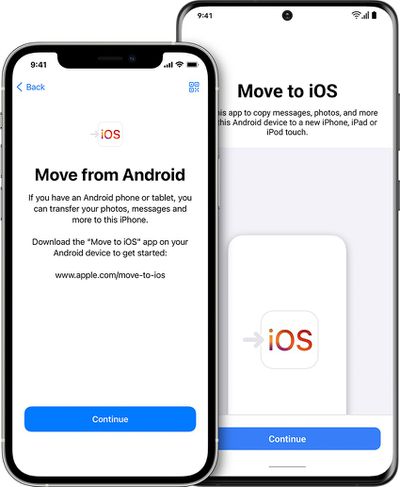
ios15 4 iphone12 pro move from android hero
Note that WhatsApp chat history migration is only supported on Android devices running Android 5.0 or later and iPhones running iOS 15.5 or later. Also, both the Android phone and the iPhone need to be connected to the same Wi-Fi network when the migration takes place. The following steps guide you through the process.

Transfer WhatsApp Chats From Android to iPhone

  1. On your Android phone, download the Move to iOS app from the Google Play Store.
  2. Start the iPhone setup process of your new (or factory reset) iPhone.
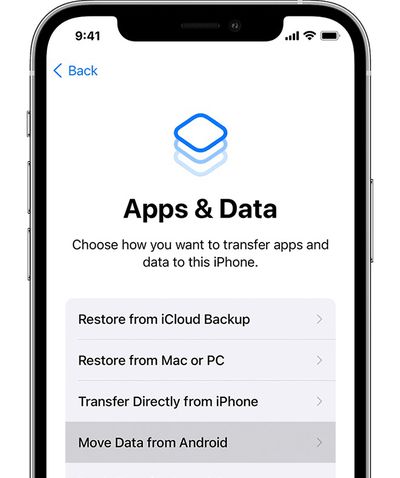
  3. When the Apps & Data setup screen appears, select Move data from Android.
    ios15 iphone12 pro setup apps data move data from android ontap

  4. On your Android phone, open the Move to iOS app and follow the onscreen instructions.
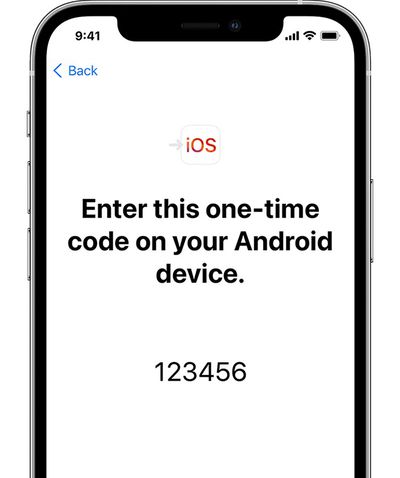
  5. On your iPhone, tap Continue when you see the Move from Android screen, then wait for a ten-digit or six-digit code to appear.
    ios15 iphone12 pro move from android setup iphone code

  6. Enter the code on your Android phone, select WhatsApp on the Transfer Data screen, then tap Start.
  7. Wait for your WhatsApp history and data to be prepared for migration. Once the process is complete, you will be signed out of WhatsApp on your Android device.
  8. Once your iPhone is fully setup, download WhatsApp from the App Store and sign into the service using the same phone number.
After following these steps, the WhatsApp chat history from your Android phone should appear on your new iPhone.

Top Rated Comments

contacos Avatar
54 months ago

wow finally, i got buddies who are stuck on android cause of their whatsapp history. too many "personal photos" 😂
I don’t understand these people. I automatically save everything to the camera roll, sort them into folders and delete the crap I don’t need and wipe all the chat attachments on WhatsApp itself on a weekly base. My mother is one of those people with like a 7 GB WhatsApp and she’s like „I don’t want to delete anything because I am not sure what I already / didn’t already save!“ and then complains about her iPhone being full and asks me what she could do 😖 /rant over haha


Score: 5 Votes (Like | Disagree)
54 months ago
I refuse to use WhatsApp since Meta owns them. I wish I could get more of my friends to use Signal.
Score: 4 Votes (Like | Disagree)
54 months ago
I don't use WhatsApp, but what a PITA. There isn't a way to just have your history stored in the cloud and synced automatically when you install the app on another device? My FB/IG message history is available on every device - iOS or Android...why is WhatsApp any different? They're owned by the same company.
Score: 4 Votes (Like | Disagree)
54 months ago
Too bad that it can be used only during iPhone setup. But still having an option is good.
Score: 2 Votes (Like | Disagree)
dabi Avatar
54 months ago
Sheesh, I'm glad I only use Discord and Messenger and don't have such problems. Literally just log in on any platform I want and the history shows up just like that. This sounds so complicated in comparison.
Score: 2 Votes (Like | Disagree)
fede777 Avatar
54 months ago

I don't use WhatsApp, but what a PITA. There isn't a way to just have your history stored in the cloud and synced automatically when you install the app on another device? My FB/IG message history is available on every device - iOS or Android...why is WhatsApp any different? They're owned by the same company.
WhatsApp always used iCloud / Google Drive to store their backups, that's why they are not easily interchangeable. It would be way better if it had their own solution like Facebook Messenger.
Score: 2 Votes (Like | Disagree)

Popular Stories

Google Logo Feature Slack

Google and Epic Abandon Injunction Modification Request, Clearing the Way for Rival Android App Stores

Wednesday July 15, 2026 5:02 pm PDT by
Google and Epic Games this week withdrew their joint motion to modify an injunction requiring Google to support third-party app stores in Google Play. The two companies abandoned the request after it became clear the court was unlikely to allow it. Google is now bound by a permanent injunction issued in October 2024 requiring it to allow alternative app stores on Android devices. In a court...
gemini for mac app google

EU Orders Google to Give Rival AI Apps the Same Android Access as Gemini

Thursday July 16, 2026 3:45 pm PDT by
The European Commission today formally ordered Google to give third-party AI services the same access to Android device features that Gemini has. Europe's Digital Markets Act requires software makers like Apple and Google to grant equal interoperability to third-party apps and services, and the EC is enforcing it. DMA interoperability rules are why Siri AI won't be available in the European...
iphone 17 pro silver

iPhone Loyalty Rate Climbs to 87% as Switching to Android Slows

Friday July 17, 2026 9:02 am PDT by
iPhone owners are sticking with the platform at a higher rate than a year ago, with new research firm CIRP putting iPhone loyalty at 87% for the first quarter of 2026. CIRP's latest quarterly survey found that just 12% of new iPhone buyers in the March quarter had come over from an Android phone, with the remaining 1% arriving from a feature phone, a different smartphone platform, or buying...

🔗 Related Apple News & Rumors

Stay updated with the latest Apple ecosystem news and verified rumors






































