Knowing how to take a screenshot on your iPad can come in handy for all sorts of reasons. Whether you want to capture a snapshot of video, or give someone a preview of a project you're working on, taking a picture of your screen is extremely easy to do.

How to Take a Screenshot on iPad, iPad mini, iPad Air, and iPad Pro (2017 models and earlier)

The following method works for all iPads with a Home button, so that's ‌iPad‌, iPad mini, iPad Air, and iPad Pro (2017 models and earlier). If your ‌iPad‌ doesn't have a Home button (if it's a 2018 ‌iPad Pro‌, for example) the way to take screenshots is a little different – click here to learn how.
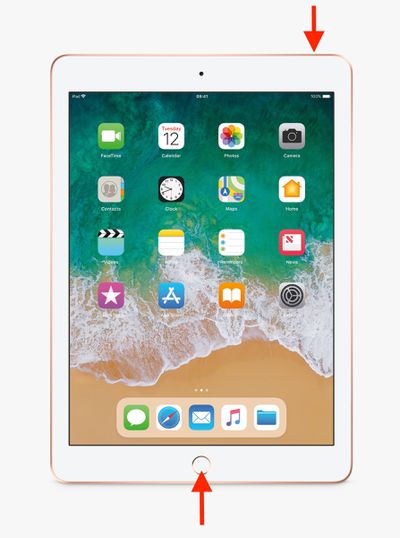
iPad

  1. Press the Top button and the Home button at the same time.
  2. Quickly release both buttons.
  3. A preview of the screenshot will pop up in the lower left of the display. Tap it to open up the Instant Markup interface, or let it disappear (this takes about five seconds) and it will be saved as-is.

The Instant Markup interface lets you add text, crop, highlight specific areas in a screenshot. To learn more about quickly editing screenshots using Instant Markup, click here.

How to Take a Screenshot on 2018 iPad Pro Models

In 2018, Apple launched third-generation ‌iPad Pro‌ models, available in 11 and 12.9-inches, which are the first iPads not to feature a Home button. Taking a screenshot on these iPads is just as easy as taking one on an iPhone without a Home button, but the gesture is a bit different.
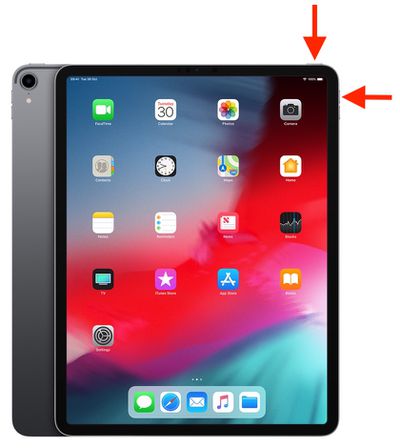
buttons

  1. Press the Power button on the top of the device and the Volume up button located on the right of the device at the same time.
  2. Quickly release both buttons.
  3. A preview of the screenshot will pop up in the lower left of the display. Tap it to open up the Instant Markup interface, or let it disappear (this takes about five seconds) and it will be saved as-is.

The Instant Markup interface lets you add text, crop, highlight specific areas in a screenshot. To learn more about quickly editing screenshots using Instant Markup, click here.

Where Are Screenshots Saved?

When you take a screenshot on your iOS device, it's automatically saved to your Photo library. The Photos app also maintains a Screenshots folder where all the pictures you've taken can be conveniently accessed.


Popular Stories

iOS 26 Feature

iOS 26.1 to iOS 26.4 Will Add These New Features to Your iPhone

Saturday October 18, 2025 11:00 am PDT by
iOS 26 was released last month, but the software train never stops, and iOS 26.1 beta testing is already underway. So far, iOS 26.1 makes both Apple Intelligence and Live Translation on compatible AirPods available in additional languages, and it includes some other minor changes across the Apple Music, Calendar, Photos, Clock, and Safari apps. More features and changes will follow in future ...
ios 26 1 liquid glass opaque

iOS 26.1 Beta 4 Lets Users Control Liquid Glass Transparency with New Toggle

Monday October 20, 2025 10:57 am PDT by
With the fourth betas of iOS 26.1, iPadOS 26.1, and macOS 26.1, Apple has introduced a new setting that's designed to allow users to customize the look of Liquid Glass. The toggle lets users select from a clear look for Liquid Glass, or a tinted look. Clear is the current Liquid Glass design, which is more transparent and shows the background underneath buttons, bars, and menus, while tinted ...
iPhone Siri Glow

Some Apple Employees Have 'Concerns' About iOS 26.4's Revamped Siri

Sunday October 19, 2025 7:39 am PDT by
iOS 26.4 is expected to introduce a revamped version of Siri powered by Apple Intelligence, but not everyone is satisfied with how well it works. In his Power On newsletter today, Bloomberg's Mark Gurman said some of Apple's software engineers have "concerns" about the overhauled Siri's performance. However, he did not provide any specific details about the shortcomings. iOS 26.4 will...
iOS 26

iOS 26.0.2 Update for iPhones Coming Soon

Friday October 17, 2025 7:35 am PDT by
Apple's software engineers continue to internally test iOS 26.0.2, according to MacRumors logs, which have been a reliable indicator of upcoming iOS versions. iOS 26.0.2 will be a minor update that addresses bugs and/or security vulnerabilities, but we do not know any specific details yet. The update will likely be released by the end of next week. Last month, Apple released iOS 26.0.1,...
Apple iPad Pro hero M5

New iPad Pro Has Six Key Upgrades Beyond M5 Chip

Saturday October 18, 2025 10:57 am PDT by
While the new iPad Pro's headline feature is the M5 chip, the device has some other changes, including N1 and C1X chips, faster storage speeds, and more. With the M5 chip, the new iPad Pro has up to a 20% faster CPU and up to a 40% faster GPU compared to the previous model with the M4 chip, according to Geekbench 6 results. Keep in mind that 256GB and 512GB configurations have a 9-core CPU,...
maxresdefault

Here's How the iOS 26.1 Transparency Toggle Changes Liquid Glass

Monday October 20, 2025 1:55 pm PDT by
With the fourth beta of iOS 26.1, Apple added a toggle that makes Liquid Glass more opaque and reduces transparency. We tested the beta to see where the toggle works and what it looks like. Subscribe to the MacRumors YouTube channel for more videos. If you have the latest iOS 26.1 beta, you can go to Settings > Display and Brightness to get to the new option. Tap on Liquid Glass, then...
iOS 26

What's New in iOS 26.1 Beta 4

Monday October 20, 2025 1:02 pm PDT by
Even though we're at the fourth beta of iOS 26.1, Apple is continuing to add new features. In fact, the fourth beta has some of the biggest changes that we'll get when iOS 26.1 releases to the public later this month. We've rounded up what's new below. Liquid Glass Transparency Toggle Apple added a toggle for customizing the look of Liquid Glass. In Settings > Display and Brightness,...
HomePod mini and Apple TV

Apple's Next Rumored Products: New HomePod Mini, Apple TV, and More

Thursday October 16, 2025 9:13 am PDT by
Apple on Wednesday updated the 14-inch MacBook Pro, iPad Pro, and Vision Pro with its next-generation M5 chip, but previous rumors have indicated that the company still plans to announce at least a few additional products before the end of the year. The following Apple products have at one point been rumored to be updated in 2025, although it is unclear if the timeframe for any of them has...
kohler toilet sensor

Kohler Launches $600 iPhone-Connected Toilet Camera That Monitors Your Health Through Waste Analysis

Monday October 20, 2025 1:42 pm PDT by
Kohler is expanding its line of bathroom products with Dekoda, an iPhone-connected device that's designed to be attached to a toilet rim (via The Verge). The device's included "sensors" point into the toilet bowl, allowing it to analyze what goes on in the bathroom. According to Kohler, Dekoda is a health tracker that can monitor gut health and hydration, as well as detect the presence of...