How to Prevent Your iPhone's Low Power Mode From Turning Off - MacRumorsOpen MenuShow RoundupsShow Forums menuVisit ForumsOpen Sidebar
Skip to Content

How to Prevent Your iPhone's Low Power Mode From Turning Off

by

Whether your iPhone or iPad is long overdue a battery replacement, or you just want to get more juice out of a single charge, here's a way to keep your device's Low Power Mode on all the time.
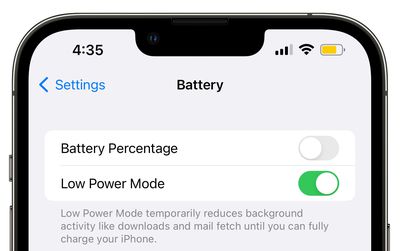
ios 16 battery low power mode beta 6
Most ‌iPhone‌ and iPad users will be familiar with the way their device throws up a prompt to turn on Low Power Mode when the battery falls to 20 percent. The special mode conserves what remaining battery life the device has left by limiting some features, but by default the mode automatically turns off when a charging iPhone or iPad reaches 80 percent. If that irks you, don't worry – there is a solution.

Perhaps you're running the latest version of iOS or iPadOS on an older device and you've found that the battery life is inadequate to get you through the day. Or maybe you just want to reduce the amount of times you have to charge your iPhone or iPad. Either way, you can keep Low Power Mode enabled regardless of the battery level with the help of an automation.

iPhone/iPad Features Disabled by Low Power Mode

Before you follow the steps in this article to create the automation, it's worth highlighting which of the features it disables to reduce your device's power consumption. According to Apple, Low Power Mode turns off the following:

  • 5G (except for video streaming) on iPhone 12 models
  • Auto-Lock (defaults to 30 seconds)
  • Display brightness
  • Display refresh rate (limited up to 60 Hz) on iPhone and iPad models with ProMotion display
  • Some visual effects
  • iCloud Photos (temporarily paused)
  • Automatic downloads
  • Email fetch
  • Background app refresh

If you're happy to live without the above features for as long as Low Power Mode is on, follow the steps below to create your automation.

Creating an Always-On Low Power Mode Automation

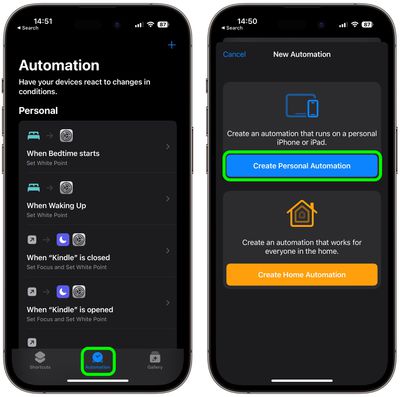
  1. Launch the Shortcuts app on your iPhone, then tap the Automation tab at the bottom.
  2. Tap the + button in the top right, then select Create Personal Automation.
    shortcuts

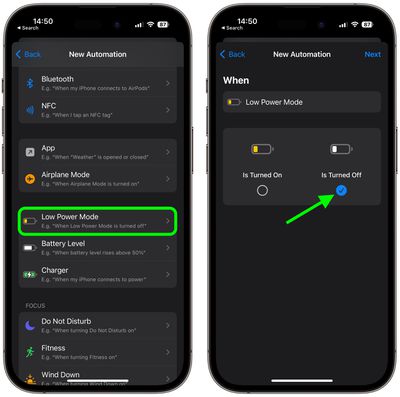
  3. Scroll down and choose Low Power Mode.
  4. Deselect the Is Turned On option and select the Is Turned Off option instead, then tap Next.
    shortcuts

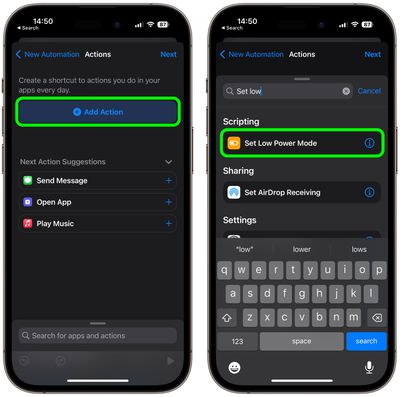
  5. Tap Add Action.
  6. Tap inside the search field and search for the Set Low Power Mode script, then select it below.
    shortcuts

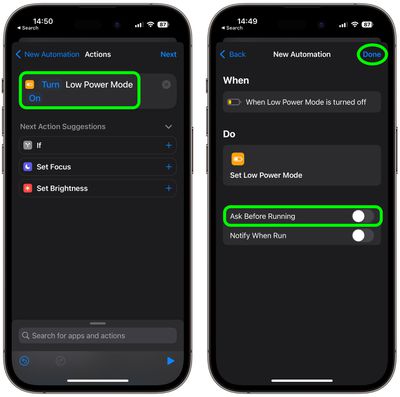
  7. Make sure the Turn and On options in blue are selected, then tap Next.
  8. Toggle off the switch next to Ask Before Running, then tap Don't Ask in the prompt to confirm.
    shortcuts

  9. Tap Done to finish.

Low Power Mode can be turned on and off manually at any time by going to Settings -> Battery and toggling on the switch next to Low Power Mode. Just bear in mind that if you want to turn it off, you'll have to disable your automation. You can do this in Shortcuts by selecting the automation and toggling off the switch next to Enable This Automation.


Top Rated Comments

George Dawes Avatar
42 months ago
This should definitely be an option in the actual os without all this farting about
Score: 27 Votes (Like | Disagree)
TheYayAreaLiving 🎗️ Avatar
42 months ago
Excellent tips! Thank you!!

Question: Is there a way to set Automation feature for the iPhone not to charge pass 80% of the battery life? 🔋🔌
Score: 16 Votes (Like | Disagree)
42 months ago

Genuine question: given that low power mode restricts a lot of the background functions, what good does this do a majority of users that are frequently pulling out their phone to refresh social media?

How much extra time are you really saving?

Note: I'm an outlier, since I never use Low Power Mode, and my 13 mini goes from 100 to 80 typically throughout a work day before I dock it for the night.
I'm an outlier too in that I keep low power mode on all the time and don't use socialist media.
Score: 12 Votes (Like | Disagree)
42 months ago
This might be the greatest tip for iPhones today. Permanent low power mode should be the default.
Score: 8 Votes (Like | Disagree)
BrownyQ Avatar
42 months ago
Genuine question: given that low power mode restricts a lot of the background functions, what good does this do a majority of users that are frequently pulling out their phone to refresh social media?

How much extra time are you really saving?

Note: I'm an outlier, since I never use Low Power Mode, and my 13 mini goes from 100 to 80 typically throughout a work day before I dock it for the night.
Score: 5 Votes (Like | Disagree)
sw1tcher Avatar
42 months ago

Excellent tips! Thank you!!

Question: Is there a way to set Automation feature for the iPhone not to charge pass 80% of the battery life? 🔋🔌
Just tell Siri to set it up for you :D
Score: 4 Votes (Like | Disagree)

Popular Stories

Home Hub Command Center with Dome Base Feature

Apple Smart Home Hub to Feature iMac G4-Style Design

Wednesday September 30, 2026 4:36 am PDT by
Apple's long-rumored smart home hub will have an iMac G4-style design and a host of unique features, Bloomberg's Mark Gurman reports. The smart home hub is said to feature a square 6-inch display, with variants that can be placed on a countertop or mounted on a wall. It features a single FaceTime camera on the front, with microphones and speakers in its connected base. Gurman described the...
HomePod minis on gradient feature 1 1

Three New Apple Smart Home Products Coming on October 13

Wednesday September 30, 2026 4:04 am PDT by
Apple plans to introduce a series of new smart home products on Tuesday, October 13, according to Bloomberg's Mark Gurman. Apple reportedly plans to debut its long-awaited smart home hub device, a new HomePod mini, and a new Apple TV on the date. The new HomePod mini and Apple TV are set to retain their existing designs, but tout faster chips to support Siri AI. The new HomePod mini will...


iphone duo colors

Apple Shares Photos Shot on iPhone Duo

Thursday October 1, 2026 1:37 pm PDT by
Apple on Instagram today shared a curated gallery of six photos shot on the iPhone Duo. The photos were shot by American photographers Jake Michaels and Jason Nocito, as part of a project commissioned by Apple. iPhone Duo is equipped with four cameras:A rear 48-megapixel Fusion Main camera A rear 48-megapixel Ultra Wide camera A front 12-megapixel Center Stage camera in the outer display A...
Latest Stories
AT&T Acknowledges iPhone 18 Pro Max Issues: 'Update Immediately'
9 hours ago
New 'AirFly Drive' Accessory Turns Wired CarPlay Into Wireless CarPlay
14 hours ago
Apple Shares Photos Shot on iPhone Duo
16 hours ago
Apple Says iPhone Duo Has Replaceable 'Cover Layer'
17 hours ago
Apple's Smart Home Camera Will Apparently Have 'No Video Recording'
19 hours ago
Apple TV Just Updated Its Selection of 'Bonus' Movies
20 hours ago
iPhone 18 Pro Colors Buyer's Guide: Which Should You Choose?
21 hours ago
Early Prime Big Deal Days: Best Discounts on Accessories, TVs, and More at Amazon
21 hours ago
MacBook Pro With OLED Touch Screen Rumored to Launch in October or November
22 hours ago
Apple's All-New Home Hub Rumored to Launch in These Four Colors
23 hours ago
iPhone 18 Pro Aperture Control Goes Fully Manual in Halide 3.2
1 day ago
Apple Stores Receive 'Do Not Open' Boxes Ahead of Smart Home Products Launch
1 day ago
iPhone 18 Pro Sales Jump in China Ahead of iPhone Duo Launch
1 day ago
Apple TV Still Down for Some Users Following Apple Services Outage
1 day ago
Microsoft 365 Work Accounts May Stop Syncing in Apple Mail
58 minutes ago
Apple's Smart Home Hub: Everything We Know So Far
2 days ago
Apple's Home Hub Borrows From the iPhone Duo's StandBy Mode
2 days ago
Apple Invites App Updated With Three New Features
2 days ago
Apple Event on October 13?
2 days ago
Apple Watch SE 3 vs. Series 12 Buyer's Guide: Which Should You Buy?
2 days ago
iPad Mini 8 to Offer These 10 New Features
2 days ago
DoorDash Unveils AI Food Ordering Through Apple's Messages App
2 days ago
Amazon Takes Up to $150 Off Select M5 MacBook Air Models
2 days ago
Apple Still Plans to Release a New Full-Sized HomePod
2 days ago
Apple Working to Expand HomeKit
2 days ago
Apple Smart Home Hub to Feature iMac G4-Style Design
2 days ago
Three New Apple Smart Home Products Coming on October 13
2 days ago
Apple Pay Now Available in India With Axis Bank Cards
3 days ago
OpenAI Launches Always-On 'Dots' Agents to Rival Meta's Muse
3 days ago
AirPods 5 Teardown: Batteries Removable, Case Still Tough
3 days ago

🔗 Related Apple News & Rumors

Stay updated with the latest Apple ecosystem news and verified rumors