How to Prevent Emails From Tracking You in Apple Mail - MacRumorsOpen MenuShow RoundupsShow Forums menuVisit ForumsOpen Sidebar
Skip to Content

How to Prevent Emails From Tracking You in Apple Mail

by

Apple's App Tracking Transparency feature is designed to allow users to opt out of the surreptitious tracking that third-party apps have traditionally relied on for ad targeting purposes. But tracking can go on in your email inbox, too.
mail ios app icon
Unsolicited marketing emails will sometimes know whether you've opened their email, and if so, when you did so. They can even know where you were at the time, thanks to tracking methods employed by marketing platforms like MailChimp.

The way they track is very discreet and kind of creepy. Embedded in the email will be a tracking pixel, often hidden within a signature image or a link. When the message is opened in your email client, code within the pixel silently sends this information back to the company.

Some email account providers attempt to limit this sort of tracking by routing images through proxy servers, for example, which hides your location. But there's actually a simple way of preventing tracking pixels altogether, and that's by disabling the automatic loading of images in your email client.

The following steps show you how to disable automatic image loading in Apple Mail for macOS, and below them, you'll find instructions to do the same in iOS.

  1. Launch Apple Mail.
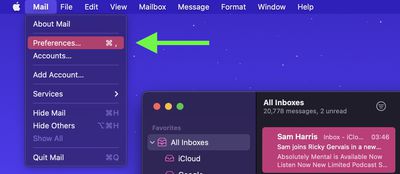
  2. Select Mail -> Preferences from the menu bar.
    mail

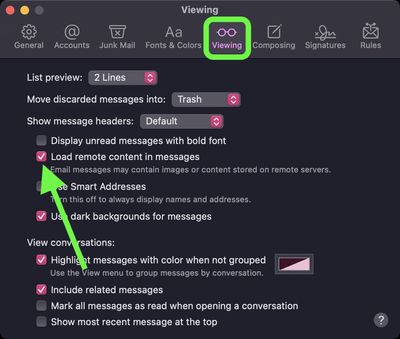
  3. Click the Viewing tab.
  4. Uncheck the box next to Load remote content in messages.
    mail

If you're using Mail for iPhone or iPad, you can find the same setting in the Settings app. Tap Mail, look under "Messages," and turn off the toggle next to Load Remote Images.


Top Rated Comments

CarlJ Avatar
67 months ago

The way they track is very discreet and kind of creepy. Embedded in the email will be a tracking pixel, often hidden within a signature image or a link. When the message is opened in your email client, code within the pixel silently sends this information back to the company.
WTF? Tracking images are creepy, but let's not pretend they're magical, because they're not. You get an email. It's full of HTML, because nobody does plain text email any more (sigh). Because it's HTML, it can specify images to load. One of them is an image on the sender's server (eh, probably all of them are images on the sender's server - that's how the web works). The act of requesting that image from the remote server leaves a log entry in the remote server (which is how the web has always worked). If they gave the pixel image a name that's unique to you (not your name, just a random number they've associated with you), then they can infer, because that image was requested from the server, that you requested it (by opening the email), and they know when, because the server logs when it fulfills requests, and by looking the requesting IP address up in a geolocation database, they can get an approximate location. But you make it sound like the pixel image itself is actively transmitting information - it's not - there's no "code within the pixel", it's just an image.
Score: 48 Votes (Like | Disagree)
jonblatho Avatar
67 months ago
There’s an even better way ('https://github.com/apparition47/MailTrackerBlocker') for macOS that blocks trackers while still allowing you to view images.

Score: 29 Votes (Like | Disagree)
Blkant Avatar
67 months ago
I’ll take articles like this over Memoji news or wristband showcases any day. It would be nice if we could filter a lot of the later articles out for a more Mac|iPhone|privacy (or just less fluff) focused experience.
Score: 27 Votes (Like | Disagree)
67 months ago
I enabled this last year when an Audi dealership insisted that they replied to me but really hadn't. The sales rep sent a screenshot of every interaction I had with their messages and it creeped me out.

This is also how marketing firms track their reach, so even more reason to enable this.

Score: 9 Votes (Like | Disagree)
67 months ago

I used a unique email address for each service I sign up for that way if I start getting spam I can block that email address.

The vast majority of users out there tearing their hair out over the 10:1 spam vs real emails they get would have no idea how to do this. There needs to be a vastly better and easier way to do this (including jail sentences, huge fines, public floggings, sterilization, or any/all of the usual Medieval tortures for spammers). I would gladly live in a world where each email or text I sent cost me a small fee if it meant spammers couldn't afford to do what they do.
Score: 7 Votes (Like | Disagree)
Chinch07 Avatar
67 months ago

I enabled this last year when an Audi dealership insisted that they replied to me but really hadn't. The sales rep sent a screenshot of every interaction I had with their messages and it creeped me out.

This is also how marketing firms track their reach, so even more reason to enable this.
I’ve worked at a marketing firm for 6 years now and could not be more of an advocate for less tracking. It’s creepy what we do
Score: 6 Votes (Like | Disagree)

Popular Stories

General macOS Mail Feature

Apple Hide My Email Vulnerability Exposes Real Email Addresses

Wednesday July 1, 2026 6:20 am PDT by
A flaw in Apple's Hide My Email service can reportedly allow almost anyone to uncover the real email address behind a generated alias, and Apple has failed to address it for more than a year since it was first reported. 404 Media is withholding the technical specifics of the vulnerability because it remains exploitable, but the publication verified the issue this week using one of its own...
Apple Acquires Award Winning App Play Feature

Apple Acquires Award-Winning App 'Play'

Monday June 29, 2026 7:39 am PDT by
In February, Apple notified the European Commission that it would be acquiring certain assets from and have the right to hire certain employees from Rabbit 3 Times, the company behind the award-winning app design tool Play. The notification was published on the European Commission's website this week, following a four-month waiting period. Play was a Mac and iPhone app that allowed designers ...
American Express Gold Apple Pay Feature

American Express Announces New Apple Pay Feature

Tuesday June 30, 2026 10:27 am PDT by
American Express today announced that you can now redeem Membership Rewards points when checking out with Apple Pay on the web and in apps on the iPhone and iPad. When checking out with Apple Pay on iOS 18 or iPadOS 18 or later, tap on your eligible American Express card (Platinum, Gold, Green, and others) and select the Membership Rewards points option. You can use points to cover all or...

🔗 Related Apple News & Rumors

Stay updated with the latest Apple ecosystem news and verified rumors