In iOS 27, currently in beta, Apple has made some changes and additions to the iPhone's stock Camera app, including the addition of a new Siri mode.
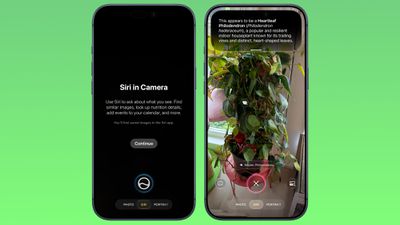
Available in addition to the video, photo, and other camera modes, Siri mode can be accessed by swiping across the mode carousel at the bottom of the screen.
The new mode uses Visual Intelligence to identify objects in the frame and provide information about them. It can be used to identify plants, animals, food, and more. If it's food you want info on, for example, it can tell you what it is, and how many calories are in it.
Other examples Siri mode can be used for include capturing a photo of an event flyer and adding a date to the Calendar app, text translation, splitting a bill, and more.
In Siri mode, a button on the right lets you search Google Images, and a button on the left lets you ask a specific question. So you could ask for help to cook the food in the frame, for instance.
Apple has also tweaked the way the camera interface works in other ways. Quick access tools for activating flash, Live Photo, and Night mode are now located at the top-center of the UI, while the full set of tools can be accessed from the bottom-right instead of the top-right.
There have been rumors that Apple has worked on a new customizable widget section for the Camera app, but there's no sign of that yet.
The iOS 27 beta is currently limited to developers, but the public beta is expected to be released next month, with a general release in September when Apple is expected to launch the iPhone 18 Pro models.