

Your iPhone's passcode is the first line of defense when it comes to protecting your private data. Here's how to set up a stronger one than the default six-digit passcode that you're likely already using.
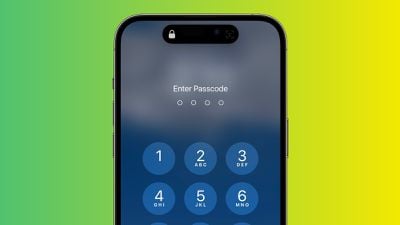
If someone with malicious intentions finds out the passcode for your iPhone, they could end up causing you all sorts of trouble. With passcode access to your iPhone's contents, they could change your Apple ID password, allowing them to disable Find My so that you can no longer locate your device. They could make contactless payments with Apple Pay, and gain access to your iCloud Keychain passwords. They could even wipe your iPhone for resale.
That's why you should never share your passcode with anyone who isn't a trusted family member. If something out of the ordinary happens and you need to loan your iPhone to someone who isn't family, you can at least temporarily change the passcode to something different, then change it back when the phone is back in your hands. (The following steps show you how to do that.)
If you're worried about strangers seeing you enter your iPhone passcode in public, then the best solution is to use Face ID or Touch ID whenever possible. Your biometric information is stored on your device's Secure Enclave, which is a lot more secure than your passcode.
If you can't or don't want to use Face ID or Touch ID for whatever reason, another option is to set up a stronger passcode. By default, iPhone passcodes are six digits, but Apple includes options to create a four-digit passcode, or a longer numeric or alphanumeric passcode.
The default six-digit passcode is obviously more secure than any four-digit one, while the strongest passcodes use a combination of letters and numbers. Just bear in mind that the longer and more complex the passcode, the harder it will be to memorize and the longer it will take to type in. If you don't have a great memory for passcodes, it might not be the best idea to make it any longer than six digits. With all that in mind, here's how it's done.
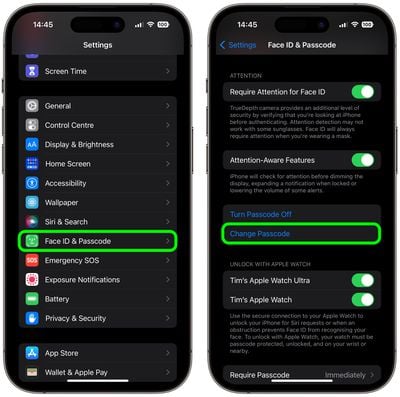
- On an iPhone X or newer model (or an iPad with Face ID), launch the Settings app, then go to Face ID & Passcode. On devices with Touch ID, go to Settings -> Touch ID & Passcode.
- Scroll down and tap Change Passcode.

- Enter your existing passcode.
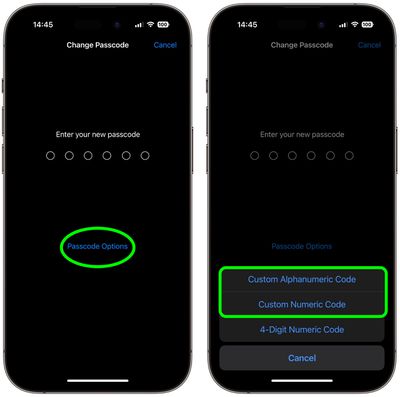
- On the next screen, tap Passcode Options.
- Select Custom Alphanumeric Code or Custom Numeric Code from the pop-up menu.
- Enter your new passcode as a combination of numbers and letters.
- Enter the new passcode again to verify it.
Your new passcode is now set up. When you next lock your iPhone and then try to unlock it, you'll be prompted to enter the new passcode.













































