How to Set Up and Connect Your New AirPods Max - MacRumorsOpen MenuShow RoundupsShow Forums menuVisit ForumsOpen Sidebar
Skip to Content

How to Set Up and Connect Your New AirPods Max

by

Apple in December 2020 debuted AirPods Max, a pair of wireless over-ear headphones that share many of the features of AirPods Pro, but in a more premium package.
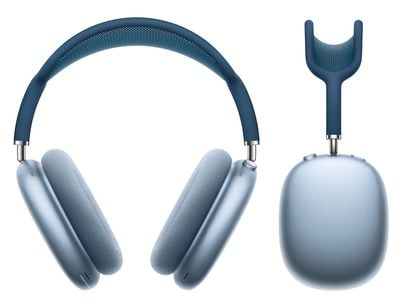
airpods max in blue
If you've just received a pair of Apple's new headphones, you'll be raring to use them to listen to music, take phone calls, use Siri, and more. Keep reading to learn how to set up and connect them to your devices.

Update Your Software

If you're setting up your AirPods Max for the first time, make sure that the device that you want to pair is up to date.

On iOS Devices

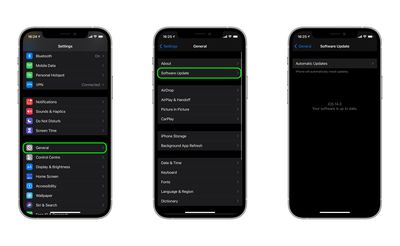
If you want to use your new ‌AirPods‌ Max with an iPhone, iPad, or iPod touch, make sure you're running iOS 14.3 or later.
software update ios14 3
To check that your device's software is up to date, launch the Settings app and then select General -> Software Update, and download any available updates if necessary.

On Mac

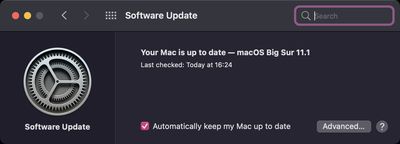
To use your new ‌AirPods‌ Max with your Mac, it needs to be running macOS 11.1 or later. To check that your machine is up to date with the latest software, select System Preferences... from the Apple () menu in the top-left corner of the screen, and then click Software Update in the preferences window.
macOS
If your Mac finds an update is available, click the Update Now button to download the software and allow the software to install when prompted.

On Apple TV

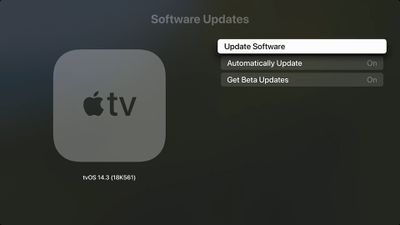
To use your new ‌AirPods‌ Max with your Apple TV , it needs to be running tvOS 14.3 or later. To you check that your ‌Apple TV‌ is up-to-date with the latest software, go to Settings -> System -> Software Updates and select Update Software.
tvOS

Set Up New AirPods Max on iPhone, iPad, and iPod touch

Before you can begin using your new ‌AirPods‌ with your iOS devices, there are a few quick steps you need to perform.

  1. Unlock your ‌iPhone‌, ‌‌iPad‌‌, or ‌iPod touch‌. If your device is already unlocked, navigate to the Home screen.
  2. Take your ‌AirPods‌ Max out of their Smart Case and bring them close to your device.
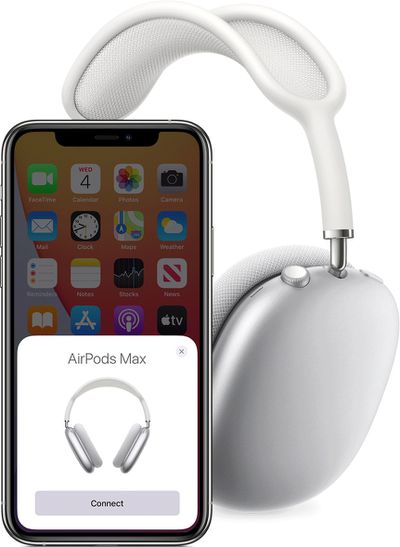
  3. Wait for the setup animation to appear on your device's screen. If you don't see the animation, pair your AirPods Max with your iOS device manually by going to Settings -> Bluetooth. If you don't see the status light flashing white on AirPods Max, try resetting the headphones and repeat the above steps.
    setup ipods max

  4. Tap Connect to pair your AirPods Max with your device, or to set up features such as Hey ‌Siri‌ if you haven't yet set it up.
  5. If you want to experience spatial audio before enabling it for supported media, tap See & Hear How It Works.
  6. Tap Done.

If you're signed in to iCloud, your AirPods Max will set up automatically with any of your other devices that are signed in to ‌iCloud‌ with the same Apple ID.

Set Up New AirPods Max on Mac

If you've set up your ‌AirPods‌ Max with your ‌iPhone‌, ‌‌iPad‌‌, or ‌iPod touch‌ and your Mac is signed in to ‌‌iCloud‌‌ with the same ‌‌Apple ID‌‌, then your ‌AirPods‌ Max should be ready to use with your Mac. If AirPods Max are nearby, your Mac will detect them and display a notification asking if you want to connect with them.

macOS
If they don't connect, place your AirPods Max over your ears and click either the Bluetooth option in the menu bar or the volume control in the menu bar on your Mac, then choose AirPods Max from the list. If you still don't see your AirPods Max, pair them with your Mac manually by following these steps.

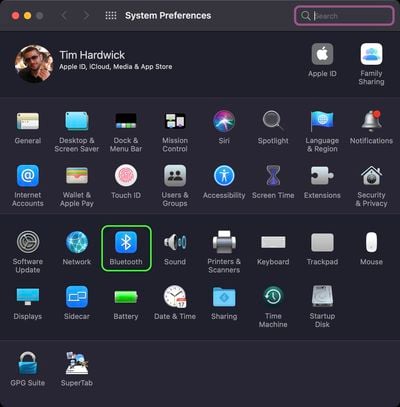
  1. Select System Preferences from the Apple menu, then click Bluetooth.
    sys-prefs

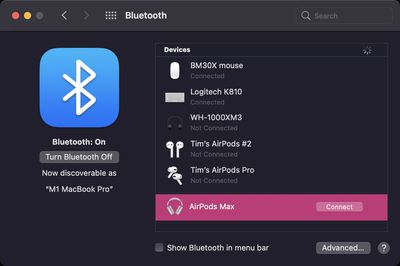
  2. Make sure Bluetooth is On, then press and hold the noise control button on your AirPods Max until the status light flashes white.
  3. Select your AirPods Max in the Devices list, then click Connect.bluetooth

If sound still plays from your Mac speakers, click the volume control icon in the menu bar and make sure that your AirPods Max are selected as the output device.

Connect New AirPods Max to Android Devices

You can use ‌AirPods‌ Max with Android smartphones and other Bluetooth-supporting devices. You won't be able to use "Hey ‌‌Siri‌‌" but you can use them to listen, talk, and you'll still be able to use the noise canceling and transparency modes.

To set up your AirPods Max with an Android phone or other non-Apple device, make sure Bluetooth is on and follow these steps:

  1. On an Android device, go to Settings -> Connections -> Bluetooth.
  2. Press and hold the noise control button on AirPods Max until the status light flashes white.
  3. Select your AirPods Max when they appear in the list of Bluetooth devices.

You can change how the physical controls work on AirPods Max, including reversing the Digital Crown volume nob, and customizing the noise control button.


Related Roundup: AirPods Max 2
Buyer's Guide: AirPods Max (Buy Now)
Related Forum: AirPods

Popular Stories

AirPods Pro Beta Firmware 2

Apple Releases New AirPods Firmware With iOS 27 Features

Monday September 14, 2026 11:42 am PDT by
Apple today released new firmware for the AirPods Pro 2, AirPods Pro 3, AirPods 4, and AirPods Max 2. The firmware is available for all of the above devices, and it will enable support for new iOS 27 features. The firmware has a build number of 9A348. In iOS 27, iPadOS 27, and macOS Golden Gate, Apple is adding a new AirPods interface, a slider for Adaptive mode, and support for custom EQ....
Home Hub Command Center with Dome Base Feature

Apple Smart Home Hub to Feature iMac G4-Style Design

Wednesday September 30, 2026 4:36 am PDT by
Apple's long-rumored smart home hub will have an iMac G4-style design and a host of unique features, Bloomberg's Mark Gurman reports. The smart home hub is said to feature a square 6-inch display, with variants that can be placed on a countertop or mounted on a wall. It features a single FaceTime camera on the front, with microphones and speakers in its connected base. Gurman described the...
HomePod minis on gradient feature 1 1

Three New Apple Smart Home Products Coming on October 13

Wednesday September 30, 2026 4:04 am PDT by
Apple plans to introduce a series of new smart home products on Tuesday, October 13, according to Bloomberg's Mark Gurman. Apple reportedly plans to debut its long-awaited smart home hub device, a new HomePod mini, and a new Apple TV on the date. The new HomePod mini and Apple TV are set to retain their existing designs, but tout faster chips to support Siri AI. The new HomePod mini will...


Latest Stories
AT&T on iPhone 18 Pro Max Issues: 'We Are Working With Apple'
2 hours ago
Upgrading From an Older Apple Watch? Here's How the New Features Stack Up
3 hours ago
Beats 360 Cushion Kits and Apple Accessories See Early Prime Day Price Drops
3 hours ago
Apple Store in UK Reopening on iPhone Duo Launch Day
4 hours ago
AT&T Acknowledges iPhone 18 Pro Max Issues: Update 'Immediately'
15 hours ago
New 'AirFly Drive' Accessory Turns Wired CarPlay Into Wireless CarPlay
20 hours ago
Apple Shares Photos Shot on iPhone Duo
22 hours ago
Apple Says iPhone Duo Has Replaceable 'Cover Layer'
23 hours ago
Apple's Smart Home Camera Will Apparently Have 'No Video Recording'
1 day ago
Apple TV Just Updated Its Selection of 'Bonus' Movies
1 day ago
iPhone 18 Pro Colors Buyer's Guide: Which Should You Choose?
1 day ago
Early Prime Big Deal Days: Best Discounts on Accessories, TVs, and More at Amazon
1 day ago
MacBook Pro With OLED Touch Screen Rumored to Launch in October or November
1 day ago
Apple's All-New Home Hub Rumored to Launch in These Four Colors
1 day ago
iPhone 18 Pro Aperture Control Goes Fully Manual in Halide 3.2
1 day ago
Apple Stores Receive 'Do Not Open' Boxes Ahead of Smart Home Products Launch
1 day ago
iPhone 18 Pro Sales Jump in China Ahead of iPhone Duo Launch
1 day ago
Apple TV Still Down for Some Users Following Apple Services Outage
1 day ago
Microsoft 365 Work Accounts May Stop Syncing in Apple Mail
7 hours ago
Apple's Smart Home Hub: Everything We Know So Far
2 days ago
Apple's Home Hub Borrows From the iPhone Duo's StandBy Mode
2 days ago
Apple Invites App Updated With Three New Features
2 days ago
Apple Event on October 13?
2 days ago
Apple Watch SE 3 vs. Series 12 Buyer's Guide: Which Should You Buy?
2 days ago
iPad Mini 8 to Offer These 10 New Features
2 days ago
DoorDash Unveils AI Food Ordering Through Apple's Messages App
2 days ago
Amazon Takes Up to $150 Off Select M5 MacBook Air Models
2 days ago
Apple Still Plans to Release a New Full-Sized HomePod
2 days ago
Apple Working to Expand HomeKit
2 days ago
Apple Smart Home Hub to Feature iMac G4-Style Design
2 days ago

🔗 Related Apple News & Rumors

Stay updated with the latest Apple ecosystem news and verified rumors