How to Set Up AirPods Personalized Spatial Audio - MacRumorsOpen MenuShow RoundupsShow Forums menuVisit ForumsOpen Sidebar
Skip to Content

How to Set Up AirPods Personalized Spatial Audio

by

With iOS 16, Apple made available a new feature for AirPods users called Personalized Spatial Audio. This article explains what it is and how to set it up on iPhone.
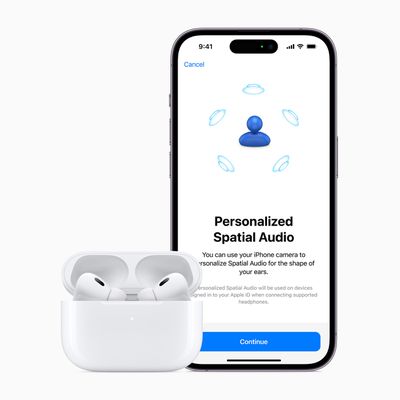
Apple AirPods Pro 2nd gen iPhone 14 Pro 2up Spatial Audio 220907
According to Apple, Personalized Spatial Audio is designed to create an even more precise and immersive listening experience than standard Spatial Audio, which uses Dolby Atmos to create a richer, more immersive soundstage when listening to songs in the Apple Music catalog.

Personalized Spatial Audio does this by using the TrueDepth camera on an iPhone to analyze the shape of your ears in three dimensions and use this mapping to create a personal sound profile that's tuned just for you. Here's what you need to start using it.

What You'll Need

  • iPhone with Face ID running iOS 16 or later.
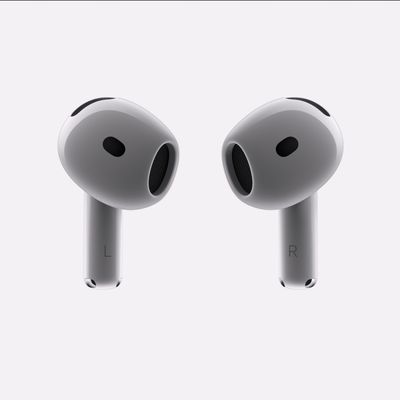
  • AirPods 3, AirPods Pro, AirPods Pro 2, or AirPods Max.

How to Set Up Personalized Spatial Audio

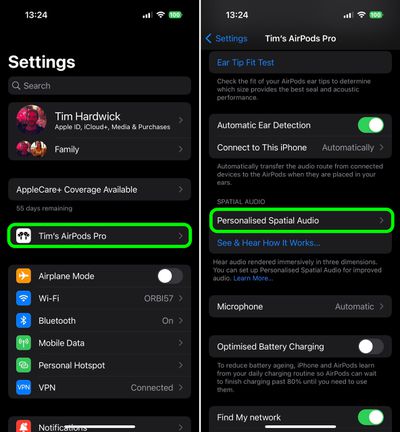
  1. With AirPods connected, launch the Settings app on your iPhone.
  2. Tap on the name of your AirPods, just below your Apple ID banner.
  3. Under "Spatial Audio," tap Personalized Spatial Audio.
  4. Tap Personalize Spatial Audio....
  5. Follow the on-screen instructions.

settings

When the setup process is complete, you can tap See & Hear How It Works on the previous screen to get an idea of how it sounds. If you don't like what you hear, you can always disable the feature via Personalized Spatial Audio -> Stop Using Personalized Spatial Audio....

How to Turn Spatial Audio On and Off in Control Center

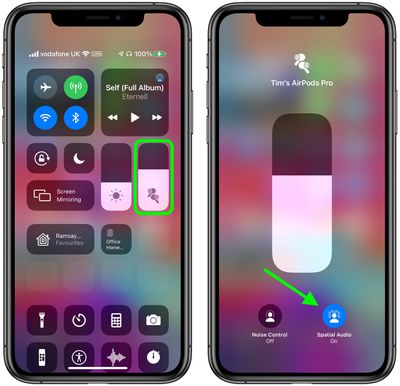
  1. Make sure the ‌‌AirPods‌‌ 3/Pro/Max are connected to your iPhone.
  2. Launch the Control Center with a diagonal swipe down from the upper right of the screen.
  3. Touch and hold the volume control bar.
  4. Tap the Spatial Audio button to turn it on or off.
control center
If spatial audio is enabled and active, the spatial audio button will be blue and animated with audio waves around the listener's head. If spatial audio is enabled but not active for the audio content that you're listening to, the spatial audio button will be blue but static.


Related Forum: AirPods

Popular Stories

iOS 27 Beta Hints at New Apple Product Such as AirPods Ultra Feature

iOS 27 Beta Hints at New Apple Product Such as 'AirPods Ultra'

Friday July 3, 2026 8:44 am PDT by
The second iOS 27 developer beta seemingly hints at a new Apple product, according to code uncovered by app designer and developer Sam Henri Gold. The code mentions a product codenamed B790 that can relay "two images from cameras on either side of [a] user's head." Gold speculated that the code could be referring to Apple's rumored smart glasses, but a more likely possibility is AirPods with ...

AirPods Pro Beta Firmware 2

Apple Releases New AirPods Beta Firmware With iOS 27 Features

Tuesday July 7, 2026 11:19 am PDT by
Apple today released a third version of the beta firmware it is testing for the AirPods Pro 2, AirPods Pro 3, AirPods 4, and AirPods Max 2. The firmware is limited to developers at the current time, and it has a build number of 9A5314b. In iOS 27, iPadOS 27, and macOS Golden Gate, Apple is adding a new AirPods interface, a slider for Adaptive mode, and support for custom EQ, so the firmware...
AirPods Pro Second Generation 2 Pairing Feature 1

Apple Plans AirPods-Like Pairing for Meta's Glasses and Quest

Monday July 13, 2026 6:45 am PDT by
Apple is developing a new API that will let third-party accessories, including Meta's Ray-Ban Meta glasses and Quest headsets, automatically pair across a user's Apple devices the same way AirPods and the Apple Watch do today, according to Apple's EU Interoperability Request page. The plan responds to a request Meta filed in October 2025 under the EU's Digital Markets Act, asking Apple to...

🔗 Related Apple News & Rumors

Stay updated with the latest Apple ecosystem news and verified rumors