Set a Custom Vibration Alert for a Contact on iPhone - MacRumorsOpen MenuShow RoundupsShow Forums menuVisit ForumsOpen Sidebar
Skip to Content

Set a Custom Vibration Alert for a Contact on iPhone

by

You can create custom sounds and ringtones for text alerts, phone calls, and more on your iPhone, but did you know the same functionality exists for vibrations? Setting a special vibration alert for someone in your Contacts app enables you to recognize when a specific person is calling you or has sent you a text, without you even having to look at your ‌iPhone‌ or ‌iPad‌ screen.

contacts
Receiving a haptic alert for incoming calls and/or messages can be handy to have if, say, you're in a quiet environment and don't want to disturb the peace. A custom vibration alert can be useful if your iPhone is on silent in your pocket and you're currently in a meeting, for instance. Recognizing the vibration as someone specific means you can decide if you need to leave the room to take the call.

Follow these steps to set up a custom vibration for the person you have in mind.

How to Assign a Custom Vibration to a Contact

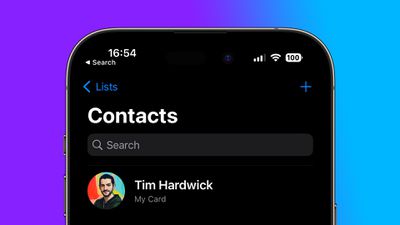
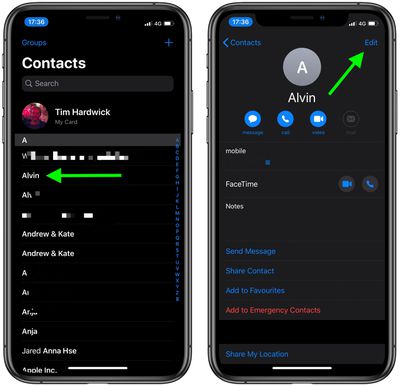
  1. Launch the Contacts app on your iPhone.
  2. Select a contact from the list.
  3. Tap Edit in the top-right corner of the screen.
    contacts

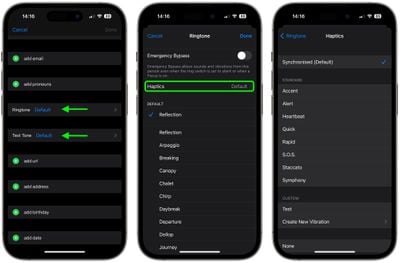
  4. Tap Ringtone or Text Tone, depending on what your vibration to be associated with.
  5. Tap Haptics.
  6. Select a custom vibration under the Standard list, or tap Create New Vibration under Custom. If you chose the latter, tap the screen to create a vibration pattern, and when you're happy with it, tap Save.
    contacts

  7. Tap Ringtone or Text Tone in the top-left corner of the screen to go back.
  8. Tap Done in the top-right corner of the screen.
  9. Tap Done again.

Did you know that you can assign custom alert tones for WhatsApp contacts? Check out our guide to learn how.


Popular Stories

Apple Event Logo

Apple Working on All-New Operating System

Wednesday July 29, 2026 11:39 am PDT by
Apple is developing an all-new operating system that is essentially a mix of tvOS, watchOS, and iOS, according to Bloomberg's Mark Gurman. In a report this week, he said the operating system will feature a grid of icons, widgets, and apps, along with customizable clock faces. The new software platform is intended for Apple's long-rumored smart home hub. With built-in facial recognition,...

Four iPhone 18 Pro Colors Mock Feature

iPhone 18 Pro and iPhone Ultra: Pre-Orders and Release Date

Thursday July 30, 2026 6:12 am PDT by
Apple has yet to reveal when the iPhone 18 Pro and iPhone Ultra will be announced and released, but the dates usually follow a familiar pattern. Labor Day is September 7 this year. The last time the holiday fell on that day was in 2020, but the iPhone event that year was delayed until October due to the COVID-19 pandemic. So, the last time Labor Day was on September 7 in a normal year was in ...
Dynamic Island iPhone 18 Pro Feature

iPhone 18 Pro: Twelve Changes Coming to Apple's Next Flagship

Thursday July 30, 2026 3:43 am PDT by
We're less than two months out from the launch of Apple's premium next-generation smartphone lineup, and while we're not expecting a dramatic change in terms of functionality, there are still several enhancements rumored to be coming to the iPhone 18 Pro and iPhone 18 Pro Max. One thing worth noting is that Apple is reportedly planning a major change to its iPhone release cycle this year,...

🔗 Related Apple News & Rumors

Stay updated with the latest Apple ecosystem news and verified rumors