

Select Faster on iPhone With This Two-Finger Trick - MacRumorsOpen MenuShow RoundupsShow Forums menuVisit ForumsOpen Sidebar
Skip to Content

Select Faster on iPhone With This Two-Finger Trick

by

Your iPhone has multiple touch and gesture capabilities that can enhance how you interact with apps. Some, like pinch and zoom, are well known enough to be considered second nature, but others are less obvious, like the one we're about to explain.
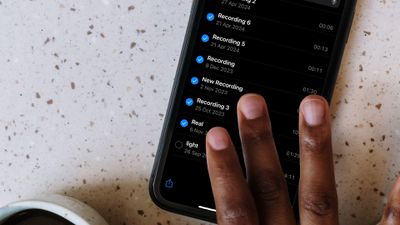
multiple select gesture

Two-Finger Drag to Select Items

If you have apps where you habitually tap on each individual item in a list to select them – emails in your Mail inbox, for example – it's time to dial in some efficiency and embrace this faster method.

This gestural feature allows you to easily select (or deselect) multiple items in apps like Contacts, Mail, Messages, Voice Memos, Notes, and indeed any Apple app that lists multiple items. Here's how it works.

  1. Open an app where multiple item selection is supported.
  2. Touch and hold the screen with two fingers at the same time.
  3. While keeping both fingers on the screen, drag them down (or up) to select multiple items. As you drag, items will be highlighted to indicate they are selected.
  4. Once the desired items are selected, you can perform actions such as moving, deleting, or organizing them.
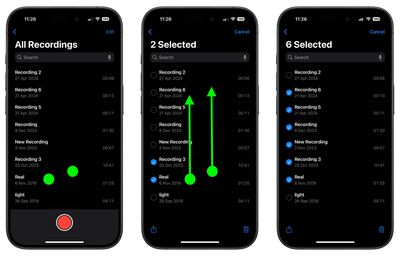
two finger select gesture

That's all there is to it. This simple yet powerful feature streamlines your workflow, saving you time and effort when handling multiple items. Looking to speed up your iPhone text editing skills? Check out our favorite hidden trick by following the link.


Top Rated Comments

17 months ago
Based on this comment thread so far, the actual steps seem to be:

1. Open an App that for some inexplicable reason does not support multi-select

2. Place two fingers on the screen over the items you'd like to select

3. Unpredictable behavior ensues.
Score: 9 Votes (Like | Disagree)
thiscatisfat Avatar
17 months ago
Just imagine that we're on iOS freaking 18. We had at least 100 releases of iOS updates so far! And you still can't select and delete multiple attachments in iMessage. Nice.
Score: 7 Votes (Like | Disagree)
neotint Avatar
17 months ago
If only Apple could make it easy to select all text in iOS. I know it's super advanced and harder to do than fixing Siri. But we can dream of a day that basic high utility features are focused on again instead of chasing hyped up slop generators. Pray to Saint Jobs for us all.
Score: 6 Votes (Like | Disagree)
17 months ago
Nice feature - thanks for the story!
Score: 5 Votes (Like | Disagree)
17 months ago

Just imagine that we're on iOS freaking 18. We had at least 100 releases of iOS updates so far! And you still can't select and delete multiple attachments in iMessage. Nice.
You have no idea how much computing power these gestures need. Every new gesture introduced needs a new gen chip that comes out every year.

Its what keeps the upgrade cycle going...
Score: 3 Votes (Like | Disagree)
17 months ago
Most of us are familiar with many of these gestures. But too many apps don’t allow them - at least not as we’ve come to use them in iOS or iPadOS. I’m looking at you, New York Times.
Score: 3 Votes (Like | Disagree)

Popular Stories

Four iPhone 18 Pro Colors Mock Feature

iPhone 18 Pro and iPhone Ultra: Pre-Orders and Release Date

Thursday July 30, 2026 6:12 am PDT by
Apple has yet to reveal when the iPhone 18 Pro and iPhone Ultra will be announced and released, but the dates usually follow a familiar pattern. Labor Day is September 7 this year. The last time the holiday fell on that day was in 2020, but the iPhone event that year was delayed until October due to the COVID-19 pandemic. So, the last time Labor Day was on September 7 in a normal year was in ...
Apple Event Logo

Apple Working on All-New Operating System

Wednesday July 29, 2026 11:39 am PDT by
Apple is developing an all-new operating system that is essentially a mix of tvOS, watchOS, and iOS, according to Bloomberg's Mark Gurman. In a report this week, he said the operating system will feature a grid of icons, widgets, and apps, along with customizable clock faces. The new software platform is intended for Apple's long-rumored smart home hub. With built-in facial recognition,...
Dynamic Island iPhone 18 Pro Feature

iPhone 18 Pro: Twelve Changes Coming to Apple's Next Flagship

Thursday July 30, 2026 3:43 am PDT by
We're less than two months out from the launch of Apple's premium next-generation smartphone lineup, and while we're not expecting a dramatic change in terms of functionality, there are still several enhancements rumored to be coming to the iPhone 18 Pro and iPhone 18 Pro Max. One thing worth noting is that Apple is reportedly planning a major change to its iPhone release cycle this year,...

🔗 Related Apple News & Rumors

Stay updated with the latest Apple ecosystem news and verified rumors







































