

macOS Quick Tip: Screenshot Straight to the Clipboard - MacRumorsOpen MenuShow RoundupsShow Forums menuVisit ForumsOpen Sidebar
Skip to Content

macOS Quick Tip: Screenshot Straight to the Clipboard

by

There are several ways you can take screenshots on a Mac. Preview offers the option from its File menu. There's also a little screen capture app in the macOS Utilities folder called Screenshot. But the simplest and most common method is to use your Mac's built-in shortcut key combinations.
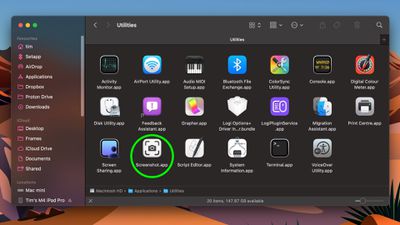
screenshot app 1
Taking a screenshot is as easy as hitting Shift-Command-3 to capture the whole screen, or Shift-Command-4 to capture a portion of the screen using the mouse cursor as a crosshair selection tool (a tap of the spacebar also turns it into a camera for capturing windows).

Screenshots taken using key shortcuts are typically saved on your desktop. However, if you tack the Control key onto either of these shortcuts, macOS will copy the captured image to the clipboard instead of saving it as a file on your desktop, which is useful if you want to paste it into an application that can edit or view images, or use Universal Clipboard to paste it on another Apple device.

In Preview, for example, Command-N creates a new document from the contents of the clipboard without you having to specify a filename until you're ready to save it. You can also access this function in Preview's menu bar (File ➝ New From Clipboard).


Top Rated Comments

Euge Avatar
18 months ago

There are just flat-out way too many modifier keys for these things. For a company like Apple that used to go out of their way to keep things simple by way of even eliminating buttons on our phones, it has always been ridiculous to figure out which finger salute you need to use to do certain things. Shift? Control? Option? Command? Maybe it's one of the 16 different combinations of them all together? There doesn't seem to be any rhyme or reason to which ones you need at any given time, and don't even get me started on trying to memorize the cute little icons they have for each of them, and the fact that sometimes instructions will only give you IKEA instructions on which combination to use...

Keep it simple, stupid!

While cool, damn is that the hardest key combo to hold while dragging a mouse. Why can't it be close to paste match style shft+ctrl+optn+cmd and maybe hold down right click until selection is made.
I don't know why MacRumors doesn't just suggest using cmd+shift+5

It's such a better interface to access all screenshot options.
Score: 13 Votes (Like | Disagree)
18 months ago

There are just flat-out way too many modifier keys for these things. For a company like Apple that used to go out of their way to keep things simple by way of even eliminating buttons on our phones, it has always been ridiculous to figure out which finger salute you need to use to do certain things. Shift? Control? Option? Command? Maybe it's one of the 16 different combinations of them all together? There doesn't seem to be any rhyme or reason to which ones you need at any given time, and don't even get me started on trying to memorize the cute little icons they have for each of them, and the fact that sometimes instructions will only give you IKEA instructions on which combination to use...

Keep it simple, stupid!
These keystrokes have been around for 20+ years. Apple isn't suddenly make it harder just recently.

These keystrokes used to be the _only_ way to capture screenshots (natively), but they more recently added the Screenshot app, as discussed in this article, for those that struggle with keystrokes.
Score: 12 Votes (Like | Disagree)
18 months ago
Better too many shortcuts than too few. Nobody forces you to use or memorize them. And for those of us who prefer keyboard control, having to use the mouse for more than we already do would suck.
Score: 10 Votes (Like | Disagree)
17 months ago
Since no one has mentioned it: you can also right-click the little screenshot preview for more options on what to do with it.


Attachment Image
Score: 7 Votes (Like | Disagree)
mrgraff Avatar
18 months ago

you dont need to hold all those keys while dragging shift-cmd 4 and released and you'll have a cursor on screen you can drag
And if you let go of the keys and then press spacebar, you can screenshot the window under the cursor. Hit spacebar again to toggle window/screen portion.
Score: 5 Votes (Like | Disagree)
18 months ago

While cool, damn is that the hardest key combo to hold while dragging a mouse. Why can't it be close to paste match style shft+ctrl+optn+cmd and maybe hold down right click until selection is made.
you dont need to hold all those keys while dragging shift-cmd 4 and released and you'll have a cursor on screen you can drag
Score: 4 Votes (Like | Disagree)

Popular Stories

Home Hub Command Center with Dome Base Feature

Apple Smart Home Hub to Feature iMac G4-Style Design

Wednesday September 30, 2026 4:36 am PDT by
Apple's long-rumored smart home hub will have an iMac G4-style design and a host of unique features, Bloomberg's Mark Gurman reports. The smart home hub is said to feature a square 6-inch display, with variants that can be placed on a countertop or mounted on a wall. It features a single FaceTime camera on the front, with microphones and speakers in its connected base. Gurman described the...
HomePod minis on gradient feature 1 1

Three New Apple Smart Home Products Coming on October 13

Wednesday September 30, 2026 4:04 am PDT by
Apple plans to introduce a series of new smart home products on Tuesday, October 13, according to Bloomberg's Mark Gurman. Apple reportedly plans to debut its long-awaited smart home hub device, a new HomePod mini, and a new Apple TV on the date. The new HomePod mini and Apple TV are set to retain their existing designs, but tout faster chips to support Siri AI. The new HomePod mini will...
iPhone Duo Open

iPhone Duo Reportedly Facing Production Problems Ahead of Launch

Tuesday September 29, 2026 6:16 am PDT by
The iPhone Duo is reportedly facing production difficulties ahead of its October launch, with early output expected to be limited. A person said to be close to Foxconn's supply chain told China's Jiemian News that final assembly yields for Apple's first foldable iPhone were only slightly above 60% as of September 17. The source said that, under Apple's current quality standards, it could...
Latest Stories
AT&T Acknowledges iPhone 18 Pro Max Issues: 'Update Immediately'
5 hours ago
New 'AirFly Drive' Accessory Turns Wired CarPlay Into Wireless CarPlay
11 hours ago
Apple Shares Photos Shot on iPhone Duo
12 hours ago
Apple Says iPhone Duo Has Replaceable 'Cover Layer'
13 hours ago
Apple's Smart Home Camera Will Apparently Have 'No Video Recording'
15 hours ago
Apple TV Just Updated Its Selection of 'Bonus' Movies
17 hours ago
iPhone 18 Pro Colors Buyer's Guide: Which Should You Choose?
17 hours ago
Early Prime Big Deal Days: Best Discounts on Accessories, TVs, and More at Amazon
17 hours ago
MacBook Pro With OLED Touch Screen Rumored to Launch in October or November
18 hours ago
Apple's All-New Home Hub Rumored to Launch in These Four Colors
19 hours ago
iPhone 18 Pro Aperture Control Goes Fully Manual in Halide 3.2
20 hours ago
Apple Stores Receive 'Do Not Open' Boxes Ahead of Smart Home Products Launch
21 hours ago
iPhone 18 Pro Sales Jump in China Ahead of iPhone Duo Launch
21 hours ago
Apple TV Still Down for Some Users Following Apple Services Outage
22 hours ago
PSA: Apple Mail on Mac May Stop Syncing Microsoft 365 Accounts Today
22 hours ago
Apple's Smart Home Hub: Everything We Know So Far
1 day ago
Apple's Home Hub Borrows From the iPhone Duo's StandBy Mode
1 day ago
Apple Invites App Updated With Three New Features
2 days ago
Apple Event on October 13?
2 days ago
Apple Watch SE 3 vs. Series 12 Buyer's Guide: Which Should You Buy?
2 days ago
iPad Mini 8 to Offer These 10 New Features
2 days ago
DoorDash Unveils AI Food Ordering Through Apple's Messages App
2 days ago
Amazon Takes Up to $150 Off Select M5 MacBook Air Models
2 days ago
Apple Still Plans to Release a New Full-Sized HomePod
2 days ago
Apple Working to Expand HomeKit
2 days ago
Apple Smart Home Hub to Feature iMac G4-Style Design
2 days ago
Three New Apple Smart Home Products Coming on October 13
2 days ago
Apple Pay Now Available in India With Axis Bank Cards
2 days ago
OpenAI Launches Always-On 'Dots' Agents to Rival Meta's Muse
2 days ago
AirPods 5 Teardown: Batteries Removable, Case Still Tough
2 days ago

🔗 Related Apple News & Rumors

Stay updated with the latest Apple ecosystem news and verified rumors







































