How to Schedule and Automate Focus Modes - MacRumorsOpen MenuShow RoundupsShow Forums menuVisit ForumsOpen Sidebar
Skip to Content

How to Schedule and Automate Focus Modes

by

Apple's new Focus feature in iOS 15 lets you set up your device to help you be in the moment and zone in on a single thing. Focus does this by filtering notifications based on what you're doing, and you can customize Focus modes for specific scenarios.
iOS 15 Focus Feature
You can activate a Focus on your iPhone when you want to reduce distractions and spotlight your attention on something, but you can also schedule Focus modes to activate at certain times of the day, like during work hours or when you're winding down for bed.

You can also set a Focus to automatically turn on when you're in a specific location, like at work, or when you open a particular app, like Books or the TV app. The steps below show you how it's done.

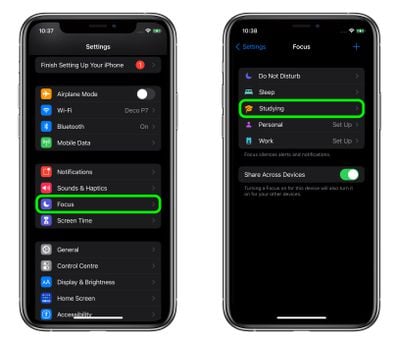
  1. Launch the Settings app on your iPhone, then tap Focus.
  2. Select the Focus mode that you want to schedule.
    focus

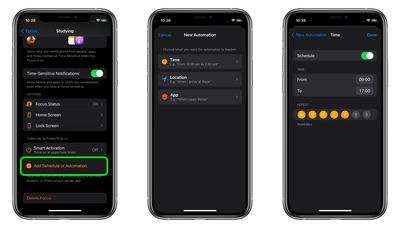
  3. Under "Turn On Automatically," tap Add Schedule or Automation.
  4. Select Time, Location, or App, depending on your use case.
  5. If you selected Time, set the duration using the From and To selectors and the days on which you want the Focus to come on. If you selected Location, search or enter an address using the input field, then tap Done. If you selected App, tap the apps in the list that you want the Focus to activate for, then tap Done.
    focus

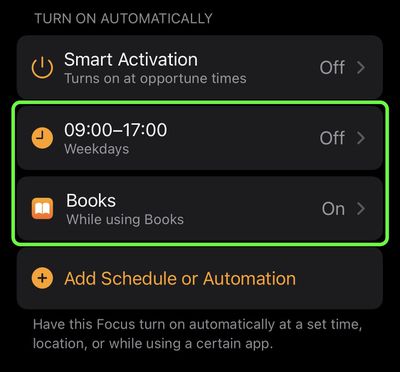
That's all there is to it. Once you've scheduled a Focus or set up an automation, you can find it listed in Settings -> Focus under "Turn On Automatically," where you can enable/disable it, or delete it completely.

focus

Related Forum: iOS 15

Popular Stories

Apple Acquires Award Winning App Play Feature

Apple Acquires Award-Winning App 'Play'

Monday June 29, 2026 7:39 am PDT by
In February, Apple notified the European Commission that it would be acquiring certain assets from and have the right to hire certain employees from Rabbit 3 Times, the company behind the award-winning app design tool Play. The notification was published on the European Commission's website this week, following a four-month waiting period. Play was a Mac and iPhone app that allowed designers ...


iPhone 18 Pro Deep Red Feature

Apple 'Concerned' Over iPhone 18 Pro Data Leak From Supplier Tata

Monday June 29, 2026 11:46 am PDT by
Apple is "concerned" about a recent data leak from Tata Electronics, one of its manufacturing partners in India, reports Reuters. Tata Electronics was the target of a cyberattack, with confidential Apple documents stolen and shared on the dark web. Hackers were able to steal information about the iPhone 18 Pro and iPhone 18 Pro Max, including a list of suppliers, parts, and images of the...
American Express Gold Apple Pay Feature

American Express Announces New Apple Pay Feature

Tuesday June 30, 2026 10:27 am PDT by
American Express today announced that you can now redeem Membership Rewards points when checking out with Apple Pay on the web and in apps on the iPhone and iPad. When checking out with Apple Pay on iOS 18 or iPadOS 18 or later, tap on your eligible American Express card (Platinum, Gold, Green, and others) and select the Membership Rewards points option. You can use points to cover all or...

🔗 Related Apple News & Rumors

Stay updated with the latest Apple ecosystem news and verified rumors