iOS 26: Add Web App or Bookmark to iPhone Home Screen - MacRumorsOpen MenuShow RoundupsShow Forums menuVisit ForumsOpen Sidebar
Skip to Content

iOS 26: Add Web App or Bookmark to iPhone Home Screen

by

iOS 26 gives you two distinct ways to add websites to your iPhone's Home screen – as web apps or traditional bookmarks. They might look similar at first glance, but choosing the right option can dramatically improve how you access your favorite sites.
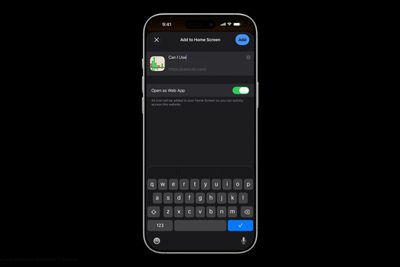
Add to Home Screen dark scaled

Understanding the Difference

When you add a website to your Home screen using the "Add to Home Screen" option, iOS 26 allows the website to be opened as a web app. The update introduces a new feature for adding any website to the Home Screen as a web app, even if it doesn't support progressive web app (PWA) functionality.

Web apps run almost like native apps, with features like offline access, push notifications, and a streamlined interface without Safari's address bar. In contrast, traditional bookmarks simply open the website in Safari when tapped. This choice matters more than you might think. Web apps can provide a faster, more app-like experience, whereas bookmarks work better for informational sites you visit only occasionally.

Add a Web App or Bookmark to Home Screen

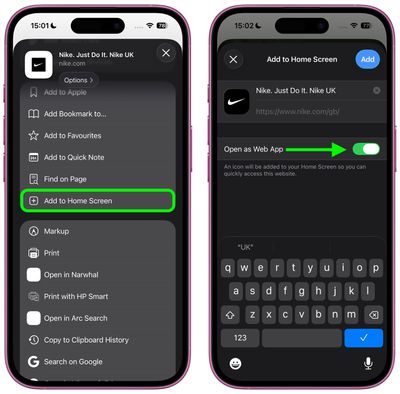
In iOS 26, Safari offers an Open as Web App toggle for all websites, even those that don't support have built-in web app support. If you want a bookmark, just switch the toggle off.

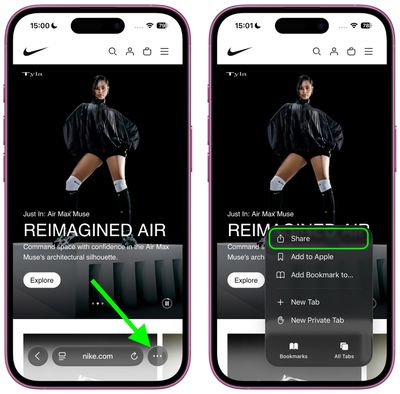
  1. Open Safari and navigate to the website you want to add.
  2. Tap the three dots to the right of Safari's address bar, then tap Share in the pop-up menu.
    safari

  3. Scroll down and tap Add to Home Screen.
  4. If the site supports web apps, you'll see the Open as Web App toggle in the dialog – switch it off if you want a bookmark instead.
  5. Customize the app name if desired, then tap Add.
    safari

Web apps appear on your Home screen with a dedicated icon, and tapping it will launch the site in its own window without Safari's browser interface. Bookmarks display with a generic website icon or the site's favicon, and tapping them opens the page in Safari.

Remove Bookmark or Web App From Home Screen

home screen
Both web apps and bookmarks can be deleted from the Home screen, much like any other app. To remove either kind, long-press the icon on your home screen, then tap Delete Bookmark (for some reason iOS doesn't differentiate the kind in this menu).

iOS 26 and iPadOS 26 are set for a general release in September 2025.

Top Rated Comments

iZac Avatar
13 months ago
I may be wrong, so please correct me if so - but I always believe the web version to be superior in one way; My assumption is that Safari allows less overt tracking and data collection of the user than an App Store counterpart.

My only evidence is that whenever I'm on the web version of a service, it keeps nagging me to download the App Store version for the 'best experience'
Score: 8 Votes (Like | Disagree)
flottenheimer Avatar
13 months ago
Locating this under 'Share' is an excellent example of how bad usability often is these days.
Score: 7 Votes (Like | Disagree)
Populus Avatar
13 months ago

I may be wrong, so please correct me if so - but I always believe the web version to be superior in one way; My assumption is that Safari allows less overt tracking and data collection of the user than an App Store counterpart.

My only evidence is that whenever I'm on the web version of a service, it keeps nagging me to download the App Store version for the 'best experience'
Exactly my thoughts. That’s why, for the past few years, more and more I opt for the web version of a service, especially if they offer a webapp.

If some day I install Discord, for instance, I will do so with the webapp instead of the App itself. I’m not sure how much data can the the App gather from my usage, but my guess is: more than just a sandboxed Safari tab.
Score: 4 Votes (Like | Disagree)
13 months ago
Good to know about the change in iOS 26. Will be setting some pages as simple bookmarks.
Score: 3 Votes (Like | Disagree)
Populus Avatar
13 months ago
Maybe I just dreamt it but, I thought that on iOS 26 Apple was providing the option of making most websites a webapp, even if the owner didn’t enable the option.

By the way, I hope this time we can actually switch from light mode to dark mode the webapp icons, such as the MacRumors Forums one, that persist in light mode ('https://forums.macrumors.com/threads/macrumors-webapp-icon-is-white-even-in-dark-mode.2443336/'). What will happen when we switch to crystal mode? Will remain as a solid white icon?
Score: 2 Votes (Like | Disagree)
13 months ago
This is one of the best iOS 26 features, the only problems are that some web apps have horrible version of the icons and that safari on iOS don't support extensions for web apps.
Score: 2 Votes (Like | Disagree)

Popular Stories

Apple Event Logo

Apple Working on All-New Operating System

Wednesday July 29, 2026 11:39 am PDT by
Apple is developing an all-new operating system that is essentially a mix of tvOS, watchOS, and iOS, according to Bloomberg's Mark Gurman. In a report this week, he said the operating system will feature a grid of icons, widgets, and apps, along with customizable clock faces. The new software platform is intended for Apple's long-rumored smart home hub. With built-in facial recognition,...
imac video apple feature

Apple Made Its Second-Biggest Acquisition Ever This Year

Wednesday July 29, 2026 12:03 pm PDT by
Apple this year acquired Israeli startup Q.ai for close to $2 billion, according to the Financial Times. That would make this Apple's second-biggest acquisition ever, after it paid $3 billion for the popular headphone maker Beats in 2014. This is also the largest known Apple acquisition since the company purchased Intel's smartphone modem business and patents for $1 billion in 2019. Q.ai...
Four iPhone 18 Pro Colors Mock Feature

iPhone 18 Pro and iPhone Ultra: Pre-Orders and Release Date

Thursday July 30, 2026 6:12 am PDT by
Apple has yet to reveal when the iPhone 18 Pro and iPhone Ultra will be announced and released, but the dates usually follow a familiar pattern. Labor Day is September 7 this year. The last time the holiday fell on that day was in 2020, but the iPhone event that year was delayed until October due to the COVID-19 pandemic. So, the last time Labor Day was on September 7 in a normal year was in ...

🔗 Related Apple News & Rumors

Stay updated with the latest Apple ecosystem news and verified rumors