


How to Use the New Safari Web Browser Settings in macOS High Sierra - MacRumorsOpen MenuShow RoundupsShow Forums menuVisit ForumsOpen Sidebar
Skip to Content

How to Use the New Safari Web Browser Settings in macOS High Sierra

by

safari iconWith the public release of macOS High Sierra, Apple introduced some additional features to its native Safari web browser. Here we'll cover just what they are and how you can customize them to make your web browsing experience a more enjoyable one.

Individual Website Settings

One of the most welcome new changes in Safari 11 is the ability to customize a range of settings for individual websites. Once these options are set up for a site, Safari applies them automatically so you don't have to bother with them again. Here's how.

  1. Navigate to a site you frequently visit.
  2. Right-click on the URL or website name that appears in the address bar, and select "Settings for This Website". Alternatively, click Safari in the menu bar and you'll see the same option under Preferences.
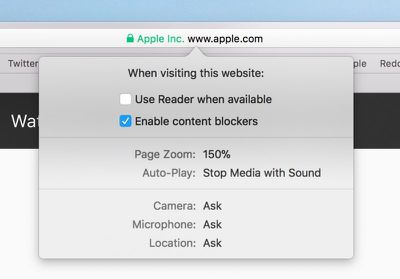
  3. Select your preferences from the drop-down pane that appears below the address bar to control how the website behaves, either by checking the boxes or selecting a setting from the available options.

Safari's built-in Reader mode strips online articles of extraneous web page furniture to make them more readable. Reader is usually enabled by clicking an icon that sometimes appears in the far left of the address bar, but you can check "Use Reader when available" to switch to this by default.

The box next to "Enable content blockers" lets you set whether to activate any ad-blocking extensions you may have installed, while the Page Zoom setting lets you adjust the size that website fonts and images display, allowing you to make them easier to read and navigate.
Screen Shot 5
With the Auto-Play setting, you can prevent websites from playing video the moment you visit a page, which should make browsing a lot less infuriating. The options are Allow All Auto-Play, Stop Media with Sound, and Never Auto-Play.

The last three options in the preferences pane let you choose whether to allow or deny the site access to your Mac's camera and microphone, and whether to enable location detection. If your preference is likely to change from time to time for these, set them to "Ask", and Safari will query you whenever access is requested by the site.

Safari Website Preferences Tab

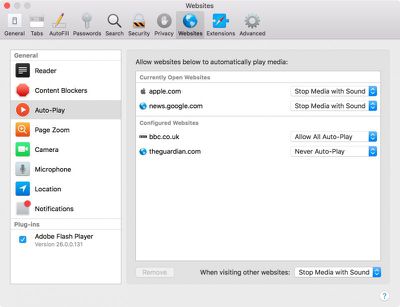
Helpfully, Apple has added a new tab to Safari preferences for you to keep track of your individual website settings. You can access it at any time by clicking "Preferences" In the Safari menu bar and selecting the Websites tab.
Screen Shot 1 2
Here you'll find lists of websites that are currently open as well as ones you've customized in the past, categorized by individual settings, where you easily can adjust them. You'll also see an additional setting in the General column listing your preference for websites you've visited that have prompted you about receiving Notifications.

Intelligent Tracking Prevention

Another new feature Apple has added in the latest Safari is Intelligent Tracking Prevention (ITP). Apple's own testing has found that popular websites can harbor more than 70 cross-site tracking and third-party cookie trackers that all silently collect data on users while making the browsing experience increasingly sluggish.

intelligent tracking prevention
To solve this, ITP uses local machine learning to identify cookie types and partition them or purge the cross-site scripting data of suspect ad trackers, without affecting the functioning of helpful cookies like those containing localized data or login details, for example. The feature should increase user privacy as well as boost overall browsing speed. You don't need to do anything to enjoy the benefits of ITP – it's on by default.


Tag: Safari
Related Forum: macOS High Sierra

Top Rated Comments

118 months ago
So ITP means I can delete ghostery?
Score: 1 Votes (Like | Disagree)

Popular Stories

Home Hub Command Center with Dome Base Feature

Apple Smart Home Hub to Feature iMac G4-Style Design

Wednesday September 30, 2026 4:36 am PDT by
Apple's long-rumored smart home hub will have an iMac G4-style design and a host of unique features, Bloomberg's Mark Gurman reports. The smart home hub is said to feature a square 6-inch display, with variants that can be placed on a countertop or mounted on a wall. It features a single FaceTime camera on the front, with microphones and speakers in its connected base. Gurman described the...

HomePod minis on gradient feature 1 1

Three New Apple Smart Home Products Coming on October 13

Wednesday September 30, 2026 4:04 am PDT by
Apple plans to introduce a series of new smart home products on Tuesday, October 13, according to Bloomberg's Mark Gurman. Apple reportedly plans to debut its long-awaited smart home hub device, a new HomePod mini, and a new Apple TV on the date. The new HomePod mini and Apple TV are set to retain their existing designs, but tout faster chips to support Siri AI. The new HomePod mini will...
iphone duo colors

Apple Shares Photos Shot on iPhone Duo

Thursday October 1, 2026 1:37 pm PDT by
Apple on Instagram today shared a curated gallery of six photos shot on the iPhone Duo. The photos were shot by American photographers Jake Michaels and Jason Nocito, as part of a project commissioned by Apple. iPhone Duo is equipped with four cameras:A rear 48-megapixel Fusion Main camera A rear 48-megapixel Ultra Wide camera A front 12-megapixel Center Stage camera in the outer display A...
Latest Stories
AT&T Acknowledges iPhone 18 Pro Max Issues: 'Update Immediately'
7 hours ago
New 'AirFly Drive' Accessory Turns Wired CarPlay Into Wireless CarPlay
13 hours ago
Apple Shares Photos Shot on iPhone Duo
14 hours ago
Apple Says iPhone Duo Has Replaceable 'Cover Layer'
16 hours ago
Apple's Smart Home Camera Will Apparently Have 'No Video Recording'
17 hours ago
Apple TV Just Updated Its Selection of 'Bonus' Movies
19 hours ago
iPhone 18 Pro Colors Buyer's Guide: Which Should You Choose?
19 hours ago
Early Prime Big Deal Days: Best Discounts on Accessories, TVs, and More at Amazon
19 hours ago
MacBook Pro With OLED Touch Screen Rumored to Launch in October or November
21 hours ago
Apple's All-New Home Hub Rumored to Launch in These Four Colors
21 hours ago
iPhone 18 Pro Aperture Control Goes Fully Manual in Halide 3.2
22 hours ago
Apple Stores Receive 'Do Not Open' Boxes Ahead of Smart Home Products Launch
23 hours ago
iPhone 18 Pro Sales Jump in China Ahead of iPhone Duo Launch
23 hours ago
Apple TV Still Down for Some Users Following Apple Services Outage
1 day ago
PSA: Apple Mail on Mac May Stop Syncing Microsoft 365 Accounts Today
1 day ago
Apple's Smart Home Hub: Everything We Know So Far
1 day ago
Apple's Home Hub Borrows From the iPhone Duo's StandBy Mode
2 days ago
Apple Invites App Updated With Three New Features
2 days ago
Apple Event on October 13?
2 days ago
Apple Watch SE 3 vs. Series 12 Buyer's Guide: Which Should You Buy?
2 days ago
iPad Mini 8 to Offer These 10 New Features
2 days ago
DoorDash Unveils AI Food Ordering Through Apple's Messages App
2 days ago
Amazon Takes Up to $150 Off Select M5 MacBook Air Models
2 days ago
Apple Still Plans to Release a New Full-Sized HomePod
2 days ago
Apple Working to Expand HomeKit
2 days ago
Apple Smart Home Hub to Feature iMac G4-Style Design
2 days ago
Three New Apple Smart Home Products Coming on October 13
2 days ago
Apple Pay Now Available in India With Axis Bank Cards
2 days ago
OpenAI Launches Always-On 'Dots' Agents to Rival Meta's Muse
3 days ago
AirPods 5 Teardown: Batteries Removable, Case Still Tough
3 days ago

🔗 Related Apple News & Rumors

Stay updated with the latest Apple ecosystem news and verified rumors







































