

How to Remove Episodes From 'Up Next' in the Apple Podcasts App - MacRumorsOpen MenuShow RoundupsShow Forums menuVisit ForumsOpen Sidebar
Skip to Content

How to Remove Episodes From 'Up Next' in the Apple Podcasts App

by

In March 2023, Apple made changes to the Up Next section of its Podcasts app for iPhone and iPad, including adding the ability to remove episodes from the queue. Keep reading to learn what's different and how to access the new features.
Podcasts Feature
In iOS 16.4 and iPadOS 16.4, Apple improved the way the Up Next queue works in the Podcasts app, by including episodes you may have saved to your Library and episodes that you play from shows you do not follow.

For example, when you play an episode of a show before deciding to follow it, that episode will now remain in Up Next until you finish it, mark it as played, or remove it.

New episodes from followed shows and recently saved episodes will appear at the top of the Up Next queue, while episodes that you have started and older saved episodes will appear toward the end. Meanwhile the latest episodes from recently followed shows appear at the start of Up Next. Also, episodes categorized with a "bonus" episode type now appear in Up Next.

Removing Podcast Episodes From Up the Next Queue

To remove an episode from your Up Next queue:

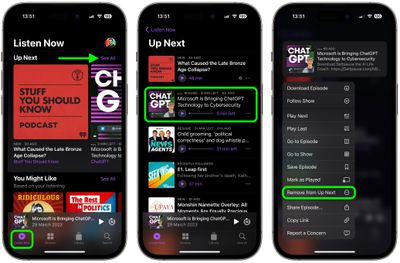
  1. In the Podcasts app's Listen Now tab, tap See All alongside "Up Next" to reveal the full queue.
  2. Long press on the episode that you want to remove from the queue.
  3. Tap Remove from Up Next in the dropdown menu.
podcasts

That's all there is to it. Alternatively, you can swipe left on an episode to reveal a grey Remove from Up Next button, which does the same thing.

Bonus tip: It's now also possible to view how many unplayed episodes are available at the top of each show page.

Popular Stories

Four iPhone 18 Pro Colors Mock Feature

iPhone 18 Pro and iPhone Ultra: Pre-Orders and Release Date

Thursday July 30, 2026 6:12 am PDT by
Apple has yet to reveal when the iPhone 18 Pro and iPhone Ultra will be announced and released, but the dates usually follow a familiar pattern. Labor Day is September 7 this year. The last time the holiday fell on that day was in 2020, but the iPhone event that year was delayed until October due to the COVID-19 pandemic. So, the last time Labor Day was on September 7 in a normal year was in ...

Apple Event Logo

Apple Working on All-New Operating System

Wednesday July 29, 2026 11:39 am PDT by
Apple is developing an all-new operating system that is essentially a mix of tvOS, watchOS, and iOS, according to Bloomberg's Mark Gurman. In a report this week, he said the operating system will feature a grid of icons, widgets, and apps, along with customizable clock faces. The new software platform is intended for Apple's long-rumored smart home hub. With built-in facial recognition,...
Dynamic Island iPhone 18 Pro Feature

iPhone 18 Pro: Twelve Changes Coming to Apple's Next Flagship

Thursday July 30, 2026 3:43 am PDT by
We're less than two months out from the launch of Apple's premium next-generation smartphone lineup, and while we're not expecting a dramatic change in terms of functionality, there are still several enhancements rumored to be coming to the iPhone 18 Pro and iPhone 18 Pro Max. One thing worth noting is that Apple is reportedly planning a major change to its iPhone release cycle this year,...

🔗 Related Apple News & Rumors

Stay updated with the latest Apple ecosystem news and verified rumors







































