How to Rearrange the Control Center in watchOS 5 - MacRumorsOpen MenuShow RoundupsShow Forums menuVisit ForumsOpen Sidebar
Skip to Content

How to Rearrange the Control Center in watchOS 5

by

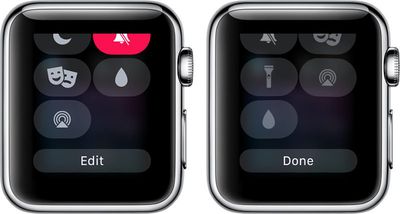
In watchOS 5, you can rearrange the Control Center to put the Control Center features that you use at the top, so they're quicker to access when you swipe up on your Apple Watch.

Unfortunately, there's no way to remove features you don't often use, but you can bury those less desirable options at the bottom of the menu.

  1. Bring up the Control Center by swiping upwards on the Apple Watch's display from the watch face.
  2. Scroll down to the bottom.
  3. Select "Edit."
  4. While the Control Center icons are wiggling, use a finger to pull an icon out of its position and then drag it into a new one.applewatchcontrolcenteredit
  5. When finished, tap "Done."

That's all there is to it. It's a simple little function that you might not think to look for, but it can be handy if there are Control Center features that you use on a regular basis because you're able to get to them more quickly.

Related Roundup: Apple Watch 11

Top Rated Comments

pdaholic Avatar
106 months ago
Unfortunately this will apply to the <.0001% who have watchos5 installed on their watches now. Hopefully I’ll remember this article when os5 launches months from now!
Score: 1 Votes (Like | Disagree)

Popular Stories

3 4 24 Sport Band Refresh Feature

Sketchy Rumor Claims Apple Watch Series 12 Could Introduce Sensor in Band

Friday July 3, 2026 8:54 am PDT by
The Apple Watch Series 12 could ship with a new health sensor built directly into one of its bands, according to a sketchy rumor from a known leaker. The leaker known as "Kosutami" says the sensor will be injection-molded into a silicone band, and only a silicone band, apparently because Apple has not yet solved how to embed similar hardware in bands made from other materials. No detail was...

watchos 27

Siri AI Comes to Apple Watch in watchOS 27 Beta 3

Monday July 6, 2026 1:24 pm PDT by
With watchOS 27 beta 3, Apple added support for Siri AI and the Siri app, so Apple Watch users can now use the features right from their wrist. Apple said Siri AI would be coming to the watch back when watchOS 27 was first introduced, but the feature wasn't live until now. The Dynamic App Grid that pops up when the Digital Crown is pressed displays the Siri app in the center, and the...

Apple Watch Series 10 Jet Black

Apple Watch Series 13 Rumored to Mark the End of an Era

Wednesday July 8, 2026 1:29 pm PDT by
While the Apple Watch Series 12 is still a few months away, a new rumor suggests that next year's Apple Watch Series 13 will mark the end of an era. According to a recent post from a known leaker on the Chinese social media platform Weibo, the Apple Watch will be receiving a major redesign next year, and this will apparently include a new way of attaching bands to the watch. As a result, the ...



🔗 Related Apple News & Rumors

Stay updated with the latest Apple ecosystem news and verified rumors