How to View Photos on Apple Watch - MacRumorsOpen MenuShow RoundupsShow Forums menuVisit ForumsOpen Sidebar
Skip to Content

How to View Photos on Apple Watch

by

The Apple Watch may have a small screen, but it's still large enough to show off those pictures of your little one's dance recital to the grandparents. As long as you've got an album synced from your iPhone, you can even view pictures while your smartphone is out of range.
apple_watch_photos
To help you get the most out of your photo viewing experience, we've put together this tutorial to explain how to set up and customize the Photos app on Apple Watch

Create an Album in Photos on iPhone

The first step to getting the most important pictures on your Apple Watch is to create an album for it in your Photos app on iPhone.

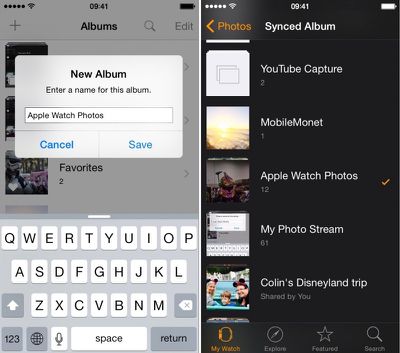
  1. Open the Photos app on the iPhone and select "Albums." Then tap the add icon (+) to create a new one.
  2. Name the new album. For simplicity, I named mine Apple Watch Photos.
  3. Select the photos you wish to add to the album and select done.
apple_watch_photos_setup

Sync an Album to Apple Watch

  1. Open the Apple Watch app on your iPhone and navigate to My Watch.
  2. Scroll down and select the Photos app from the list.
  3. Tap Synced Album. Then select your newly created Apple Watch album.
  4. Photos will automatically sync with your Apple Watch and be available to view, even when your iPhone is out of range.

You can also select a preexisting album instead. You might prefer the immediacy of syncing with your Camera Roll or Photo Stream for currently added pictures instead. The Apple Watch Photos app is defaulted to your Favorites album.

Manage Photo Storage

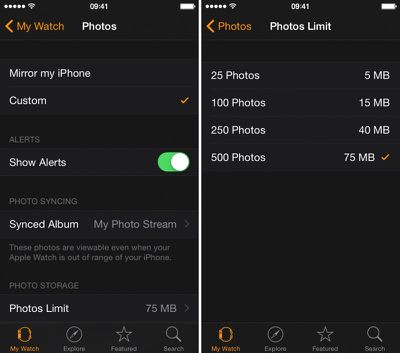
You can customize how many photos you want synced to your Apple Watch for more control over how much room they take up. Select from 25 to 500 photos or five to 75 MB of storage space.
Apple Watch Photos App 4

Use Photos App to View a Synced Album

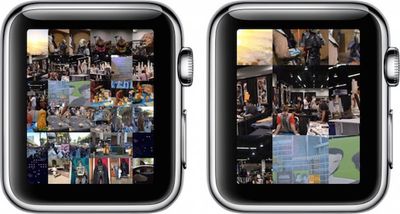
Apple Watch Photos 1Once you've synced an album to Apple Watch, view the pictures on your wrist via the Photos app. When you open it, the first screen will be a collage of all pictures in your album. Rotate the Digital Crown to zoom in.

Tap a picture to view it full screen. Use the Digital Crown to zoom in closer. Drag your finger on the screen to pan. Double Tap to fill the screen. Double-tap again to see the full picture. You can browse your album by swiping to the left or right to switch between photos.

Now that you know how to set up and customize your Photos app on Apple Watch, showing off important moments in your life will be simple.

When Apple updates watchOS to version 2 later this year, we will also be able to view videos from within the Photos app and use single photos or photo albums as backgrounds for watch faces.


Related Roundup: Apple Watch 12
Buyer's Guide: Apple Watch (Buy Now)
Related Forum: Apple Watch

Top Rated Comments

148 months ago
Can I make a request? I would really like to see a tutorial on how to view the time on the Apple Watch. I've had this thing for over a month and I still can't figure out how to make it show me the date and time. Is there some hidden setting?
Score: 12 Votes (Like | Disagree)
148 months ago
Or just pull your phone out to show people on a screen that they can actually see your face on...
Score: 10 Votes (Like | Disagree)
148 months ago
Please...do not use your Watch to show some pictures when you can just use your iPhone or iPad.

Its so damn small. And it's common knowledge that as you grow older, your eyesight gets worse. They probably can't even see it. Showing it on the iPad...now that's a magical and beautiful experience.
Score: 4 Votes (Like | Disagree)
UnfetteredMind Avatar
148 months ago
I have to agree with captain cadet, unless you don't have your phone with you, why wouldn't you just take out the iPhone to which the :apple:Watch is tethered to show the pics? Maybe for very brief encounters where you don't even want to bother pulling out the phone (but then maybe it's not even worth trying to show the pic in the first place).
Score: 4 Votes (Like | Disagree)
BMcCoy Avatar
148 months ago
These how-to's are starting to feel like deliberate threads to incite comments about how pointless the watch is...

They're working!
Score: 3 Votes (Like | Disagree)
pubwvj Avatar
148 months ago
A more useful guide to these things:

https://www.apple.com/watch/built-in-apps/

https://manuals.info.apple.com/MANUALS/1000/MA1708/en_US/apple_watch_user_guide.pdf

Perhaps this is where MacRumors Bot is skimming from...

How about skipping the fake how-to click-bait and stick to real rumors that we care about...

And if you don't like complaints about bad articles just skip the comments complaining about them.
Score: 3 Votes (Like | Disagree)

Popular Stories

Surprise and Shine Live Coverage Article

Apple Event Live Blog: iPhone Duo, iPhone 18 Pro, and More

Wednesday September 9, 2026 9:10 am PDT by
Apple's "Surprise and Shine" event kicks off today at 10:00 a.m. Pacific Time, where we're expecting to see the foldable iPhone Duo, the iPhone 18 Pro and Pro Max, Apple Watch Series 12 and Ultra 4 models, new AirPods 5 earphones, and perhaps some other announcements. Apple is providing a live video stream on its website, on YouTube, and in the company's TV app across various platforms. We...


apple surprise and shine event

Apple Event Today: iPhone 18 Pro and iPhone Duo Cheat Sheet

Tuesday September 8, 2026 10:24 am PDT by
Apple's biggest event of the year is almost here, and all eyes are on Cupertino. With the first foldable iPhone expected to headline Apple's "Surprise and Shine" event on Wednesday, September 9, at 10:00 a.m. Pacific Time, the rumor mill has been running full throttle, fuelled by the biggest single design change in the life of the iPhone. To get you up to speed, here's a quick reference...
apple watch series 12

Leak Hints at Four New Features for Apple Watch Series 12 and Ultra 4

Monday September 7, 2026 8:57 am PDT by
Ahead of the announcement of the Apple Watch Series 12 and Ultra 4 later this week, code in the watchOS 27 and iOS 27 betas points to a series of new features for the product line. The information comes from a new post from MacRumors forums member "pdfu." The findings include: New "Readiness" app: An all-new separate Watch app referred to in code as "Readiness," distinct from the...
Latest Stories
Upgrading From an Older Apple Watch? Here's How the New Features Stack Up
3 minutes ago
Beats 360 Cushion Kits and Apple Accessories See Early Prime Day Price Drops
27 minutes ago
Apple Store in UK Reopening on iPhone Duo Launch Day
1 hour ago
AT&T Acknowledges iPhone 18 Pro Max Issues: 'Update Immediately'
12 hours ago
New 'AirFly Drive' Accessory Turns Wired CarPlay Into Wireless CarPlay
17 hours ago
Apple Shares Photos Shot on iPhone Duo
19 hours ago
Apple Says iPhone Duo Has Replaceable 'Cover Layer'
20 hours ago
Apple's Smart Home Camera Will Apparently Have 'No Video Recording'
22 hours ago
Apple TV Just Updated Its Selection of 'Bonus' Movies
23 hours ago
iPhone 18 Pro Colors Buyer's Guide: Which Should You Choose?
23 hours ago
Early Prime Big Deal Days: Best Discounts on Accessories, TVs, and More at Amazon
1 day ago
MacBook Pro With OLED Touch Screen Rumored to Launch in October or November
1 day ago
Apple's All-New Home Hub Rumored to Launch in These Four Colors
1 day ago
iPhone 18 Pro Aperture Control Goes Fully Manual in Halide 3.2
1 day ago
Apple Stores Receive 'Do Not Open' Boxes Ahead of Smart Home Products Launch
1 day ago
iPhone 18 Pro Sales Jump in China Ahead of iPhone Duo Launch
1 day ago
Apple TV Still Down for Some Users Following Apple Services Outage
1 day ago
Microsoft 365 Work Accounts May Stop Syncing in Apple Mail
4 hours ago
Apple's Smart Home Hub: Everything We Know So Far
2 days ago
Apple's Home Hub Borrows From the iPhone Duo's StandBy Mode
2 days ago
Apple Invites App Updated With Three New Features
2 days ago
Apple Event on October 13?
2 days ago
Apple Watch SE 3 vs. Series 12 Buyer's Guide: Which Should You Buy?
2 days ago
iPad Mini 8 to Offer These 10 New Features
2 days ago
DoorDash Unveils AI Food Ordering Through Apple's Messages App
2 days ago
Amazon Takes Up to $150 Off Select M5 MacBook Air Models
2 days ago
Apple Still Plans to Release a New Full-Sized HomePod
2 days ago
Apple Working to Expand HomeKit
2 days ago
Apple Smart Home Hub to Feature iMac G4-Style Design
2 days ago
Three New Apple Smart Home Products Coming on October 13
2 days ago

🔗 Related Apple News & Rumors

Stay updated with the latest Apple ecosystem news and verified rumors