

In iOS 18.4, Apple added a new Shortcuts action to open a specific conversation in the Messages app. This means it's now possible to open a chat thread with someone important to you straight from your Lock Screen, for example. Keep reading to learn more.
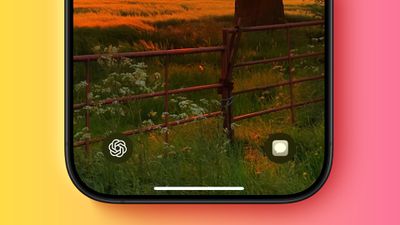
If you'd like to reduce the time it takes to chat with a frequently contacted person, this new shortcut action is for you. Placing a shortcut on your Lock Screen to a spouse or family member's chat thread allows you to contact them without navigating through the app, making it perfect for quick updates, urgent communications, or daily check-ins.
The feature also streamlines interactions by minimizing distractions, since it lets you bypass the Messages interface, so you won't be tempted to engage with other messages or notifications. It could be handy in situations where rapid access matters, such as emergencies or business communications. The following steps show you how it's done.
Create Your Shortcut Action
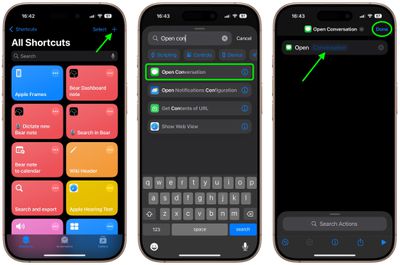
- Open the Shortcuts app on your iPhone.
- Tap the + button in the top-right corner of the app.
- Start typing "Open Conversation" in the Search Actions input field, then select the action in the results.
- Tap "Conversation" in blue, then select the Messages conversation you want from the dropdown.
- Tap Done to finish.
Add Shortcut to Your Lock Screen
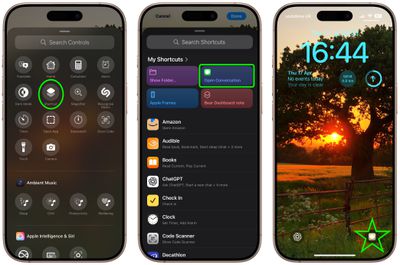
- Long press your Lock Screen, tap Customize on the Lock Screen you want to use, then tap Lock Screen again.
- Tap the minus symbol on one of the bottom buttons to remove the existing control.
- Tap the plus symbol that replaces it, then select Shortcut from the Controls menu.
- Tap "Choose" in blue, then select Open Conversation from the shortcuts menu.
- Tap Done on the Lock Screen customize screen to finish.
That's all there is to it. The "Open Conversation" is more versatile than you might think. For example, you could use it to add a neat shortcut to a particular chat thread on your Home Screen, or even pop one on your Control Center. Have a play around with it, and see what works for you.













































