How to Enable Markup Annotation Tools in macOS - MacRumorsOpen MenuShow RoundupsShow Forums menuVisit ForumsOpen Sidebar
Skip to Content

How to Enable Markup Annotation Tools in macOS

by

Recognizing the utility of Markup annotation tools, Apple has extended their availability in recent versions of iOS, but it's worth bearing in mind that you can access a similar and equally useful annotation toolset within several native Mac applications.

In macOS, accessing an application's Markup toolbar lets you draw on and annotate images or PDF documents within the app using arrows, shapes, and text. You can also use it to quickly sign a document with your digital signature.
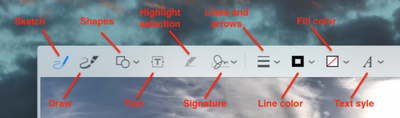
macos markup tools
We've highlighted which native apps support Markup in this article. But before you can access the toolset in desktop apps, you'll need to check that the relevant extension is enabled on your Mac. Keep reading to learn how it's done.

How to Enable the Markup Extension in macOS

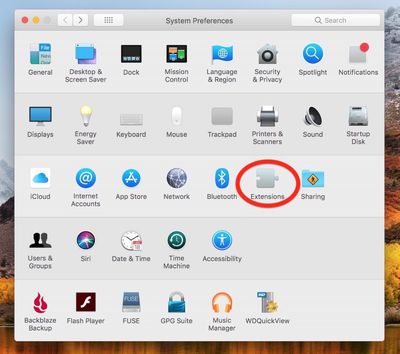
  1. Click the Apple () symbol in your Mac's menu bar and select System Preferences....
    macos extensions

  2. Click the Extensions preference pane.

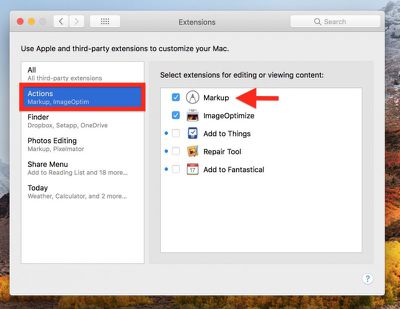
  3. Click Actions in the left column of the Extension pane.
    macos Markup extension

  4. If it isn't already ticked, click on the box next to the Markup extension in the right column.
macos mail markup
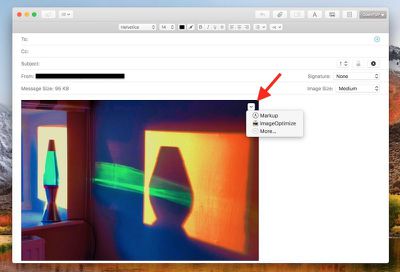
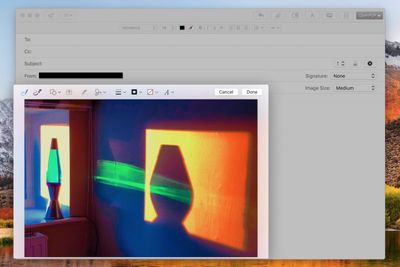
One of the most useful Markup integrations can be found in Mail. Once you've dragged an image into your message, hover your mouse cursor over it, click the arrow button that appears in the upper right corner, and select Markup from the dropdown menu.
macos mail markup 2
Your attached image will be foregrounded with the Markup toolbar across the top, ready for you to apply your annotations.

Markup can be accessed in the same manner within TextEdit as well as some third-party document editors. To test whether it's available, simply hover your cursor over the image once it's inside your document and look for the arrow in the upper right corner.
macos preview markup
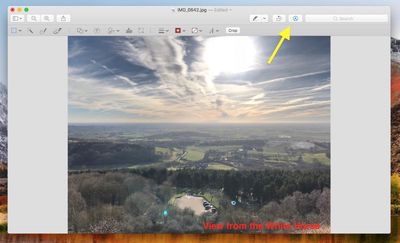
In Preview, the Markup toolbar has its own button next to the Search input field on the right of the taskbar. You also get a few extra Markup tools here, like Adjust Color, Adjust Size, and Crop, so if you can't annotate an image within your application of choice then Preview should be your next stop.

macos photos markup
Finally, the Markup toolset is also accessible in Apple's Photos application: Next time you're editing an image, click the Extensions icon (the three dots in a circle) and select Markup to enter annotation mode.


Top Rated Comments

108 months ago
Apple pencil support (on trackpad) with more expansive markup tools in macos would be awesome.

Score: 4 Votes (Like | Disagree)
chucker23n1 Avatar
108 months ago
Having Markup available in many places (such as Mail and Notes) is cool, but in practice I find the annotation tools a bit baffling. Maybe I just need to get used to them. I want a highlight pen like in Windows Snipping Tool.

Is there a third-party extension that does this?
Score: 2 Votes (Like | Disagree)
chucker23n1 Avatar
108 months ago
I browse the internet on an iPad docked to a keyboard/case. No reason this can't happen on a Macbook as well.
There are plenty of reasons. There's plenty Apple would need to do to change macOS to make it suitable for touch, such as adding a virtual keyboard, making the controls suitable in size for touch targets, changing the gestures, …. And you'd roughly end up with the touch experience of Windows 7, which wasn't great.
Score: 1 Votes (Like | Disagree)
108 months ago
Apple pencil support (on trackpad) with more expansive markup tools in macos would be awesome.
I'll go further and suggest touch screens on all Apple products.
I don't understand the opposition.

No, you're not going to draw vertically on an iMac or laptop. But there are plenty of times where a quick finger touch to select a button is quicker than a cursor.

Make it optional. If you don't like using touch...guess what...don't touch the screen.
Score: 1 Votes (Like | Disagree)

Popular Stories

Apple Event Logo

Apple Working on All-New Operating System

Wednesday July 29, 2026 11:39 am PDT by
Apple is developing an all-new operating system that is essentially a mix of tvOS, watchOS, and iOS, according to Bloomberg's Mark Gurman. In a report this week, he said the operating system will feature a grid of icons, widgets, and apps, along with customizable clock faces. The new software platform is intended for Apple's long-rumored smart home hub. With built-in facial recognition,...
imac video apple feature

Apple Made Its Second-Biggest Acquisition Ever This Year

Wednesday July 29, 2026 12:03 pm PDT by
Apple this year acquired Israeli startup Q.ai for close to $2 billion, according to the Financial Times. That would make this Apple's second-biggest acquisition ever, after it paid $3 billion for the popular headphone maker Beats in 2014. This is also the largest known Apple acquisition since the company purchased Intel's smartphone modem business and patents for $1 billion in 2019. Q.ai...
Dynamic Island iPhone 18 Pro Feature

iPhone 18 Pro: Twelve Changes Coming to Apple's Next Flagship

Thursday July 30, 2026 3:43 am PDT by
We're less than two months out from the launch of Apple's premium next-generation smartphone lineup, and while we're not expecting a dramatic change in terms of functionality, there are still several enhancements rumored to be coming to the iPhone 18 Pro and iPhone 18 Pro Max. One thing worth noting is that Apple is reportedly planning a major change to its iPhone release cycle this year,...

🔗 Related Apple News & Rumors

Stay updated with the latest Apple ecosystem news and verified rumors