

Photos in iOS 10: How to Find and Use Image Markup - MacRumorsOpen MenuShow RoundupsShow Forums menuVisit ForumsOpen Sidebar
Skip to Content

Photos in iOS 10: How to Find and Use Image Markup

by

Apple is expanding the iPhone's photo editing abilities in iOS 10 with a new feature called "Markup" that lets you doodle, magnify, and place text on any picture you have within the Photos app. Thanks to Markup's flexibility, it could be used for both casually sharing photos with friends and family, and also to enhance and add detail to an image in an enterprise situation.

Markup is also available directly through the Messages app in iOS 10, adding it to the roster of inventive and colorful updates coming to text messaging in the new iPhone operating system this fall. In both locations, Markup is a bit buried and somewhat difficult to find, so follow these steps to discover the new photo editing feature in iOS 10.

Finding Image Markup in Photos
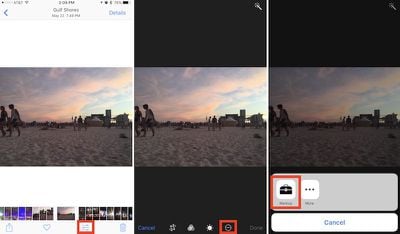
How To Markup 3

  1. Open the Photos app.
  2. Find the image you want to edit and tap on it.
  3. Tap the editing slider button.
  4. While in editing mode, tap the button that looks like an ellipsis within a circle and choose "Markup" from the popup menu.

Finding Image Markup in Messages
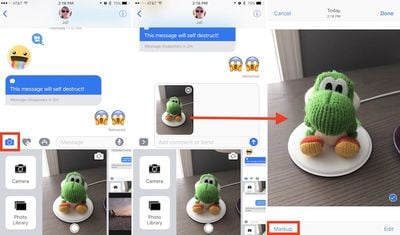
How To Markup 4

  1. Open Messages.
  2. Tap the contact you want to send the photo to.
  3. Tap the Camera icon to the left of the iMessage conversation box.
  4. Find the image you want to edit by taking a new picture, scrolling right to browse all your images, or scrolling left to jump into a vertical version of your Photo Library.
  5. Tap on the photo to place it in the conversation box, then tap on it once again within the box.
  6. Tap "Markup" in the bottom left corner.

Using Image Markup

In Photos or Messages, the editing features of Markup are mostly similar, although the former app presents a darker layout, while the latter has a lighter one. First, the feature lets you doodle on the picture you've decided to edit, with eight different colors and three different stylus thickness options to the right of the color dots.

Within each of the three options, you can change the thickness of the doodle by pressing harder or softer as you draw on the photo if you have a device that supports 3D Touch. If you begin free-styling on the photo and draw a recognizable shape, Markup will intelligently suggest a more true-to-form representation, be it a basic circle, oval, square, or even a star. You can also keep your hand-drawn option.
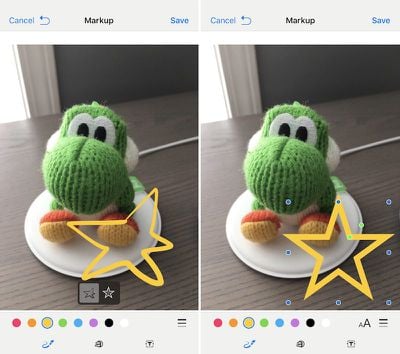
How To Markup 6

Start drawing any shape and Markup will recommend a symmetrical version

The second icon, to the right of the doodle feature, is a magnifying glass that can zoom in on any part of a picture it's placed over. After tapping on it, you can tap on the small green dot and then scrub it to the right to enhance the zoom of the magnifying glass. The blue dot will increase or decrease the circumference of the circle, while tapping anywhere within the circle will allow you to drag it around on the photo. After placing the zoom feature, tapping on any of the color dots will change the border of the magnification circle to match the color, while jumping into the thickness menu will let you alter the boldness of the border.

The last option on the bottom row of the Markup screen is a simple text box that lets you type out any message on top of the photo, and adjust its size by dragging the two blue dots on each side of the box. Similar to the magnifying glass, tap anywhere within the box to drag it, and double tap to add text. You can also change the color of the text by choosing any from the color dot menu, and a new "aA" option to the right of the color dots allows for new font options, sizes, and indentations.
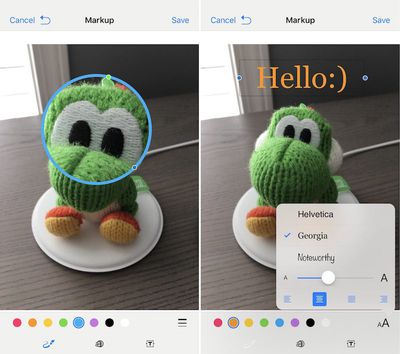
How To Markup 7
Since there is no direct trash button, the only way to undo a mistake is a simple undo button, which is one of the major differences between marking up a photo in Photos or in Messages. In Photos, the reversed arrow is located at the bottom right of the screen; in Messages, it appears at the top left, next to "Cancel," once you start editing the photo. If you want to change a lot about the edits you've made to a photo, it's potentially faster to simply tap "Cancel" and then jump back into Markup to start over.

The biggest difference between Markup in these two apps lies in how permanent you want the edits to be. If done within Photos, your Markups will remain a permanent addition to each picture within the app, which can of course be reversed using the "Revert" option in the editing menu of each image. If executed within Messages, Markup is more transient, keeping the edits only on the version of the image sent to your contact, and not saving any edits onto the version in your own Photos app.


Related Forum: iOS 10

Top Rated Comments

132 months ago
This update is way awesome!!! Best release ever!! And the smoothest!
Score: 3 Votes (Like | Disagree)
132 months ago
Will you guys be covering anything using apps that shoot in RAW? The Lightroom mobile app has a nice camera and RAW editing. Actually very surprised with what I was able to pull detail wise with the tiny sensor in the 6S plus.

Score: 3 Votes (Like | Disagree)
Keane16 Avatar
132 months ago
Without a third party app?

In which app do you open the PDF to do the markup?
Pretty sure it's without a 3rd party App (checked the wife's iPhone and she has it too - 99% sure she wouldn't have installed anything for markup).

Open a email with PDF attachment. Tap the toolbox bottom right. You're in markup mode.

Just had a play around and you can also save PDFs to iCloud Drive and it allows you to markup PDFs from there too (then send them however you want using the share sheet). This should be extra handy once macOS Sierra launches and iCloud Drive supports the Desktop and Documents folder from my mac, will make some my workflows slicker.
Score: 1 Votes (Like | Disagree)
132 months ago
Great how-to. Wish markup was more obvious. It's a great feature.
Score: 1 Votes (Like | Disagree)
iThingsGurl Avatar
132 months ago
A much needed feature! Thanks for the How-to guys :)
Score: 1 Votes (Like | Disagree)

Popular Stories

iPhone Duo Display Cracking

Apple Alerts Stores to iPhone Duo's Display Cracking Issue

Friday October 30, 2026 3:20 pm PDT by
In a memo shared with Apple Stores and Apple Authorized Service Providers this week, and later obtained by MacRumors, Apple provided technicians with guidance on how to diagnose and address the iPhone Duo's inner display cracking issue. If a customer reports the issue, Apple advised technicians to inspect the iPhone Duo and repair or replace it in accordance with their standard procedures....
iPad mini OLED feature 1

Apple Executive Comments on New iPad Mini Lacking 120Hz Display

Thursday October 29, 2026 1:47 pm PDT by
While the new iPad mini has an OLED display, the device does not support ProMotion, meaning the display's refresh rate is limited to 60Hz instead of 120Hz. ProMotion support would have allowed for the iPad mini's refresh rate to automatically adjust from 10Hz to 120Hz depending on the content being displayed, but evidently Apple has kept the feature exclusive to the iPad Pro among iPad...
Pinched iPad Mini

Apple Avoids Showing Pinched Fingers on iPad Mini Page in South Korea

Thursday October 29, 2026 11:52 am PDT by
In the U.S. and most other countries, Apple's website shows the new iPad mini being held by pinched fingers, but this is not the case in South Korea. The new iPad mini shown with pinched fingers on Apple's website in the U.S. On its South Korean website, Apple simply shows an image of the iPad mini on its own. The new iPad mini shown without pinched fingers on Apple's website in South Korea ...
Latest Stories
Apple Watch Ultra 4 Hits All-Time Low Price With Amazon's $99 Discount
14 hours ago
Reminder: Apple's Big Discount on Beats 360 Ear Cushions Ends Today
14 hours ago
Here's a New Tour of Apple's HomeView Software
14 hours ago
Apple Reveals New iPad Mini's Battery Capacity
15 hours ago
Top Stories: Apple's Big MacBook Pro, iPad mini and iMac Updates
16 hours ago
'Pluribus' Season 2 Reportedly Starts Production Today
23 hours ago
iPhone 18 Pro Sales Surge in China, Offsetting Decline in U.S. and Japan
1 day ago
HomeView Software 27.2: Wallpapers, Control Center, and More
1 day ago
Apple Alerts Stores to iPhone Duo's Display Cracking Issue
1 day ago
iOS 27.3 Will Enable These Apple Intelligence Features in China
1 day ago
Apple Says iOS 27.3 Beta Coming Next Week
1 day ago
Apple's Flash Storage Suppliers Are Finally 'Getting Their Revenge'
1 day ago
14 New Things Your iPhone Can Do in iOS 27.2
1 day ago
iPhone Duo Review: One Week Later
1 day ago
Samsung Mocks iPhone Duo Display Cracks in New Ad Campaign
2 days ago
The MacRumors Show: OLED MacBook Pro, iPad Mini 8, and More
2 days ago
MacBook Pro With Touch Display: 15 More Details Revealed
2 days ago
Russia Places Apple on State Surveillance Registry
2 days ago
Halloween Weekend Brings Discounts on Apple Accessories and Pre-Orders
2 days ago
Apple Has Released More Than 25 New Products in the Past Two Months
2 days ago
Local Code Launches as Free, Private AI Assistant Tool for Mac
2 days ago
Apple Acquires Ascend.io
2 days ago
HomePod Mini 2 Launches Today: All the New Features
2 days ago
AirTag 2 4-Pack Drops to New Low Price of $69.99
2 days ago
Rian Johnson's iPhone Camera App Goes Viral
2 days ago
Where Did All the iPhone Duos Go? Mostly to Apple's Stores
2 days ago
Apple's Touchscreen MacBook Pro Could Ship 1.5M Units in 2027
2 days ago
New Apple TV 4K and iPad Mini: RAM Amounts Revealed
2 days ago
Apple Executive Comments on New iPad Mini Lacking 120Hz Display
2 days ago
Here's a Hands-On Look at HomePod Mini 2's New Two-Tone Colors
2 days ago

🔗 Related Apple News & Rumors

Stay updated with the latest Apple ecosystem news and verified rumors











































