

When you receive a PDF document by email that you must sign, the process of printing out the file, signing on the dotted line with a pen, scanning the signed document and sending it back can be a rather tedious task. Fortunately, Apple has added the ability to electronically sign a PDF document using Preview, a program that comes preinstalled on every Mac running OS X Lion or later.
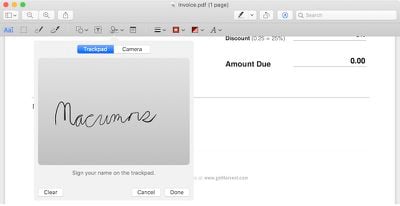
The steps involved to electronically sign a PDF using Preview on Mac are quite simple and will save you valuable time, especially if you have multiple documents, contracts, forms or other paperwork to sign. If you are worried that your virtual signature will look bad, rest assured that you can create your signature by using the trackpad or holding up your signature on paper to a Mac's built-in iSight camera.
Steps to Electronically Sign a PDF Using Trackpad
- Open the PDF file you need to sign in Preview.
- Click on the Markup icon (
 ) and then the signature () icon.
 - Click on Create Signature > Click Here to Begin. Draw your signature on the trackpad. Click any key when finished. Click Done.
- Click on the signature created to insert it into the PDF document. The signature can be moved or resized like a regular image.
 ) and then the signature (
 ) icon.
Steps to Electronically Sign a PDF Using Camera
- Open the PDF file you need to sign in Preview.
- Click on the Markup icon () and then the signature () icon.
- Click on Create Signature > Camera. Sign your name on white paper and hold it to be visible to the camera. Preview will draw a virtual signature. Click Done.
- Click on the signature created to insert it into the PDF document. The signature can be moved or resized like a regular image.
Tips
- If you are using the trackpad to create your electronic signature, it is recommended that you look at Preview and go slow and steady with your finger to achieve the best result. For an even more precise signature, you can use an iPhone or iPad stylus, preferably one with a fine-tipped ending, to draw your signature on the trackpad.
- Signing a piece of white paper and holding it up to the camera is the easiest way of creating an electronic signature in Preview, although this method does not always yield the best results. The signature will appear inverted when you hold it up to your Mac's camera, but Preview will automatically ensure that it reads properly from left to right.
- You can create an electronic signature in Preview by following steps above even if you do not have a PDF document opened. By default, all electronic signatures that you create are automatically stored in a list on Preview so that you can insert them into future PDFs documents and other files without needing to repeat these steps. Preview can store multiple signatures at once.
- Apple also provides markup tools in the Mail app in macOS to create electronic signatures that can be directly inserted into your emails.


















































Top Rated Comments
While people often do refer to this as a "digital signature", it really isn't anything of the sort. A digital signature is a cryptographic entity that at some level proves that you are indeed who you claim you are. It generally doesn't involve anything resembling your on-paper signature.
Anyone can append a rasterized/digitized version of your written signature to a document - it doesn't have to be you. With a real digital signature, though, that can't happen unless you are sloppy with your private key(s).
Pretty sure that's a tool box
This is exactly what I was going to say. I thought this article would be about RSA.
This scanned signature is a joke, if I sent my invoices with such a signature, my clients would laugh (and obviously return it), this has no legal value whatsoever.
I was hoping to view an easy way to sign with a certified signature (a cryptographic token) in Preview.app, I've been doing it with Acrobat until now.
Thank you. I like this tip.