How to Limit What a Toddler Can Do When You Hand Over Your iPhone or iPad - MacRumorsOpen MenuShow RoundupsShow Forums menuVisit ForumsOpen Sidebar
Skip to Content

How to Limit What a Toddler Can Do When You Hand Over Your iPhone or iPad

by

If you've ever handed your iPhone or iPad to a baby or toddler to entertain them while you do something else, you'll probably know just how easily their little fingers can navigate into all manner of screens and settings they shouldn't be messing with.

ipad kids playing
Fortunately, Apple includes a feature in iOS that allows you to keep your device locked into a single app and control which features are available. It's called Guided Access, and this article explains how you can use it.

How to Enable Guided Access on iPhone and iPad

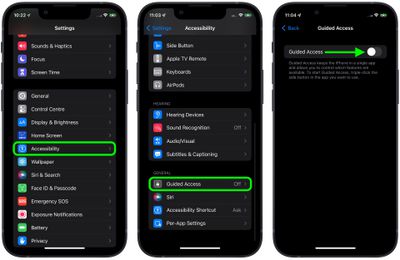
  1. Launch the Settings app on your iPhone or ‌iPad‌.
  2. Tap Accessibility.
  3. Scroll down to "General" and tap Guided Access.
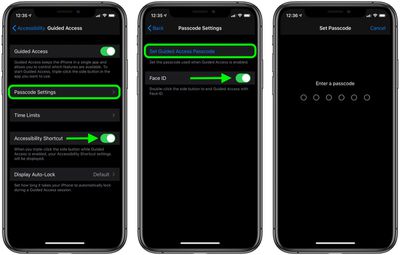
  4. Tap the switch next to Guided Access to toggle it to the green ON position and reveal further options.
    settings

  5. If you use any other accessibility options, turn on the switch next to Accessibility Shortcut so that you can access them when Guided Access is active, using a triple-click of the Home button or Side button (depending on your device).
  6. Tap Passcode Settings, then tap Set Guided Access Passcode to set a special passcode for exiting the feature. Optionally, turn on the toggle next to Face ID or Touch ID (depending on your device) if you want to be able to use biometric authentication to exit Guided Access.
    settings

How to Use Guided Access on iPhone and iPad

  1. Launch the app that you want to limit access to. In our example, we're using the BBC iPlayer app to play a kids' show.
  2. If your device has a Home button, triple-click it to enter the Guided Access initialization screen. If your device has Face ID in lieu of a Home button, triple-click the Side button instead.
    guided access

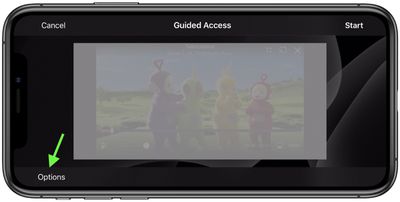
  3. The screen area will appear within a frame. If you want to make certain areas of the screen inaccessible, simply circle them using your finger.
    guided access

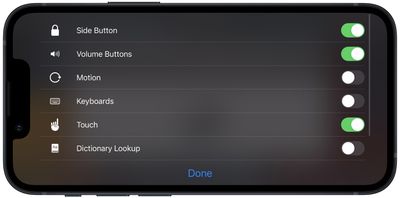
  4. Tap Options in the bottom-left corner, then use the switches to control access to the Side Button, Volume Buttons, Motion, Keyboards, Touch, or to set a Time Limit. In our example, to prevent the video (and audio) from being disrupted by little fingers, we would disable Side Button, Volume, and Touch by toggling off the associated switches.
    guided access

  5. Tap Done.
  6. Tap Start at the top-right corner of the screen to activate Guided Access proper. A banner will briefly appear on the screen advising you that the feature is active.
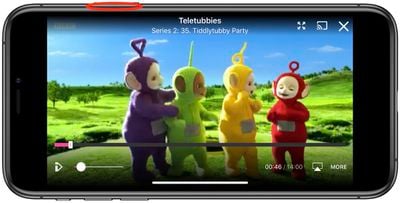
With Guided Access enabled, the only way to leave the app is by double-clicking the Side button to activate ‌Face ID‌, or by triple-clicking the Side/Home button and entering the pre-set passcode. So you can leave your little ones to watch their favorite video or play their favorite game, safe in the knowledge that they can't delete your email account, phone a random number, or worse.

Apart from using the triple-click to bring up the Accessibility Shortcut, you can also add a Guided Access shortcut to your device's Control Center.


Top Rated Comments

HQuest Avatar
64 months ago
Alternative option: don’t handle iPads or the likes to toddlers.

There is an entire world out there for them to discover.

Score: 30 Votes (Like | Disagree)
64 months ago
At this point, the research is pretty damning. Only an idiot allows a baby or toddler any sort of screen time.

Score: 23 Votes (Like | Disagree)
Mac Fly (film) Avatar
64 months ago
Parents: don't give your toddler a tablet.
Score: 17 Votes (Like | Disagree)
64 months ago
I know a few (young) families where they complain they can't get their two year old off their iPad and laugh. Yeah, real funny. If you can't get your two year old off your ipad, and they have a conniption when they can't use it, you are doing something wrong. Have them play outside, get dirty, eat dirt, and play with bugs. That is where the real learning begins.
Score: 13 Votes (Like | Disagree)
yellow8 Avatar
64 months ago
It's been proven that screens are dangerous for kids and it's highly recommended not to show them before at least 3 years old.

DON'T FOLLOW THIS ARTICLE's ADVICE --> JUST DON'T GIVE ANY DEVICE TO TODDLERS.

Your kids will thank you.
Score: 10 Votes (Like | Disagree)
djplong Avatar
64 months ago
It's not access to apps that I worry about. It's damage. Toddlers and babies wouldn't be entrusted with a device covered in glass that costs hundreds of dollars under any other circumstances. This is one area where, if you MUST hand over a device, the cheap Fire tablets with the bumpers all around are a better choice.
Score: 9 Votes (Like | Disagree)

Popular Stories

iPhone Duo Display Cracking

Apple Alerts Stores to iPhone Duo's Display Cracking Issue

Friday October 30, 2026 3:20 pm PDT by
In a memo shared with Apple Stores and Apple Authorized Service Providers this week, and later obtained by MacRumors, Apple provided technicians with guidance on how to diagnose and address the iPhone Duo's inner display cracking issue. If a customer reports the issue, Apple advised technicians to inspect the iPhone Duo and repair or replace it in accordance with their standard procedures....
iPad mini OLED feature 1

Apple Executive Comments on New iPad Mini Lacking 120Hz Display

Thursday October 29, 2026 1:47 pm PDT by
While the new iPad mini has an OLED display, the device does not support ProMotion, meaning the display's refresh rate is limited to 60Hz instead of 120Hz. ProMotion support would have allowed for the iPad mini's refresh rate to automatically adjust from 10Hz to 120Hz depending on the content being displayed, but evidently Apple has kept the feature exclusive to the iPad Pro among iPad...
Pinched iPad Mini

Apple Avoids Showing Pinched Fingers on iPad Mini Page in South Korea

Thursday October 29, 2026 11:52 am PDT by
In the U.S. and most other countries, Apple's website shows the new iPad mini being held by pinched fingers, but this is not the case in South Korea. The new iPad mini shown with pinched fingers on Apple's website in the U.S. On its South Korean website, Apple simply shows an image of the iPad mini on its own. The new iPad mini shown without pinched fingers on Apple's website in South Korea ...
Latest Stories
Apple Watch Ultra 4 Hits All-Time Low Price With Amazon's $99 Discount
13 hours ago
Reminder: Apple's Big Discount on Beats 360 Ear Cushions Ends Today
13 hours ago
Here's a New Tour of Apple's HomeView Software
13 hours ago
Apple Reveals New iPad Mini's Battery Capacity
14 hours ago
Top Stories: Apple's Big MacBook Pro, iPad mini and iMac Updates
16 hours ago
'Pluribus' Season 2 Reportedly Starts Production Today
22 hours ago
iPhone 18 Pro Sales Surge in China, Offsetting Decline in U.S. and Japan
23 hours ago
HomeView Software 27.2: Wallpapers, Control Center, and More
1 day ago
Apple Alerts Stores to iPhone Duo's Display Cracking Issue
1 day ago
iOS 27.3 Will Enable These Apple Intelligence Features in China
1 day ago
Apple Says iOS 27.3 Beta Coming Next Week
1 day ago
Apple's Flash Storage Suppliers Are Finally 'Getting Their Revenge'
1 day ago
14 New Things Your iPhone Can Do in iOS 27.2
1 day ago
iPhone Duo Review: One Week Later
1 day ago
Samsung Mocks iPhone Duo Display Cracks in New Ad Campaign
1 day ago
The MacRumors Show: OLED MacBook Pro, iPad Mini 8, and More
2 days ago
MacBook Pro With Touch Display: 15 More Details Revealed
2 days ago
Russia Places Apple on State Surveillance Registry
2 days ago
Halloween Weekend Brings Discounts on Apple Accessories and Pre-Orders
2 days ago
Apple Has Released More Than 25 New Products in the Past Two Months
2 days ago
Local Code Launches as Free, Private AI Assistant Tool for Mac
2 days ago
Apple Acquires Ascend.io
2 days ago
HomePod Mini 2 Launches Today: All the New Features
2 days ago
AirTag 2 4-Pack Drops to New Low Price of $69.99
2 days ago
Rian Johnson's iPhone Camera App Goes Viral
2 days ago
Where Did All the iPhone Duos Go? Mostly to Apple's Stores
2 days ago
Apple's Touchscreen MacBook Pro Could Ship 1.5M Units in 2027
2 days ago
New Apple TV 4K and iPad Mini: RAM Amounts Revealed
2 days ago
Apple Executive Comments on New iPad Mini Lacking 120Hz Display
2 days ago
Here's a Hands-On Look at HomePod Mini 2's New Two-Tone Colors
2 days ago

🔗 Related Apple News & Rumors

Stay updated with the latest Apple ecosystem news and verified rumors