

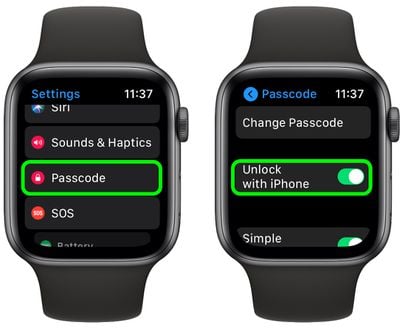
On Apple Watch, there's an option in watchOS that lets your iPhone unlock your watch as long as the iPhone is unlocked (Settings -> Passcode -> Unlock With iPhone). Enabling this option means you don't have to input a passcode twice in the morning – one on your Apple Watch when you put it on your wrist, and one on your iPhone when you unlock it for the first time.
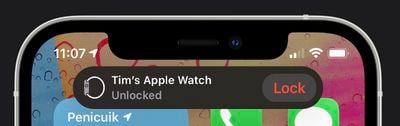
However, we've heard reports that the "Unlock with iPhone" function hasn't been working for some people since at least iOS 14.7. Apple was aware enough of the same problem on iPhones with Touch ID to issue a fix with the release of iOS 14.7.1, but it appears that Face ID-equipped iPhones are affected too, and iOS 14.7.1 does nothing to resolve it. If you have a Face ID iPhone and the Unlock With iPhone feature isn't working on your Apple Watch, here are a couple of possible solutions.
Disable Unlock iPhone With Apple Watch
Perhaps confusingly, some users have found that disabling the "Unlock With Apple Watch" feature on iPhone somehow returns functionality to the "Unlock With iPhone" switch on Apple Watch.
- On your iPhone, launch the Settings app.
- Tap Face ID & Passcode.
- Under "Unlock With Apple Watch," toggle the switch next to your Apple Watch's name so that it's in the gray OFF position.
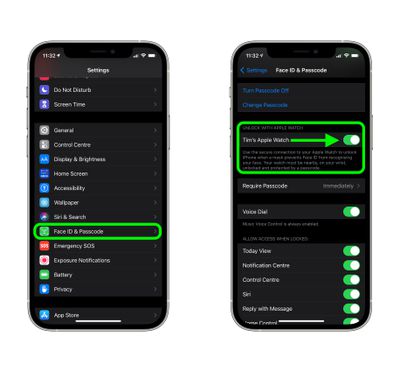
Of course, this is a workaround rather than a fix, because you're turning off one feature to resurrect another, so you'll have to weigh up whether the compromise is worth it in your particular use case.
If you often rely on the "Unlock With Apple Watch" feature to access your iPhone when you're wearing a face mask, then the workaround isn't going to work for you, in which case...
Unpair Then Re-pair Your Apple Watch
Unpairing Apple Watch from iPhone has worked for some people suffering from the issue. It takes a bit of time, but if you miss the "Unlock With iPhone" feature on your Apple Watch, then it's probably going to be worth the effort.
- Bring your iPhone and Apple Watch close together, then open the Watch app on your iPhone.
- In the My Watch tab, tap All Watches.
- Tap the info (i) button next to the watch that you want to unpair.
- Tap Unpair Apple Watch. (For GPS + Cellular models, choose to keep your cellular plan.)
- Tap again to confirm. You might need to enter your Apple ID password to disable Activation Lock.
Before erasing all content and settings on your Apple Watch, your iPhone creates a new backup of your Apple Watch. You can use the backup to restore a new Apple Watch. After your Apple Watch unpairs, you'll see the Start Pairing message. Then you can pair your watch to your iPhone again in the normal way.
- Press and hold the side button on your Apple Watch until you see the Apple logo.
- Wait for the "Use your iPhone to set up this Apple Watch" message to appear on your iPhone, then tap Continue. If you don't see this message, open the Watch app on your iPhone, tap All Watches, then tap Pair New Watch.
- Follow the on-screen instructions to re-pair your watch.
Note that some users who re-paired their Apple Watch to their iPhone found that although it fixed the problem, they no longer received a notification on their iPhone that their Apple Watch had been unlocked, suggesting Apple has some work to do to thoroughly nix whatever bug is affecting this behavior.
Final Thoughts
At the end of the day, neither the workaround nor the solution (assuming it works for you) are ideal, but as of writing there appears to be no other way to get Unlock With iPhone working properly again. On the bright side, Apple is aware of the problem and we should see a fix arrive in the next software update to iOS 14 or with the release of iOS 15 in September.












































