

On Apple's iPhone 15 Pro models, users can switch between three preset camera focal lengths when shooting on the main camera. This article explains what they are and how to enable or disable them on your iPhone.
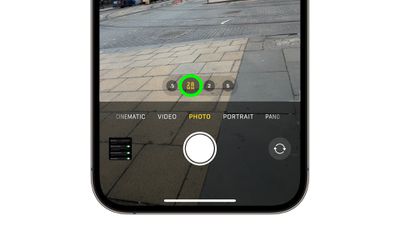
To take advantage of the enhanced camera system on the iPhone 15 Pro and iPhone 15 Pro Max, Apple has added three popular focal length options for the main camera's optical zoom. There's the default 24mm (equivalent to 1x optical zoom) 28mm (1.2x optical zoom), and 35mm (1.5x optical zoom).
Apple has made these particular focal lengths available to photography enthusiasts by using computational processing to transform the 48-megapixel image that the new larger sensor can capture, so the results always deliver a high-resolution 24MP image.
You can manually switch between photo lengths by changing the optical zoom setting in the Camera app. Tapping the circled 1x icon at the bottom of the viewfinder switches the camera between 28mm focal length (1.2x optical zoom) and 35mm focal length (1.5x optical zoom), and back to 1x optical zoom.
Disable Focal Length Presets
If you find this behavior in the Camera app unnecessary or frustrating, you can disable it by following these steps.
- Open the Settings app.
- Scroll down and tap Camera.
- Tap Main Camera.
- Under "Additional Lenses," toggle off the switches next to 28mm and/or 35mm.
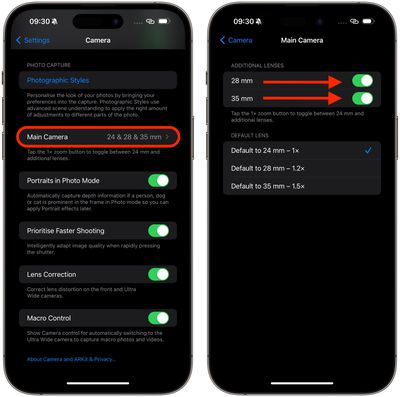
That's all you have to do. Now pressing the 1x button will always equal 1x optical zoom.
Change Default Focal Length
Apple has also added an option to change the default optical zoom setting, which is handy if you're working with a specific focal length. The following steps show you how it's done.
- Open the Settings app.
- Scroll down and tap Camera.
- Tap Main Camera.
- Under "Default Lens," select from Default to 24mm - 1x, Default to 28mm - 1.2, and Default to 35mm - 1.5x.
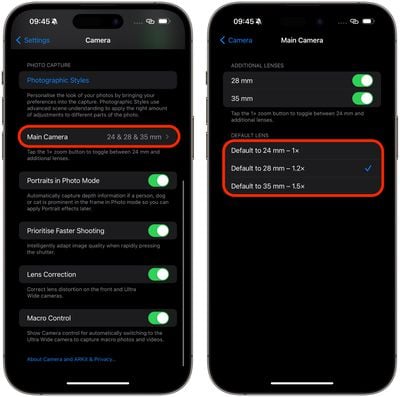
That's all there is to it. The next time you shoot, you won't have to set the focal length before you start shooting – your preferred option will already be selected.













































