iOS 18.1: How to Type to Siri - MacRumorsOpen MenuShow RoundupsShow Forums menuVisit ForumsOpen Sidebar
Skip to Content

iOS 18.1: How to Type to Siri

by

With the introduction of Apple Intelligence in iOS 18.1, communicating with Siri has become more flexible since you can easily type your requests instead of speaking them. It's a subtle but powerful change that's perfect for those moments when you need to be quiet or discreet.
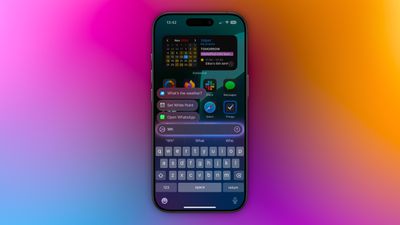
type to siri 1
Enabling Type to Siri is straightforward. Head to Settings -> Apple Intelligence & Siri, tap Talk & Type to Siri, and make sure the Type to Siri toggle is switched on. Once enabled, you can summon the typing interface with a quick double-tap at the bottom edge of your iPhone's display.

The typing interface includes suggested requests to help you get started, and you can type virtually anything you'd normally say to Siri. Simply enter your query and tap the up arrow to submit. Siri will respond just as it would to a voice command, maintaining context between messages for natural back-and-forth conversations.

This text-based interaction is particularly useful during meetings or in quiet spaces, when you're in a noisy environment where Siri might struggle to hear you, or if you prefer typing to speaking for more precise queries. It can also help when you want to maintain privacy in public places.
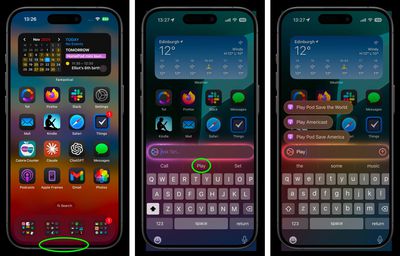
siri
The feature integrates seamlessly with Siri's expanded knowledge base in iOS 18.1, including Apple product support and settings navigation. You can even use natural language to find settings when you're not sure of their exact names.

Whether you're a longtime Siri user looking for more flexibility or someone who's been hesitant to use voice commands in public, Type to Siri offers a handy alternative for interacting with Apple's virtual assistant.

Popular Stories

iOS 26 Home Glass Feature

Apple Intelligence Home Features Require 2TB iCloud+ Plan in iOS 27

Monday July 6, 2026 2:13 pm PDT by
Using Apple Intelligence camera features in the Home app will require an iCloud+ plan starting at 2TB, according to Apple. Apple shared the detail in its notes for the third macOS Golden Gate beta that was released today. In iOS 27, iPadOS 27, and macOS 27 Golden Gate, the Home app is able to generate written summaries for motion alerts from HomeKit Secure Video cameras. It's also able to...
iphone 16 teal

'Siri AI' Lawsuit Update: Apple to Pay Owners of These iPhone Models

Thursday July 9, 2026 7:08 am PDT by
In May, Apple agreed to pay $250 million to settle a U.S. class action lawsuit over Siri AI's delayed launch, and eligible iPhone users could receive up to a $95 payout. This week, the California court overseeing the case held a hearing regarding preliminary approval of the settlement, but the judge has not yet issued a ruling. It will likely be at least a few more months before eligible...


ios 27 siri animation

Apple Exploring Ways to Run Much Larger AI Models Directly on iPhones

Thursday July 9, 2026 9:24 am PDT by
Apple has held meetings with PrismML about ways it could use the startup's technology to run much larger AI models directly on iPhones, according to The Information. The report said PrismML has managed to shrink down Alibaba's open-source large language model Qwen 3.6 to run entirely on an iPhone 17 Pro. The model has 27 billion parameters, which is larger than Apple's on-device AFM 3 Core...

🔗 Related Apple News & Rumors

Stay updated with the latest Apple ecosystem news and verified rumors