iOS 26 Screenshots: Turn Off Full-Screen Previews - MacRumorsOpen MenuShow RoundupsShow Forums menuVisit ForumsOpen Sidebar
Skip to Content

iOS 26 Screenshots: Turn Off Full-Screen Previews

by

Apple has modified the screenshot experience in iOS 26 to accommodate Visual Intelligence and its new Liquid Glass aesthetic. Taking a screenshot is still done by pressing the Side button and Volume Up button on your iPhone, but the interface has been redesigned, while there's another change that might slow down your workflow if you're used to the streamlined approach taken in iOS 18 and earlier.
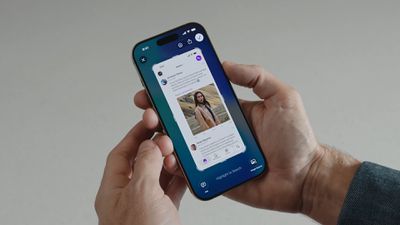
iOS 26 Screenshots

Why You Might Want to Switch Back

If you regularly use Apple's screen capture tools in iOS 18, you'll know that screenshots appear as small thumbnails in the bottom-left corner that you can quickly tap to edit and save or ignore. This lets you continue using your iPhone without interruption, while still giving you the option to markup and/or share a screenshot when required.

In contrast, the new full-screen preview mode in iOS 26 displays your screenshot across the entire display by default, complete with editing tools and Visual Intelligence options at the bottom. While this gives you immediate access to cropping, markup, and AI-powered features, it may feel intrusive compared to iOS 18's approach.

Disabling Full-Screen Previews

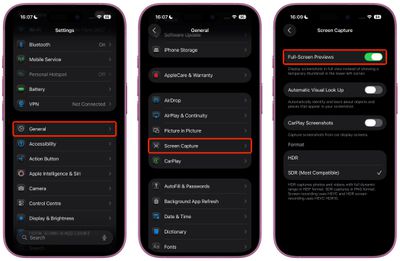
When you take your first screenshot after updating to iOS 26, you should see an on-screen prompt asking if you'd like to "Switch to Thumbnail View." If you missed this opportunity or accidentally tapped "Not Now," you can still revert to the old thumbnail approach, thanks to a new settings menu:

  1. Open Settings on your iPhone.
  2. Tap General.
  3. Select Screen Capture.
  4. Toggle off Full-Screen Previews.

settings

Once disabled, screenshots will revert to the familiar iOS 18 behavior, appearing as temporary thumbnails in the bottom-left corner. You can still access all editing features by tapping the thumbnail when you need them, or you can review the images later in the Photos app.

Additional Screenshot Options

While you're in Screen Capture settings, you'll also find new options for enabling HDR screenshots (saved in HEIF image format), a CarPlay Screenshots toggle for when your iPhone is connected to CarPlay, and Visual Lookup (iPhone 15 Pro and newer models only).


Top Rated Comments

13 months ago

It would be nice if Apple allowed the ability to take screenshots, but also have the option of NOT saving the screenshot to the photo library

This would be useful for when you’re looking to share information with friends or family, but not necessarily want to save that screenshot to your photo library
iOS 18 does have this option. After tapping 'Done' there is a 'Copy and Delete' option, which is perfect for your use case (which is also often a use case for me).
Score: 11 Votes (Like | Disagree)
jz0309 Avatar
13 months ago
Thank you1 I love these type of articles!
Score: 9 Votes (Like | Disagree)
Justin Cymbal Avatar
13 months ago

Additional Screenshot Options

While you're in Screen Capture settings, you'll also find new options for enabling HDR screenshots (saved in HEIF image format), a CarPlay Screenshots toggle for when your iPhone is connected to CarPlay, and Visual Lookup (iPhone 15 Pro and newer models only).

It would be nice if Apple allowed the ability to take screenshots, but also have the option of NOT saving the screenshot to the photo library

This would be useful for when you’re looking to share information with friends or family, but not necessarily want to save that screenshot to your photo library
Score: 6 Votes (Like | Disagree)
jayducharme Avatar
13 months ago

good grief, I just tell Siri to take a screenshot..
"Here's what I found for screenshots on the web."

I have a slightly different problem: I inadvertently take screenshots just by picking up the phone. I wish Apple had left the power button on the top of the device, rather than opposite the volume buttons (though I realize that's inconvenient with ginormous phones).

Score: 4 Votes (Like | Disagree)
Moonjumper Avatar
13 months ago
I'd like the option to just capture the screen and have no preview, going straight to saving to Photos, just like it used to be. I'd also like the same on Mac, which is where I notice the difference most. The click and carry on flow has gone. I'm not saying it should be the default, but it should be an option.

Score: 4 Votes (Like | Disagree)
13 months ago
I am a heavy screenshot user but it isn't obvious to me - just from reading - that the change needs to be undone. Always good to have a setting to turn it off and a tutorial on how to do that, but I will try the new default behavior first. I am not a dev so waiting for the public beta to drop.
Score: 4 Votes (Like | Disagree)

Popular Stories

Apple Event Logo

Apple Working on All-New Operating System

Wednesday July 29, 2026 11:39 am PDT by
Apple is developing an all-new operating system that is essentially a mix of tvOS, watchOS, and iOS, according to Bloomberg's Mark Gurman. In a report this week, he said the operating system will feature a grid of icons, widgets, and apps, along with customizable clock faces. The new software platform is intended for Apple's long-rumored smart home hub. With built-in facial recognition,...
imac video apple feature

Apple Made Its Second-Biggest Acquisition Ever This Year

Wednesday July 29, 2026 12:03 pm PDT by
Apple this year acquired Israeli startup Q.ai for close to $2 billion, according to the Financial Times. That would make this Apple's second-biggest acquisition ever, after it paid $3 billion for the popular headphone maker Beats in 2014. This is also the largest known Apple acquisition since the company purchased Intel's smartphone modem business and patents for $1 billion in 2019. Q.ai...
Dynamic Island iPhone 18 Pro Feature

iPhone 18 Pro: Twelve Changes Coming to Apple's Next Flagship

Thursday July 30, 2026 3:43 am PDT by
We're less than two months out from the launch of Apple's premium next-generation smartphone lineup, and while we're not expecting a dramatic change in terms of functionality, there are still several enhancements rumored to be coming to the iPhone 18 Pro and iPhone 18 Pro Max. One thing worth noting is that Apple is reportedly planning a major change to its iPhone release cycle this year,...

🔗 Related Apple News & Rumors

Stay updated with the latest Apple ecosystem news and verified rumors