iOS 18: How to Schedule Messages to Send Later - MacRumorsOpen MenuShow RoundupsShow Forums menuVisit ForumsOpen Sidebar
Skip to Content

iOS 18: How to Schedule Messages to Send Later

by

Apple has introduced a significant update to its messaging capabilities with a new "Send Later" feature in iOS 18. This addition to the Messages app now allows users to schedule text messages for future delivery, enhancing the chat platform's flexibility and convenience.
General Apps Messages
Available exclusively for iMessage conversations, the Send Later function enables users to compose messages in advance and set a specific time or date for them to be sent. This feature is particularly useful for remembering important dates or managing communication across different time zones.

Apple's implementation seamlessly integrates with the existing iMessage framework. The feature works for both individual and group chats, provided all participants are using Apple devices with iMessage enabled. However, it's important to note that this functionality is not available when messaging Android users or in standard SMS conversations.

Here's how to schedule a message in iOS 18 and iPadOS 18:

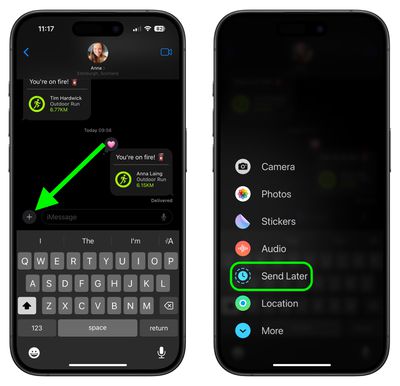
  1. Open a conversation in the Messages app.
  2. Tap the "+" button on the left side of the text box.
  3. Tap More.
  4. Choose Send Later.
    messages

  5. Type in your message.
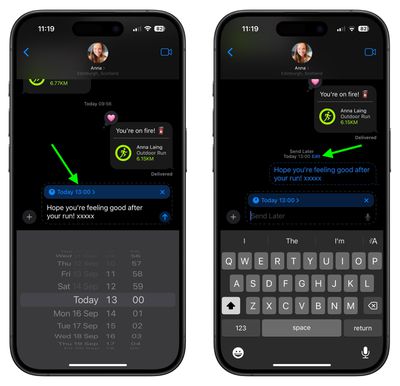
  6. To change the send time, tap on the blue bubble that defaults to Tomorrow 9:00 am. From there, you will have a slider that lets you input a date and a time.
  7. With your time selected and your message typed in, tap on the blue arrow to schedule it.
    messages

Scheduled messages are displayed at the bottom of a conversation. If you want to change the time of a message or cancel it, tap the Edit button. You will have options to edit the time, delete the message, or send it immediately.

Note that messages can be scheduled up to 14 days in advance, so if it's August 1, for example, you can schedule up to August 15. Messages are sent even if your iPhone is offline without a Wi-Fi or cellular connection.

Popular Stories

iOS 27 Next to iPhone

Here's When iOS 27 Rolls Out Today in Every Time Zone [Update: It's Out]

Sunday September 13, 2026 3:00 am PDT by
Update 10:04 a.m.: iOS 27 is rolling out now, though it may take a bit for all users to see it, so keep checking! Apple is about to release iOS 27, which will finally deliver more advanced Siri AI capabilities as well as a variety of other refinements, improvements, and new features to iPhones. It's Apple's biggest software update of the year, and Apple announced at Wednesday's iPhone event...

iOS 27 Icon iPhone

iOS 27 Available Now With These 8 New Features

Monday September 14, 2026 9:00 am PDT by
Update — 10 a.m. Pacific Time: Apple has released iOS 27. During its iPhone 18 Pro and iPhone Duo event last week, Apple announced that iOS 27 will be released widely on Monday, September 14. iOS 27 should be available around 10 a.m. Pacific Time / 1 p.m. Eastern Time today via the Settings app, under General → Software Update. Below, we have highlighted eight new features and...
Apple iCloud Plus expansion hero

iCloud+ Now Includes Apple TV, Apple Arcade, and Curated Apple Music Stations in Over 100 Countries

Tuesday September 15, 2026 1:43 am PDT by
Apple today announced a new subscription initiative that turns paid iCloud+ subscriptions into a broader services bundle in more than 100 countries. In select countries, Apple says every paid iCloud+ plan, including the cheapest 50GB tier, now includes Apple TV and Apple Arcade "at no additional cost," while family sharing extends the storage, TV and Arcade access to up to five people....

🔗 Related Apple News & Rumors

Stay updated with the latest Apple ecosystem news and verified rumors