iOS 26: Save Physical Card Details in Wallet App - MacRumorsOpen MenuShow RoundupsShow Forums menuVisit ForumsOpen Sidebar
Skip to Content

iOS 26: Save Physical Card Details in Wallet App

by

Apple's Wallet app in iOS 26 includes a new feature that lets you store physical card information alongside your digital payment cards. This allows you to quickly access account numbers, expiry dates, and other details without carrying the physical card.
Apple Wallet
It's a simple addition in iOS 26, but it brings the Wallet app closer to being a comprehensive card management tool, filling the gap that third-party apps like 1Password typically fill. With the full card information to hand, you can check your card's expiry date for a subscription service or provide account details over the phone, without needing to dig through your physical wallet or memorize card numbers. It also means you don't have to delve into settings to find Safari's Autofill fields.

Adding Physical Card Information

To store your physical card details, follow these steps:

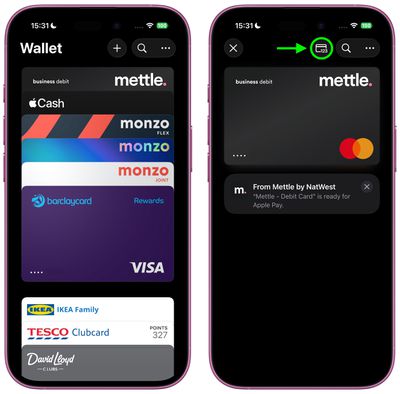
  1. Open the Wallet app on your iPhone, then tap one of your stored cards. Alternatively, add a new card using the + button, then select it in Wallet.
  2. Tap the "123" card symbol at the top, then authenticate with Face ID or your passcode.
    add physical card info wallet ios1

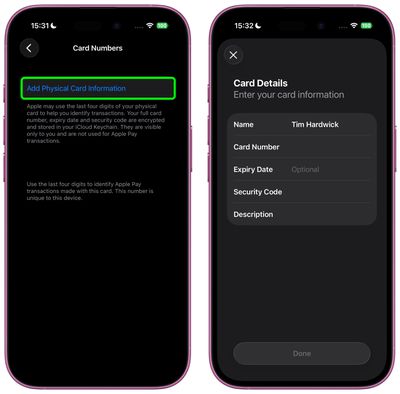
  3. Select Add Physical Card Information.
  4. Fill in your card details including name, number, expiry date (optional), and security code.
  5. Add a description to help identify the card.
  6. Tap Done to save.
    add physical card info wallet ios2

Apple encrypts and stores this information in your iCloud Keychain, keeping it secure and accessible only to you. The details are not used for Apple Pay transactions.

Viewing Stored Information

After adding your details, simply tap the card in Wallet and then tap the same "123" button at the top. You'll need to authenticate with Face ID or your passcode before the information displays, adding an extra layer of security to your stored card data.

Note that this is a feature of iOS 26, which is currently in beta. Apple will roll out a public release of iOS 26 sometime in September.
Popular Stories

apple wallet drivers license feature iPhone 15 pro purple 1

iPhone Driver's Licenses May Soon Expand to New State

Thursday July 23, 2026 1:58 pm PDT by
Driver's licenses and IDs may soon be available in Apple Wallet for iPhone and Apple Watch users who live in Utah. MacRumors discovered signs of a Utah ID in Apple's backend, suggesting Apple is moving forward on implementing support. Utah already offers a mobile driver's license option through a standalone app, but there is no Apple Wallet integration. Utah's mobile driver's license FAQ page...

apple wallet drivers license feature iPhone 15 pro purple 1

iPhone Driver's Licenses May Soon Expand to Another US State

Wednesday July 29, 2026 6:15 am PDT by
Driver's licenses and IDs may soon be available in Apple Wallet for iPhone and Apple Watch users living in Oklahoma. MacRumors discovered signs of an Oklahoma ID in Apple's backend. With input from Apple, a House bill was passed in March 2026 that allows Service Oklahoma to issue mobile or digital versions of state identification cards, driver's licenses or permits – suggesting this is...
Bee Card

Apple Wallet Support Coming to Manchester's Bee Card

Wednesday July 29, 2026 8:20 am PDT by
Apple is preparing to allow the Bee Card to be added to the Wallet app, according to code seen by MacRumors. When this functionality goes live, you will be able to add the Bee Card to your iPhone or Apple Watch and use it to pay your fare for trams and buses in the Manchester, England area. However, the code does not provide any timeframe for availability, so stay...

🔗 Related Apple News & Rumors

Stay updated with the latest Apple ecosystem news and verified rumors