

In iOS 15, Apple introduced a new Focus feature that aims to help reduce distractions and let you zone in on a single thing. Focus does this by filtering notifications based on what you're doing.
With Focus, you can set your device to help you be in the moment by creating a custom Focus or selecting a suggested one based on the context, like during work hours or while you're winding down for bed. It's also possible to create Home Screen pages with apps and widgets that apply to moments of focus to only display relevant apps and reduce temptation.
How to Create a Custom Focus
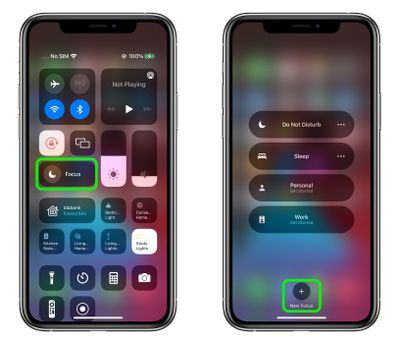
- Launch the Control Center and tap the Focus button.
- Tap the New Focus button at the bottom, indicated by a plus sign.

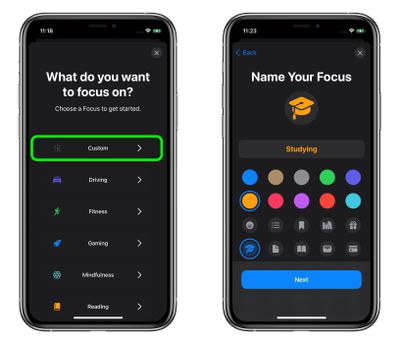
- Select Custom to create a new Focus.
- Give your custom Focus a name and choose a colour/emoji/icon to make it recognizable, then tap Next.
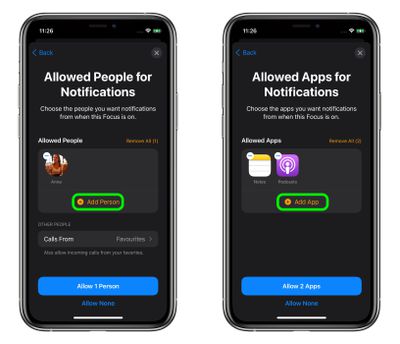
- On the next screen, tap Add Person to choose the people you want to receive notifications from when the Focus mode is enabled. You can also choose to receive calls from Everyone, No One, Favorites, or All Contacts, with this being a separate call-specific option.
- Tap Allow [X] Person or Allow None.
- On the next screen, tap Add App to choose apps you want to receive notifications from when the Focus mode is enabled.
- Tap Allow [X] Apps or Allow None.
- On the next screen, choose whether to Allow Time Sensitive notifications when the Focus is enabled or tap Not Now to decide later.
- Tap Done to finish creating the custom Focus.
Once your custom Focus is created, you can adjust its options anytime by going to Settings -> Focus and selecting its name. There, you'll find additional settings available to you, including the option to Hide Notification Badges on app icons and an option to hide certain Home Screen pages using the Custom Page toggle. You can also choose to Dim Lock Screen appearance and Show On Lock Screen any silenced notifications you receive.
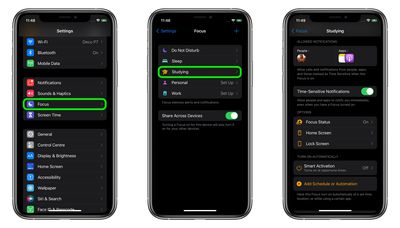
In addition, note the Smart Activation option, which when turned on allows your device to turn on the custom Focus automatically at relevant times throughout the day, based on signals like your location, app usage, and more. Alternately, choose Add Schedule or Automation to have the Focus turn on automatically at a set time, location, or while using a certain app.
How to Turn On a Focus
Turning a Focus on is easy. Simply launch the Control Center, tap the Focus button, then select the Focus you want to enable. You can also tap the ellipsis (three dots) button to enable it For 1 hour, Until this evening, or Until I leave this location.
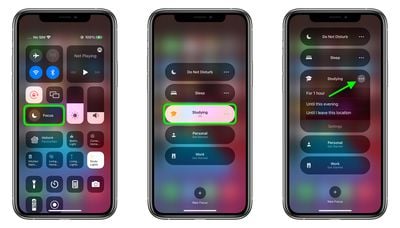
To disable the Focus, just tap the Focus button again in Control Center and then tap the active Focus. Remember, when you turn on/turn off a Focus, it's turned on/off across all your devices.
For more information on the new Focus mode options available in iOS 15, make sure to check out our Focus guide.















































Top Rated Comments
When I’m working, my distracting apps are hidden away and I get a screen just full of tools and information to get me productive. When work is done, my work apps are put away and I dont get reminded about my work life. And when it’s time to wind down for bed, most of my apps are automatically hidden away in the last hour of the day and I only see the apps that will help me accomplish my nighttime routine.
I’ve only been using it for a few days and already I don’t want to go back to when I didn’t use my phone like this.
I'll show myself out...