How to Install the macOS 13 Ventura Public Beta - MacRumorsOpen MenuShow RoundupsShow Forums menuVisit ForumsOpen Sidebar
Skip to Content

How to Install the macOS 13 Ventura Public Beta

by

Apple has made a macOS 13 Ventura beta available for its public beta testing group, letting public beta testers try out the software before it launches this fall.

macos ventura roundup header
The ‌macOS Ventura Public Beta is available to anyone with a compatible Mac and it does not require a developer account. This guide walks you through some simple steps on installing the beta software.

Before downloading the update, it's worth noting that Apple does not recommend installing the ‌macOS Ventura Public Beta on your main Mac, so if you have a secondary machine, use that. This is beta software, and there are often bugs and issues that pop up that can prevent software from working properly or cause other problems.

It's also worth noting that there are some major UI changes to System Preferences, so you may want to avoid committing to the beta usage experience until you've tried it out.

macOS Ventura Compatibility

macOS Ventura is compatible with many of the Macs that were able to run macOS Monterey. The Macs below can run the software.

  • iMac - Late 2015 and later
  • ‌iMac‌ Pro - 2017 and later
  • MacBook Air - Early 2015 and later
  • MacBook Pro - Early 2015 and later
  • Mac Pro - Late 2013 and later
  • Mac mini - Late 2014 and later
  • MacBook - Early 2016 and later

Make a Time Machine Backup

Before you upgrade to the Ventura beta, you should make sure to make a backup using Apple's Time Machine backup feature with an external drive.

If you want to revert back to your previous setup after testing macOS Ventura or if you run into a bug and need to backtrack, you'll need to reinstall macOS Monterey (or your prior OS) and a backup can be helpful for reverting.

Enroll in the Beta Software Program

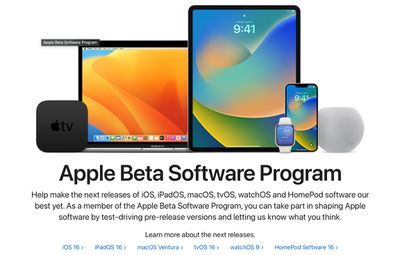
Installing macOS Ventura requires enrolling your Mac in Apple's free Apple Beta Software Program. Follow these steps to do so.
beta oses

  1. Visit the Apple Beta Software Program website in a browser on your Mac.
  2. Click on the blue Sign up button or, if you're already a member, click Sign in in the top-right of the webpage.
  3. Enter your Apple ID and password and then a two-factor authentication code if verification is required.
  4. Agree to the Apple Beta Software Program terms and conditions.
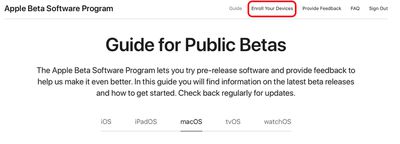
  5. Once signed in and at the Guide for Public Betas page, scroll up to the top and click on "Enroll Your Devices" then click on "macOS." publicbetaenrolldevices

Downloading and Installing the macOS Ventura Beta

After you've enrolled in the public beta testing program, you're able to download macOS 13.

  1. After selecting the macOS section on the beta website, scroll down to "Enroll your Mac" and click on "Download the macOS Public Beta Access Utility option."
  2. If you get a popup asking if you want to allow downloads on "beta.apple.com" click Allow.
  3. Unless you've changed where files download, the beta installer (macOSPublicBetaAccessUtility.dmg) will show up in your downloads folder. Locate it and double-click it to open it up.
  4. Double click on the .pkg file inside to run the installer.
  5. You may see a warning advising you to back up your Mac with Time Machine. Either stop here and back up, or, if you've already done so, Click OK and then click Continue.
  6. Click Continue again and then click Agree to accept Apple's software license agreement, then click Install. Enter your admin password if prompted.
  7. Once the installer has completed the download, the System Preferences Software Update panel will open automatically and display the ‌macOS 13 Beta download. Click Upgrade Now to download the public beta software when prompted. It will take some time to download the file, and when the download is complete, your Mac should restart.
  8. After a restart, the macOS 13 installer should launch automatically. If it does not, it can be found in the applications folder.
  9. From here, click Continue and walk through the steps as instructed, agreeing to the terms and conditions and making sure you've performed a backup.
  10. Select the drive that you want to install the public beta on. You can choose your main drive or a partition that you've created.
  11. Click Install, enter your administrator password, and click OK, then click Restart or wait for your Mac to reboot automatically.

After your Mac restarts, the macOS 13 installation process will begin. It takes some time for the update to install, but when the installation is finished and your Mac boots up again, it will be running the Ventura public beta.

macOS Ventura introduces a long list of new features such as Stage Manager and Continuity Camera. We have a full list of everything new in macOS Ventura in our dedicated roundup. The final release is expected in the fall.


Popular Stories

Home Hub Command Center with Dome Base Feature

Apple Smart Home Hub to Feature iMac G4-Style Design

Wednesday September 30, 2026 4:36 am PDT by
Apple's long-rumored smart home hub will have an iMac G4-style design and a host of unique features, Bloomberg's Mark Gurman reports. The smart home hub is said to feature a square 6-inch display, with variants that can be placed on a countertop or mounted on a wall. It features a single FaceTime camera on the front, with microphones and speakers in its connected base. Gurman described the...


HomePod minis on gradient feature 1 1

Three New Apple Smart Home Products Coming on October 13

Wednesday September 30, 2026 4:04 am PDT by
Apple plans to introduce a series of new smart home products on Tuesday, October 13, according to Bloomberg's Mark Gurman. Apple reportedly plans to debut its long-awaited smart home hub device, a new HomePod mini, and a new Apple TV on the date. The new HomePod mini and Apple TV are set to retain their existing designs, but tout faster chips to support Siri AI. The new HomePod mini will...
iPhone Duo Open

iPhone Duo Reportedly Facing Production Problems Ahead of Launch

Tuesday September 29, 2026 6:16 am PDT by
The iPhone Duo is reportedly facing production difficulties ahead of its October launch, with early output expected to be limited. A person said to be close to Foxconn's supply chain told China's Jiemian News that final assembly yields for Apple's first foldable iPhone were only slightly above 60% as of September 17. The source said that, under Apple's current quality standards, it could...
Latest Stories
New 'AirFly Drive' Accessory Turns Wired CarPlay Into Wireless CarPlay
2 hours ago
Apple Shares Photos Shot on iPhone Duo
4 hours ago
Apple Says iPhone Duo Has Replaceable 'Cover Layer' Above the Display
5 hours ago
Apple's Smart Home Camera Will Apparently Have 'No Video Recording'
7 hours ago
Apple TV Just Updated Its Selection of 'Bonus' Movies
8 hours ago
iPhone 18 Pro Colors Buyer's Guide: Which Should You Choose?
8 hours ago
Early Prime Big Deal Days: Best Discounts on Accessories, TVs, and More at Amazon
9 hours ago
MacBook Pro With OLED Touch Screen Rumored to Launch in October or November
10 hours ago
Apple's All-New Home Hub Rumored to Launch in These Four Colors
11 hours ago
iPhone 18 Pro Aperture Control Goes Fully Manual in Halide 3.2
12 hours ago
Apple Stores Receive 'Do Not Open' Boxes Ahead of Smart Home Products Launch
12 hours ago
iPhone 18 Pro Sales Jump in China Ahead of iPhone Duo Launch
13 hours ago
Apple TV Still Down for Some Users Following Apple Services Outage
13 hours ago
PSA: Apple Mail on Mac May Stop Syncing Microsoft 365 Accounts Today
14 hours ago
Apple's Smart Home Hub: Everything We Know So Far
1 day ago
Apple's Home Hub Borrows From the iPhone Duo's StandBy Mode
1 day ago
Apple Invites App Updated With Three New Features
1 day ago
Apple Event on October 13?
1 day ago
Apple Watch SE 3 vs. Series 12 Buyer's Guide: Which Should You Buy?
1 day ago
iPad Mini 8 to Offer These 10 New Features
1 day ago
DoorDash Unveils AI Food Ordering Through Apple's Messages App
1 day ago
Amazon Takes Up to $150 Off Select M5 MacBook Air Models
1 day ago
Apple Still Plans to Release a New Full-Sized HomePod
1 day ago
Apple Working to Expand HomeKit
2 days ago
Apple Smart Home Hub to Feature iMac G4-Style Design
2 days ago
Three New Apple Smart Home Products Coming on October 13
2 days ago
Apple Pay Now Available in India With Axis Bank Cards
2 days ago
OpenAI Launches Always-On 'Dots' Agents to Rival Meta's Muse
2 days ago
AirPods 5 Teardown: Batteries Removable, Case Still Tough
2 days ago
iPhone 18 Pro Owners Complain of Speaker Crackling or Popping
2 days ago

🔗 Related Apple News & Rumors

Stay updated with the latest Apple ecosystem news and verified rumors