How to Install the iPadOS Public Beta - MacRumorsOpen MenuShow RoundupsShow Forums menuVisit ForumsOpen Sidebar
Skip to Content

How to Install the iPadOS Public Beta

by

Apple released a public beta of iPadOS for compatible iPad models, enabling users who aren't signed up for the Apple Developer Program to test the software update ahead of its official release in the fall.

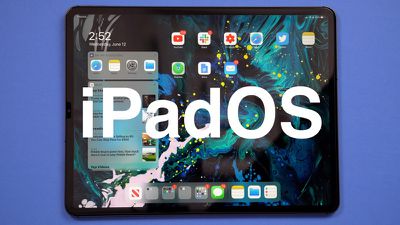
iPadOS is a rebranded version of iOS 13 specially made for iPads, with extra features designed to take advantage of larger tablet displays. It includes an updated Home screen, improved multitasking functionality, new Apple Pencil functionality, support for external drives, folder sharing in Files, text editing improvements, and all of the other new changes in iOS 13.
ipados 1
With that said, bear in mind that iPadOS is pre-release software, so installing the public beta on a secondary device is highly recommended. The stability of beta software cannot be guaranteed, as it often contains bugs and issues that have yet to be ironed out, so installing it on your day-to-day device isn't advised.

Is iPadOS Compatible With My iPad?

Apple's list of compatible devices confirms that iPadOS is compatible with all of these ‌iPad‌ models:

  • 12.9-inch iPad Pro 3rd generation
  • 12.9-inch ‌iPad Pro‌ 2nd generation
  • 12.9-inch ‌iPad Pro‌ 1st generation
  • 11-inch ‌iPad Pro‌
  • 10.5-inch ‌iPad Pro‌
  • 9.7-inch ‌iPad Pro‌
  • ‌iPad‌ 6th generation (2018 model)
  • ‌iPad‌ 5th generation
  • iPad Air 3 (2019 model)
  • ‌iPad Air‌ 2
  • iPad mini 5 (2019 model)
  • ‌iPad mini‌ 4

Installing the Public Beta shouldn't take longer than half an hour, but first you should create a backup of your device's contents and settings by following the step-by-step instructions below.

How to Create a Backup of Your iPad in iTunes

  1. Connect your ‌iPad‌ to a Mac or PC using a Lightning to USB cable or a USB-C to USB cable, depending on the model.

  2. Open iTunes.
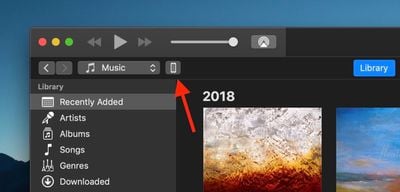
  3. Click the device icon in the top-left menu and select your ‌iPad‌.
    how to install the iPadOS Public Beta 1
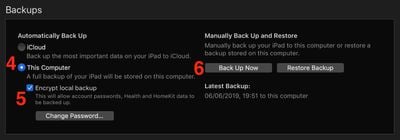
  4. Under Backups, click This computer.
  5. Tick the Encrypt local backup checkbox if you want to securely back up your login credentials and any Health and HomeKit data.
    how to install the iPadOS Public Beta 2
  6. Click Back Up Now.
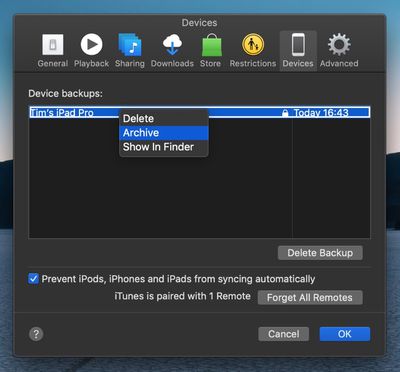
  7. Click iTunes -> Preferences… in the macOS menu bar.
  8. Click the Devices tab.
    how to install the ipados public beta 3
  9. Right-click (or Ctrl-click) the new backup, and select Archive from the contextual dropdown menu.
How to Enroll in the Apple Beta Software Program

Now that you've backed up your device, you're ready to download the iPadOS Public Beta. To do so, you must enroll your ‌iPad‌ in the free Apple Beta Software Program.

  1. Open Safari on your ‌iPad‌ and navigate to the Apple Beta Software Program.
  2. Tap the Sign up button, or sign in if you're already a member.
  3. Enter your Apple ID credentials and tap the Sign in button.
  4. Agree to the Apple Beta Software Program terms and conditions if necessary.
    how to install ipados public beta 4
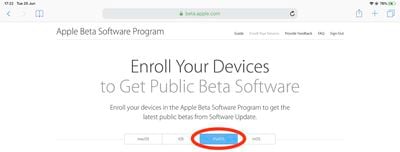
  5. A Guide for Public Betas screen will appear. Select the iPadOS tab, scroll down to the Get Started section and tap enroll your iOS device.
  6. On the Enroll Your Devices screen, with the iPadOS tab selected, scroll down and tap the Download profile button. how to install ipados public beta 5
  7. Tap Allow at the profile prompt.
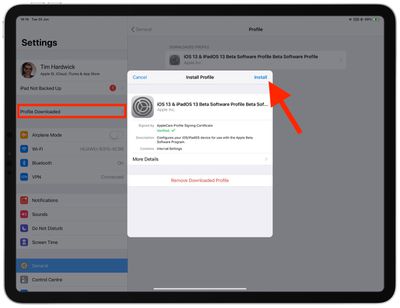
  8. Launch the Settings app on your iOS device and then tap Profile Downloaded below your ‌Apple ID‌ banner.
    how to install the iPadOS Public Beta 7
  9. Tap Install and follow the prompts to install the iOS Beta Software Profile.
  10. Restart your device after installing the profile by tapping the restart popup.
How to Install the iPadOS Public Beta

Once you're enrolled in the Apple Beta Software Program, you can install the iPadOS Public Beta on your iOS device just as you would a regular software update.

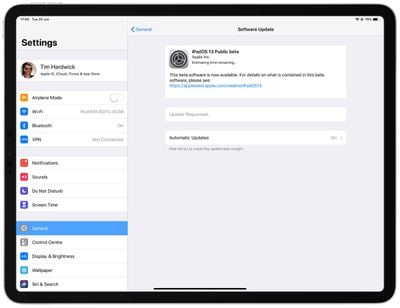
  1. Launch the Settings app on your ‌iPad‌.
  2. Tap General -> Software Update.
    how to install the iPadOS Public Beta 6
  3. Tap Download and Install.
  4. Tap Install Now.

If you come across any issues installing the iPadOS Public Beta, it may help to clear any previous profiles lingering on your device. You can find these in the Settings app under General -> Profile.



Want to discuss the iPadOS beta? Make sure to check out our iOS 13 discussion forum.

Related Forum: iOS 13

Top Rated Comments

95 months ago
So tempting as I cannot wait for the changes but not sure I want to install on a business critical daily driver!
Score: 3 Votes (Like | Disagree)
magicschoolbus Avatar
95 months ago
Beta testers are the real MVPs. I just want to know if a Sandisk extreme ssd will be able to be read from my lightning port...
Score: 2 Votes (Like | Disagree)
Shirasaki Avatar
95 months ago
iPadOS is only for developers right now, not for Beta testing
iOS13 beta you can install, & iPadOS is available to developers right now :)
[doublepost=1562224357][/doublepost]
no. i used to update the apps in iTunes & actually USE iTunes, but i quit like a year ago haha
No, iPadOS is also available for public beta testing now. Just download profile from beta.apple.com.
Score: 1 Votes (Like | Disagree)
BroTim52 Avatar
95 months ago
So tempting as I cannot wait for the changes but not sure I want to install on a business critical daily driver!
[doublepost=1561679547][/doublepost]I just installed and this is an amazing update. I initially on my iPad Pro 2nd generation and then installed on my new iPad Pro 3rd generation and so far it’s working great for the most part. I really haven’t ran across any major issues.
Score: 1 Votes (Like | Disagree)
paulchat55 Avatar
95 months ago
I am on my second try of installing the public beta. First time was last night and it was taking awhile so I turned it off, back on, and had to do a restore today back to ios12, then to beta 12.4, then install my backup. Now I’m trying again and it’s rebooted and been on the Apple logo for a good hour. It’s a 10.5” iPad Pro.
I have the same issue on my 10.5 iPad Pro. tried the install multiple times.
Score: 1 Votes (Like | Disagree)
Gravydog316 Avatar
95 months ago
Tap the blue person account icon (App Store) and scroll down the short list. You will see any apps that need to be updated.
yeah i found it! i like the old way 'cause i'm obsessed with app updates for some reason haha
Score: 1 Votes (Like | Disagree)

Popular Stories

Home Hub Command Center with Dome Base Feature

Apple Smart Home Hub to Feature iMac G4-Style Design

Wednesday September 30, 2026 4:36 am PDT by
Apple's long-rumored smart home hub will have an iMac G4-style design and a host of unique features, Bloomberg's Mark Gurman reports. The smart home hub is said to feature a square 6-inch display, with variants that can be placed on a countertop or mounted on a wall. It features a single FaceTime camera on the front, with microphones and speakers in its connected base. Gurman described the...
HomePod minis on gradient feature 1 1

Three New Apple Smart Home Products Coming on October 13

Wednesday September 30, 2026 4:04 am PDT by
Apple plans to introduce a series of new smart home products on Tuesday, October 13, according to Bloomberg's Mark Gurman. Apple reportedly plans to debut its long-awaited smart home hub device, a new HomePod mini, and a new Apple TV on the date. The new HomePod mini and Apple TV are set to retain their existing designs, but tout faster chips to support Siri AI. The new HomePod mini will...
iphone duo colors

Apple Shares Photos Shot on iPhone Duo

Thursday October 1, 2026 1:37 pm PDT by
Apple on Instagram today shared a curated gallery of six photos shot on the iPhone Duo. The photos were shot by American photographers Jake Michaels and Jason Nocito, as part of a project commissioned by Apple. iPhone Duo is equipped with four cameras:A rear 48-megapixel Fusion Main camera A rear 48-megapixel Ultra Wide camera A front 12-megapixel Center Stage camera in the outer display A...


Latest Stories
Upgrading From an Older Apple Watch? Here's How the New Features Stack Up
15 minutes ago
Beats 360 Cushion Kits and Apple Accessories See Early Prime Day Price Drops
39 minutes ago
Apple Store in UK Reopening on iPhone Duo Launch Day
1 hour ago
AT&T Acknowledges iPhone 18 Pro Max Issues: 'Update Immediately'
12 hours ago
New 'AirFly Drive' Accessory Turns Wired CarPlay Into Wireless CarPlay
18 hours ago
Apple Shares Photos Shot on iPhone Duo
19 hours ago
Apple Says iPhone Duo Has Replaceable 'Cover Layer'
20 hours ago
Apple's Smart Home Camera Will Apparently Have 'No Video Recording'
22 hours ago
Apple TV Just Updated Its Selection of 'Bonus' Movies
1 day ago
iPhone 18 Pro Colors Buyer's Guide: Which Should You Choose?
1 day ago
Early Prime Big Deal Days: Best Discounts on Accessories, TVs, and More at Amazon
1 day ago
MacBook Pro With OLED Touch Screen Rumored to Launch in October or November
1 day ago
Apple's All-New Home Hub Rumored to Launch in These Four Colors
1 day ago
iPhone 18 Pro Aperture Control Goes Fully Manual in Halide 3.2
1 day ago
Apple Stores Receive 'Do Not Open' Boxes Ahead of Smart Home Products Launch
1 day ago
iPhone 18 Pro Sales Jump in China Ahead of iPhone Duo Launch
1 day ago
Apple TV Still Down for Some Users Following Apple Services Outage
1 day ago
Microsoft 365 Work Accounts May Stop Syncing in Apple Mail
4 hours ago
Apple's Smart Home Hub: Everything We Know So Far
2 days ago
Apple's Home Hub Borrows From the iPhone Duo's StandBy Mode
2 days ago
Apple Invites App Updated With Three New Features
2 days ago
Apple Event on October 13?
2 days ago
Apple Watch SE 3 vs. Series 12 Buyer's Guide: Which Should You Buy?
2 days ago
iPad Mini 8 to Offer These 10 New Features
2 days ago
DoorDash Unveils AI Food Ordering Through Apple's Messages App
2 days ago
Amazon Takes Up to $150 Off Select M5 MacBook Air Models
2 days ago
Apple Still Plans to Release a New Full-Sized HomePod
2 days ago
Apple Working to Expand HomeKit
2 days ago
Apple Smart Home Hub to Feature iMac G4-Style Design
2 days ago
Three New Apple Smart Home Products Coming on October 13
2 days ago

🔗 Related Apple News & Rumors

Stay updated with the latest Apple ecosystem news and verified rumors