

 Apple today released the first public beta of iOS 12 for compatible iPhone, iPad, and iPod touch models, enabling users who aren't signed up for the Apple Developer Program to test the software update ahead of its official release in the fall.
While iOS 12 introduces several new features, it is designed to work on all iPhone, iPad, and iPod touch models that can run iOS 11, and the company says it has focused on bringing performance improvements to both old and new devices.
That said, iOS 12 is pre-release software, so installing the Public Beta on a secondary device is highly recommended. The stability of beta software cannot be guaranteed, as it often contains bugs and issues that have yet to be ironed out, so installing it on your day-to-day device isn't advised.
Installing the Public Beta shouldn't take longer than half an hour, but first you should create a backup of your device's contents and settings. The following step-by-step instructions are given for iPhone, but apply to iPad and iPod touch just the same.
How to Create a Backup of Your Device in iTunes
- Connect your iOS device to a Mac or PC using a Lightning to USB cable.
- Open iTunes.
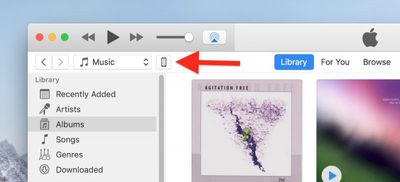
- Click the device's icon in the top-left menu.

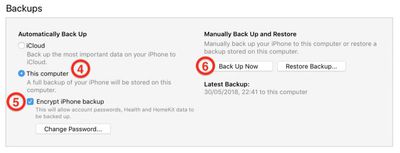
- Under Backups, click This computer.
- Tick the Encrypt iPhone backup checkbox if you want to back up your login credentials and any Health and HomeKit data.
- Click Back Up Now.
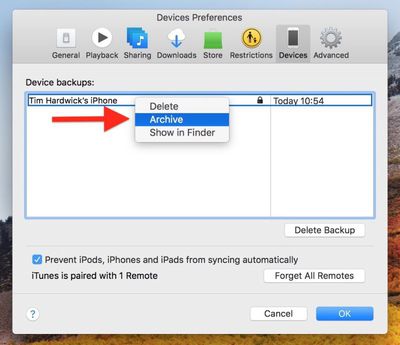
- Click iTunes -> Preferences… in the macOS menu bar.
- Click the Devices tab.
- Right-click (or Ctrl-click) the new backup, and select Archive from the contextual dropdown menu.
How to Enroll in the Apple Beta Software Program
Now that you've backed up your device, you're ready to download the iOS 12 Public Beta. To do so, you must enroll your iPhone, iPad, or iPod touch in the free Apple Beta Software Program.
- Open Safari on your iOS device and navigate to the Apple Beta Software Program.
- Tap the Sign up button, or sign in if you're already a member.
- Enter your Apple ID credentials and tap the Sign in button.
- Agree to the Apple Beta Software Program terms and conditions if necessary.
- A Guide for Public Betas screen will appear. Select the iOS tab, scroll down to the Get Started section and tap enroll your iOS device.
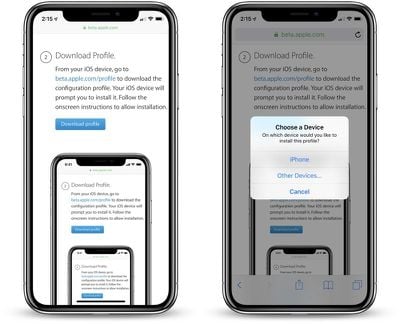
- On the Enroll Your Devices screen, with the iOS tab selected, scroll down and tap the Download profile button.
- Tap "iPhone" or "iPad" when prompted to choose a device.
- Tap Allow.
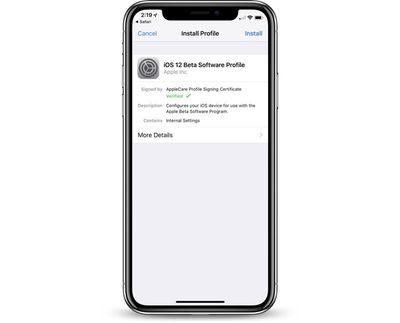
- Tap Install and follow the prompts to install the iOS Beta Software Profile.
- Restart your device after installing the profile by tapping the restart popup.
How to Install the iOS 12 Public Beta
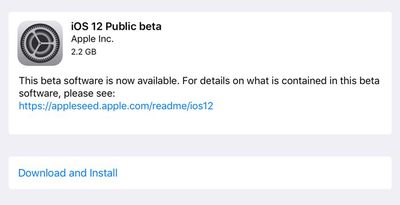
Once you're enrolled in the Apple Beta Software Program, you can install the iOS 12 Public Beta on your iOS device just as you would a regular software update.
- Launch the Settings app on your iPhone, iPad, or iPod touch.
- Tap General.
- Tap Software Update.
- Tap Download and Install.
- Tap Install Now.














































Top Rated Comments
- battery also last longer
- tiny little stutter while scrolling really fast
but I am not a heavy user, so do not know how it is under heavy stress
Be a man like me and install thiz. Who cares if a female or the ios12 is full of bugs. Just do it. This is America. Land of the BRAVE
[doublepost=1529972626][/doublepost]iCloud backup does not archive like iTunes does. Best stick to iTunes and or use iMazing, if one needs to roll back.