

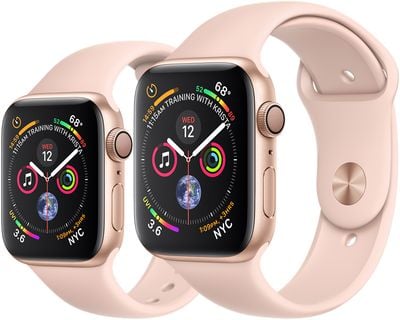
Apple Watch models are available in 40mm and 44mm sizes to compensate for different wrist shapes and to offer customers the choice of a smaller or bigger screen. Whichever model size you go for, both feature clear and bright OLED screens that are designed to display text as clearly as possible.
However, if you're longsighted or you regularly suffer from eyestrain, no amount of backlighting will make up for text that is just too small to be comfortable to read. The good news is that Apple Watch includes a system-wide feature that lets you increase the text size on the screen.
Note that the setting described below supports Dynamic Type for apps that support it, including all of Apple's native Apple Watch apps. This means text in app like Messages and Mail will be shown with the increased text size, but some third-party apps and any complications on your watch face won't be affected. If that's not comprehensive enough for you, you may find using the Apple Watch zoom feature to your advantage.
Keep reading to learn how to adjust text size on Apple Watch.
How to Increase Text Size on Apple Watch
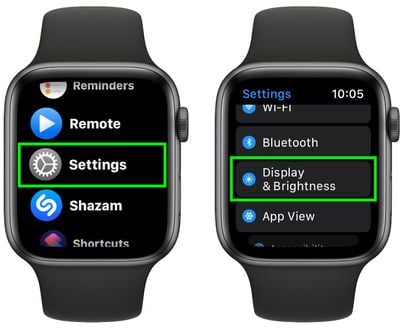
- Press the Digital Crown on your Apple Watch and select the Settings app from the apps list.
- Scroll down and select Display & Brightness.

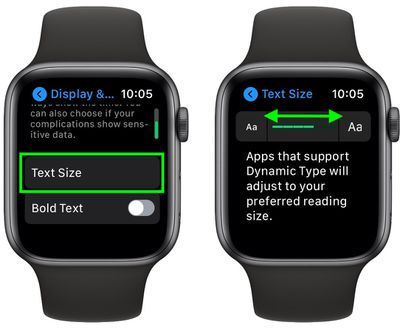
- Tap Text Size.
- Move the slider to the right to make the text larger.
- If the text is still difficult to read, tap the chevron in the upper left of the screen to return to the previous menu, where you can try enabling Bold Text using the toggle.
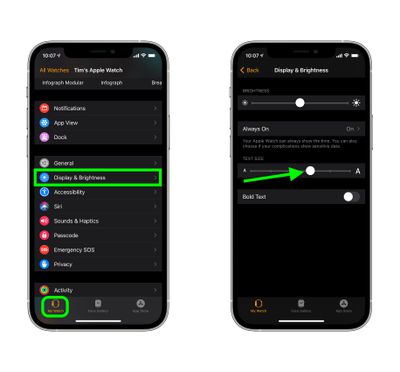
As with many Apple Watch features, you can also control the Text Size option in from your iPhone. Simply launch the Watch app, hit the My Watch tab at the bottom of the screen, then select Display & Brightness, where you'll find a similar slider to adjust the text size on your watch in real time.
If you find this feature useful, don't forget that there are other accessibility features available on Apple Watch, such as the ability to zoom the screen, make icons bigger, or even have your watch use haptic vibrations to tap out the time on your wrist on the hour.














































