

How to Use the HomePod's Physical Controls - MacRumorsOpen MenuShow RoundupsShow Forums menuVisit ForumsOpen Sidebar
Skip to Content

How to Use the HomePod's Physical Controls

by

As a smart speaker, HomePod comes with built-in Siri support, so you can use it without ever touching it, but Apple did include a touch panel at the top of the device that supports several gestures.
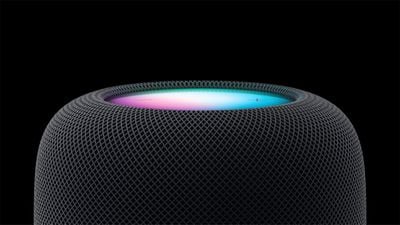
HomePod 2023
‌HomePod‌ gestures can activate ‌Siri‌, control the volume of what's playing, skip to the next song, pause/play and more. All of the touch gestures you can use with the ‌HomePod‌ are below.

Volume

Volume up - Tap on the "+" button to raise volume by one level, or touch and hold to increase the volume by several levels.

Volume down - Tap on the "-" button to lower the volume by one level, or touch and hold to decrease the volume by several levels.

Playback

Pause or resume playback - Tap in the middle of the ‌HomePod‌ to pause your music and tap it again to unpause.

Go to the next track - When a song is playing, double tap in the middle of the ‌HomePod‌ to skip a song.

Replay the previous track - When a song is playing from a playlist or an album, triple tap in the middle of the ‌HomePod‌ to go back to the previous song that was playing.

Siri

To activate ‌Siri‌, place a place a finger on the top of the ‌HomePod‌ and hold it there until the visual ‌Siri‌ waveform appears. From there, you can speak your ‌Siri‌ command.

Other Available Gestures

Dismiss an alarm - If an alarm is going off on the ‌HomePod‌, tap in the middle of it to stop it.

Activate VoiceOver - If you have VoiceOver enabled in the Accessibility settings, double tap to activate it. With VoiceOver enabled, all other gestures will require one extra tap, so pausing, for example will require two taps.

End a call - When using your HomePod as a speakerphone, you can end a call by tapping on the green light on top of the ‌HomePod‌.

Switch calls - If you're using ‌HomePod‌ as a speakerphone on a call and a second call comes in, you can touch and hold on the green light to put a hold on call. Switch between calls by double tapping.


Related Roundups: HomePod, HomePod mini 2

Top Rated Comments

myscrnnm Avatar
114 months ago
Am I the only one who finds these controls unintuitive and confusing? They put a display on the top of the HomePod. Why not just utilize a proximity sensor to display context-specific controls when you approach the device?
Score: 5 Votes (Like | Disagree)
114 months ago
Am I the only one who finds these controls unintuitive and confusing? They put a display on the top of the HomePod. Why not just utilize a proximity sensor to display context-specific controls when you approach the device?
Pretty sure you are the only one lol. Apple has used these controls for years on the headphones and iPods.... simple enough.
Score: 4 Votes (Like | Disagree)
Brookzy Avatar
114 months ago
I get that they are the same controls but I'm with you... why not just have some of the options on the display? I feel the display is not used at all... Such a beautiful display and all it does is display + and - I mean really?
It isn’t really a display, it’s just a small LED array in the centre, covered by a panel that blurs the light to make it look like a nice glowing orb.

The volume controls are simply one LED each.

So only a very small area of the top of the HomePod has the potential to illuminate, and even then it can only display vague shapes and colours rather than symbols.

(Fun fact: I noticed today that there must be an ambient light sensor hidden somewhere because the brightness of the volume controls changed to the room lighting. That’s a really nice touch!)

Score: 3 Votes (Like | Disagree)
Arran Avatar
114 months ago
It isn’t really a display, it’s just a small LED array in the centre, covered by a panel that blurs the light to make it look like a nice glowing orb.

The volume controls are simply one LED each.

So only a very small area of the top of the HomePod has the potential to illuminate, and even then it can only display vague shapes and colours rather than symbols.

(Fun fact: I noticed today that there must be an ambient light sensor hidden somewhere because the brightness of the volume controls changed to the room lighting. That’s a really nice touch!)

You're right. On close inspection it's not a screen at all. Just a few colored LEDs and a diffuser.

That's a bit limiting. I was secretly hoping a future software upgrade might support coverflow. I like visuals. No chance of that happening now.


Score: 2 Votes (Like | Disagree)
Arran Avatar
114 months ago
...Apple has used these controls for years on the headphones and iPods.... simple enough.
True, but that was through necessity: There was only one mechanical button, so it was necessary to learn morse code click combinations.

That all seems inappropriate on a device with a big color touchscreen. And since this is a shared device intended for common areas, what if your houseguests don't know about the secret click combos? Seems user-hostile. Seems like a wasted opportunity.
Score: 2 Votes (Like | Disagree)
114 months ago
True, but that was through necessity: There was only one mechanical button, so it was necessary to learn morse code click combinations.

That all seems inappropriate on a device with a big color touchscreen. And since this is a shared device intended for common areas, what if your houseguests don't know about the secret click combos? Seems user-hostile. Seems like a wasted opportunity.
I agree, seems like they could have easily had Skip Forward and Skip back on the North/South portions of the screen (assuming you consider +/- the East and West) and Play/Pause as one button in the center.

I also wish they would have used the standard figure 8 power cable like they do on the Apple TV, Airport Express, Airport Extreme, etc. Would have been nice to be able to buy a shorter cable so I don't have 4' of it wrapped up in a coil next to the speaker on my kitchen counter.

That said I am pretty impressed with the sound and am overall happy with it. I probably won't bother buying any more until I see what kind of firmware updates are made etc. Then I could see picking up a couple more for my kids' rooms. Would also be nice if they made a bit smaller/cheaper version better suited for bathrooms etc.
Score: 1 Votes (Like | Disagree)

Popular Stories

Apple TV 4K HomeView HomePod Mini tweaked

New Apple TV 4K, HomeView, and HomePod Mini: 16 Details Just Leaked

Sunday October 11, 2026 12:56 pm PDT by
Just two days before Apple's "Welcome home" experience in New York, Bloomberg's Mark Gurman has leaked several details about the new products set to be unveiled, including an all-new smart home hub, a HomePod mini 2, and a new Apple TV 4K. Here is an all-in-one summary of the details shared by Gurman:Apple's home hub with a touch-enabled display will be named HomeView, seemingly confirming a ...
iPad mini 7 Review Thumb 1 sans text

Apple Expected to Release New Products on Next Four Fridays

Sunday October 18, 2026 11:01 am PDT by
Apple likely plans to release MacBook Pro models with OLED displays, 14-inch MacBook Pro and iMac models with M6 chips, and/or an iPad mini 8 with an OLED display on Friday, November 6, according to Bloomberg's Mark Gurman. The devices are expected to be announced on Tuesday, October 27 or Wednesday, October 28. If this timeframe proves to be accurate, then Apple will be releasing new...
homepod mini 2 feature6

Apple Announces $149 HomePod Mini 2 With Siri AI, 'Sound Glow', and Four-Speaker Surround Sound

Tuesday October 13, 2026 6:11 am PDT by
Apple today announced a new HomePod mini equipped with Siri AI, new colors, and improved audio experiences. The new HomePod mini has an S10 chip that supports advanced computational audio, and Apple says it optimizes dynamic range, loudness, and acoustic performance in real-time. A Sound Glow feature turns the HomePod mini's top into a "visual canvas" that glows and animates in sync with...
Latest Stories
Apple Watch Ultra 4 Hits All-Time Low Price With Amazon's $99 Discount
26 minutes ago
Reminder: Apple's Big Discount on Beats 360 Ear Cushions Ends Today
30 minutes ago
Here's a New Tour of Apple's HomeView Software
33 minutes ago
Apple Reveals New iPad Mini's Battery Capacity
2 hours ago
Top Stories: Apple's Big MacBook Pro, iPad mini and iMac Updates
3 hours ago
'Pluribus' Season 2 Reportedly Starts Production Today
10 hours ago
iPhone 18 Pro Sales Surge in China, Offsetting Decline in U.S. and Japan
10 hours ago
HomeView Software 27.2: Wallpapers, Control Center, and More
17 hours ago
Apple Alerts Stores to iPhone Duo's Display Cracking Issue
18 hours ago
iOS 27.3 Will Enable These Apple Intelligence Features in China
19 hours ago
Apple Says iOS 27.3 Beta Coming Next Week
19 hours ago
Apple's Flash Storage Suppliers Are Finally 'Getting Their Revenge'
20 hours ago
14 New Things Your iPhone Can Do in iOS 27.2
21 hours ago
iPhone Duo Review: One Week Later
22 hours ago
Samsung Mocks iPhone Duo Display Cracks in New Ad Campaign
23 hours ago
The MacRumors Show: OLED MacBook Pro, iPad Mini 8, and More
1 day ago
MacBook Pro With Touch Display: 15 More Details Revealed
1 day ago
Russia Places Apple on State Surveillance Registry
1 day ago
Halloween Weekend Brings Discounts on Apple Accessories and Pre-Orders
1 day ago
Apple Has Released More Than 25 New Products in the Past Two Months
1 day ago
Local Code Launches as Free, Private AI Assistant Tool for Mac
1 day ago
Apple Acquires Ascend.io
1 day ago
HomePod Mini 2 Launches Today: All the New Features
1 day ago
AirTag 2 4-Pack Drops to New Low Price of $69.99
1 day ago
Rian Johnson's iPhone Camera App Goes Viral
1 day ago
Where Did All the iPhone Duos Go? Mostly to Apple's Stores
1 day ago
Apple's Touchscreen MacBook Pro Could Ship 1.5M Units in 2027
1 day ago
New Apple TV 4K and iPad Mini: RAM Amounts Revealed
2 days ago
Apple Executive Comments on New iPad Mini Lacking 120Hz Display
2 days ago
Here's a Hands-On Look at HomePod Mini 2's New Two-Tone Colors
2 days ago

🔗 Related Apple News & Rumors

Stay updated with the latest Apple ecosystem news and verified rumors








































