

How to Use Your iPhone With HomeKit-Enabled Devices - MacRumorsOpen MenuShow RoundupsShow Forums menuVisit ForumsOpen Sidebar
Skip to Content

How to Use Your iPhone With HomeKit-Enabled Devices

by

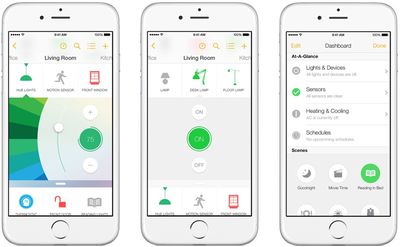
Now that HomeKit-enabled accessories are hitting the market, you may be wondering what you can do with your new connected devices. Whether you are controlling the temperature, turning off lights, or locking the front door, you will be able to use your iPhone to take care of various activities around the house.

If you are away from home, you’ll even be able to use Apple TV (third-generation or newer running Apple TV OS 7.0 or later) to control some functions while away from home. We've got a tutorial for getting your HomeKit-enabled accessories ready for use.
insteonhomekit

Download the App

HomeKit is compatible with iPhone, iPad, and iPod touch running iOS 8.1 or later. When you get your device, be sure to download the compatible app from the App Store and pair your device using the special code that comes with your new HomeKit accessory.

Setup

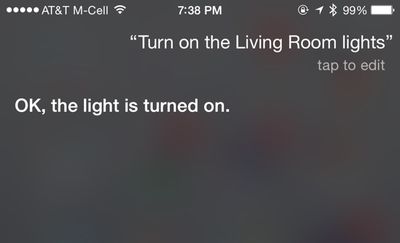
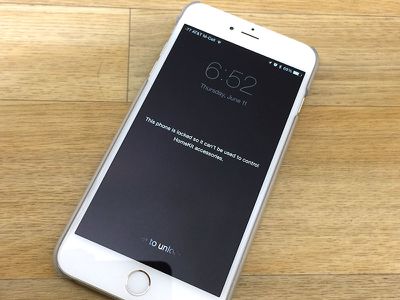
Once paired, use Siri to take control of your electronics. You can tell the virtual assistant to set the temperature or turn off the lights in the kitchen. There are some commands that will require you to unlock your iPhone before Siri will comply. For example, you won’t be able to unlock your door until you unlock your iPhone.
sirilightson
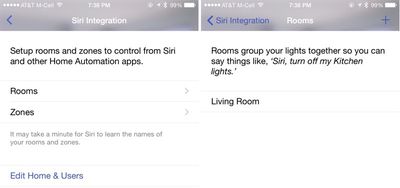
Some apps allow you to group multiple accessories together, letting them be controlled with a single Siri command. Groupings need to be set up in third-party accessory apps, and the settings may be called "homes, rooms, or scenes." Third-party apps that offer HomeKit groupings can often incorporate HomeKit devices they're not even designed to control. Lutron's app, for example, can also control a Nest thermostat.
lutron_homekit


Not all apps have a grouping option, but for those that do, once the accessories are grouped, they can be controlled together. You might be able to tell Siri to "Get ready for bed," for example, a command that would turn off the lights and turn down the temperature.

If you want to reset the system and begin anew, open the Settings app on your iPhone and select Privacy. Then, select HomeKit and tap "Reset HomeKit Configuration."

Shared Connections

Multiple iOS users within the same household will be able to use the connected devices. However, one person will be designated the administrator. Add new users from the settings section of the company's app for the system you use.

Using Apple TV

If you are away from home, you will be able to set up your Apple TV to do the work while you are gone. All you have to do is make sure your iPhone and Apple TV are signed in with the same Apple ID account. Then, you can use Siri commands to remotely control your accessories, like turning on the lights while you are away. With iOS 9 later this year, remote access to HomeKit devices will get even easier via iCloud.

Lost or Stolen iPhone

If, against your desires, you no longer have your iOS device in your possession, use Find My iPhone to turn on Lost Mode so no one can use it to remotely activate your HomeKit accessories. You can also erase the contents of the device (only use this feature if you are sure you won't be getting the device back).

You can use another iOS device that is signed into the same Apple ID to control your HomeKit-enabled accessories. Just download the compatible app and follow the steps above.
lockediphonehomekit
If you don't have another iOS device, you will have to manually reset your accessories by following the manufacturers' instructions. When you replace your device, you will be able to pair it with your HomeKit-enabled accessories again.

Each system's app will have a slightly different user interface. However, HomeKit supported devices will all be able to work with Siri so you can control your home from your iPhone by activating the virtual personal assistant. When iOS 9 and watchOS 2 launch in the fall, you will be able to use Apple Watch to control HomeKit-enabled devices and you'll be able to access them remotely without an Apple TV.


Top Rated Comments

Robwilliams Avatar
147 months ago
'I get to my front door and it opens automatically when it senses my phone is near (I can disable this remotely if I lose my phone)'.

You get to your front door pursued by a madman. You get inside and slam the door shut. But it's unlocked because you're close by. The madman enters after you...

After an exhausting day at work, you accidentally leave your phone near the front door. A burglar comes in and steals the phone, along with several of your possessions.

You're going away on holiday for two weeks. You leave the house. Better check the door's locked. Damn, you can't! Stupid phone keeps it unlocked until you walk away.

Your phone gets stolen or runs out of battery just before you get home. Darn it! I can't open my front door. Better get that locksmith.

The hot weather has warped the wood of your front door, and the lock won't turn. Better use a physical key. Bugger! I don't have one.

Someone hacks your phone and obtains the remote code to unlock your front door.

I prefer a metal key.
1) - Lol Ben, you often get pursued by madmen?!?

2) - The lock detects when it's on the inside, and doesn't open the door :)

3) - Why would you need to check, it locks as soon as you close the door, you tap it to open it, when you're near it :)

4/5) - The keyvo comes with, and also accepts a physical key, just in case, having said that, i've never used it :)

6) - Surely it's easier just to steal someones physical key :) currently i trust my bank with all my money, so i trust my keyvo with my front door security.

you really should try it, or research a bit better, this feels a little like a trolling post, rather than a constructive debate about whether app based door security is viable

Rob
Score: 5 Votes (Like | Disagree)
147 months ago
I really doubt that HomeKit, or, indeed, any Internet of Things thingy will get any traction.

Unlocking a door or turning on a light is so quick and easy. Quicker and easier than even getting your phone out or using your watch. You don't have to think; you just do a simple motion and it works all of the time. No batteries required. No glitches to worry about. No wireless problems. No re-wiring. No bluetooth woes. No extra gadget needed. No extra expense.

HomeKit and the Internet of Things are solutions in search of a problem for all but niche scenarios, such as handicapped people.
Totally disagree. If done right, these products will be able to seamlessly fit into your everyday routine.
Score: 5 Votes (Like | Disagree)
ArtOfWarfare Avatar
147 months ago
Won't get any traction? Too late... You really think it's easier to unlock a door with a key than to simply walk up to it and open it automatically via Bluetooth? Getting up and walking over to a light switch to dim the lights is easier than looking down at my watch? Your entire entertainment center can be controlled by one wifi device, you think it's easier to use 10 remotes? Then again, you're just thinking about lights and door locks like it's 2001...you might get it eventually.
Is it worth it to replace all those pieces of hardware? Some of them, maybe. Some of them, I'm not so sure.

homekit iphone image

Also, that chart is strictly considering software automation, something that can be done for free. Since we're talking about buying new hardware, which probably costs more than the other hardware, you'll need to also consider the price difference and then convert that price difference into time based on how much you value your time at.

(Link to the page this chart is from. The chart is handy, I keep it bookmarked. (http://xkcd.com/1205/))
Score: 4 Votes (Like | Disagree)
pubwvj Avatar
147 months ago
Can't wait until this just works. Then we won't need the tutorial. It will be implanted, you think "Let there be light!" and the light will be separated from the dark. A password may be necessary to use this on the Universe size scale.
Score: 4 Votes (Like | Disagree)
Iconoclysm Avatar
147 months ago
I really doubt that HomeKit, or, indeed, any Internet of Things thingy will get any traction.

Unlocking a door or turning on a light is so quick and easy. Quicker and easier than even getting your phone out or using your watch. You don't have to think; you just do a simple motion and it works all of the time. No batteries required. No glitches to worry about. No wireless problems. No re-wiring. No bluetooth woes. No extra gadget needed. No extra expense.

HomeKit and the Internet of Things are solutions in search of a problem for all but niche scenarios, such as handicapped people.
Won't get any traction? Too late... You really think it's easier to unlock a door with a key than to simply walk up to it and open it automatically via Bluetooth? Getting up and walking over to a light switch to dim the lights is easier than looking down at my watch? Your entire entertainment center can be controlled by one wifi device, you think it's easier to use 10 remotes? Then again, you're just thinking about lights and door locks like it's 2001...you might get it eventually.
Score: 4 Votes (Like | Disagree)
Benjamin Frost Avatar
147 months ago
I really doubt that HomeKit, or, indeed, any Internet of Things thingy will get any traction.

Unlocking a door or turning on a light is so quick and easy. Quicker and easier than even getting your phone out or using your watch. You don't have to think; you just do a simple motion and it works all of the time. No batteries required. No glitches to worry about. No wireless problems. No re-wiring. No bluetooth woes. No extra gadget needed. No extra expense.

HomeKit and the Internet of Things are solutions in search of a problem for all but niche scenarios, such as handicapped people.
Score: 3 Votes (Like | Disagree)

Popular Stories

iOS 26 Home Feature

Apple Working to Expand HomeKit

Wednesday September 30, 2026 4:46 am PDT by
Apple is working to revamp HomeKit amid a new push into the smart home market, according to Bloomberg's Mark Gurman. In a report that detailed the impending launch of next-generation Apple TV and HomePod mini models, as well as Apple's all-new smart home hub, Gurman said that the company is developing broader smart-home ecosystem software for its devices. Apple apparently plans to expand ...
Home Hub Command Center with Dome Base Feature

Apple Smart Home Hub to Feature iMac G4-Style Design

Wednesday September 30, 2026 4:36 am PDT by
Apple's long-rumored smart home hub will have an iMac G4-style design and a host of unique features, Bloomberg's Mark Gurman reports. The smart home hub is said to feature a square 6-inch display, with variants that can be placed on a countertop or mounted on a wall. It features a single FaceTime camera on the front, with microphones and speakers in its connected base. Gurman described the...
HomePod minis on gradient feature 1 1

Three New Apple Smart Home Products Coming on October 13

Wednesday September 30, 2026 4:04 am PDT by
Apple plans to introduce a series of new smart home products on Tuesday, October 13, according to Bloomberg's Mark Gurman. Apple reportedly plans to debut its long-awaited smart home hub device, a new HomePod mini, and a new Apple TV on the date. The new HomePod mini and Apple TV are set to retain their existing designs, but tout faster chips to support Siri AI. The new HomePod mini will...
Latest Stories
AT&T Acknowledges iPhone 18 Pro Max Issues: 'Update Immediately'
9 hours ago
New 'AirFly Drive' Accessory Turns Wired CarPlay Into Wireless CarPlay
14 hours ago
Apple Shares Photos Shot on iPhone Duo
16 hours ago
Apple Says iPhone Duo Has Replaceable 'Cover Layer'
17 hours ago
Apple's Smart Home Camera Will Apparently Have 'No Video Recording'
19 hours ago
Apple TV Just Updated Its Selection of 'Bonus' Movies
20 hours ago
iPhone 18 Pro Colors Buyer's Guide: Which Should You Choose?
21 hours ago
Early Prime Big Deal Days: Best Discounts on Accessories, TVs, and More at Amazon
21 hours ago
MacBook Pro With OLED Touch Screen Rumored to Launch in October or November
22 hours ago
Apple's All-New Home Hub Rumored to Launch in These Four Colors
23 hours ago
iPhone 18 Pro Aperture Control Goes Fully Manual in Halide 3.2
1 day ago
Apple Stores Receive 'Do Not Open' Boxes Ahead of Smart Home Products Launch
1 day ago
iPhone 18 Pro Sales Jump in China Ahead of iPhone Duo Launch
1 day ago
Apple TV Still Down for Some Users Following Apple Services Outage
1 day ago
Microsoft 365 Work Accounts May Stop Syncing in Apple Mail
1 hour ago
Apple's Smart Home Hub: Everything We Know So Far
2 days ago
Apple's Home Hub Borrows From the iPhone Duo's StandBy Mode
2 days ago
Apple Invites App Updated With Three New Features
2 days ago
Apple Event on October 13?
2 days ago
Apple Watch SE 3 vs. Series 12 Buyer's Guide: Which Should You Buy?
2 days ago
iPad Mini 8 to Offer These 10 New Features
2 days ago
DoorDash Unveils AI Food Ordering Through Apple's Messages App
2 days ago
Amazon Takes Up to $150 Off Select M5 MacBook Air Models
2 days ago
Apple Still Plans to Release a New Full-Sized HomePod
2 days ago
Apple Working to Expand HomeKit
2 days ago
Apple Smart Home Hub to Feature iMac G4-Style Design
2 days ago
Three New Apple Smart Home Products Coming on October 13
2 days ago
Apple Pay Now Available in India With Axis Bank Cards
3 days ago
OpenAI Launches Always-On 'Dots' Agents to Rival Meta's Muse
3 days ago
AirPods 5 Teardown: Batteries Removable, Case Still Tough
3 days ago

🔗 Related Apple News & Rumors

Stay updated with the latest Apple ecosystem news and verified rumors






































